QML
← All components

Flex

Arrange items in rows or columns with control over alignment, spacing and wrapping.

import Syidax.Core.Flex

Supported QML types

TypeDefinition / role
Container for arranging content along a horizontal or vertical axis with alignment and gaps.

Learn by example

Previews are images of native Qt runs. Use the buttons below each image to view a result.

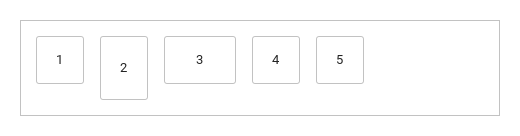
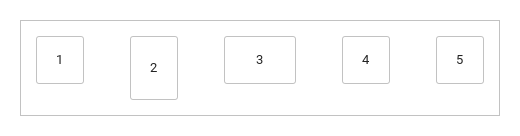
01 Basic composition

Compare the configuration and result of Basic composition.

Qt capture · image
Basic composition · Default
Default execution
QML code
import QtQuick
import Syidax.Core

Item {
    component FlexBox: Rectangle {
    property string label: ""
    property real side: 48
    width: side
    height: side
    radius: Foundation.borderRadiusMedium
    color: Theme.flex.itemBackgroundEnabled
    border.width: 1
    border.color: Theme.flex.containerBorderEnabled
    Text {
        anchors.centerIn: parent
        text: parent.label
        font.family: Theme.fontFamily
        font.pixelSize: 13
        color: Theme.semantic.textDefault
    }
}

    implicitWidth: Math.max(360, childrenRect.width)
    implicitHeight: childrenRect.height
    id: story

    property QtObject settings: QtObject {
        id: storyArgs
        property string direction: "horizontal"
        property string justify: "start"
        property string align: "start"
        property string wrap: "nowrap"
        property string rowGap: "medium"
        property string columnGap: "medium"
        property string padding: "medium"
    }


    Rectangle {
        width: 480
        height: flex.height
        color: "transparent"
        border.width: 1
        border.color: Theme.flex.containerBorderEnabled
        SyFlex {
            id: flex
            width: parent.width
            height: storyArgs.direction.indexOf("vertical") === 0 ? 320 : Math.max(implicitHeight, 48 + 2 * paddingPx)
            direction: storyArgs.direction
            justify: storyArgs.justify
            align: storyArgs.align
            wrap: storyArgs.wrap
            rowGap: storyArgs.rowGap
            columnGap: storyArgs.columnGap
            padding: storyArgs.padding
            FlexBox { label: "1" }
            FlexBox { label: "2"; height: 64 }
            FlexBox { label: "3"; width: 72 }
            FlexBox { label: "4" }
            FlexBox { label: "5" }
        }
    }

}

02 justify

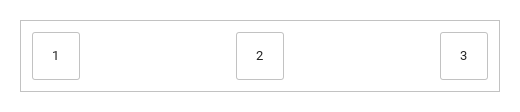
justify distributes the free space along the main axis

Qt capture · image
justify · Default
QML code
import QtQuick
import Syidax.Core

Item {
    component FlexBox: Rectangle {
    property string label: ""
    property real side: 48
    width: side
    height: side
    radius: Foundation.borderRadiusMedium
    color: Theme.flex.itemBackgroundEnabled
    border.width: 1
    border.color: Theme.flex.containerBorderEnabled
    Text {
        anchors.centerIn: parent
        text: parent.label
        font.family: Theme.fontFamily
        font.pixelSize: 13
        color: Theme.semantic.textDefault
    }
}

    implicitWidth: Math.max(360, childrenRect.width)
    implicitHeight: childrenRect.height
    property QtObject settings: QtObject {
        id: storyArgs
        property string justify: "space-between"
    }


    Rectangle {
        width: 480
        height: flex.implicitHeight
        color: "transparent"
        border.width: 1
        border.color: Theme.flex.containerBorderEnabled
        SyFlex {
            id: flex
            width: parent.width
            justify: storyArgs.justify
            padding: "small"
            FlexBox { label: "1" }
            FlexBox { label: "2" }
            FlexBox { label: "3" }
        }
    }
}

03 align

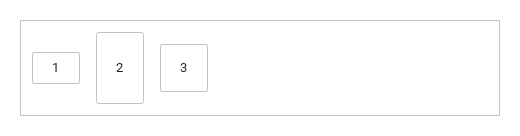
align places each child across the main axis

Qt capture · image
align · Default
QML code
import QtQuick
import Syidax.Core

Item {
    component FlexBox: Rectangle {
    property string label: ""
    property real side: 48
    width: side
    height: side
    radius: Foundation.borderRadiusMedium
    color: Theme.flex.itemBackgroundEnabled
    border.width: 1
    border.color: Theme.flex.containerBorderEnabled
    Text {
        anchors.centerIn: parent
        text: parent.label
        font.family: Theme.fontFamily
        font.pixelSize: 13
        color: Theme.semantic.textDefault
    }
}

    implicitWidth: Math.max(360, childrenRect.width)
    implicitHeight: childrenRect.height
    property QtObject settings: QtObject {
        id: storyArgs
        property string align: "center"
    }


    Rectangle {
        width: 480
        height: flex.implicitHeight
        color: "transparent"
        border.width: 1
        border.color: Theme.flex.containerBorderEnabled
        SyFlex {
            id: flex
            width: parent.width
            align: storyArgs.align
            padding: "small"
            FlexBox { label: "1"; height: 32 }
            FlexBox { label: "2"; height: 72 }
            FlexBox { label: "3"; height: 48 }
        }
    }
}

04 wrap

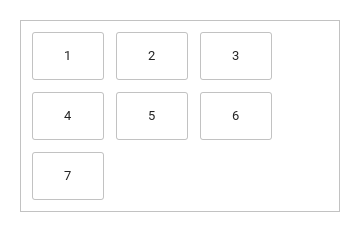
wrap: "nowrap" (the default) keeps every child on one line even when it overflows the container.

Qt capture · image
wrap · Default
QML code
import QtQuick
import Syidax.Core

Item {
    component FlexBox: Rectangle {
    property string label: ""
    property real side: 48
    width: side
    height: side
    radius: Foundation.borderRadiusMedium
    color: Theme.flex.itemBackgroundEnabled
    border.width: 1
    border.color: Theme.flex.containerBorderEnabled
    Text {
        anchors.centerIn: parent
        text: parent.label
        font.family: Theme.fontFamily
        font.pixelSize: 13
        color: Theme.semantic.textDefault
    }
}

    implicitWidth: Math.max(360, childrenRect.width)
    implicitHeight: childrenRect.height
    property QtObject settings: QtObject {
        id: storyArgs
        property string wrap: "wrap"
    }


    Rectangle {
        width: 320
        height: Math.max(flex.implicitHeight, 48 + 2 * Foundation.spacingSmall)
        clip: true
        color: "transparent"
        border.width: 1
        border.color: Theme.flex.containerBorderEnabled
        SyFlex {
            id: flex
            width: parent.width
            wrap: storyArgs.wrap
            padding: "small"
            rowGap: "small"
            columnGap: "small"
            Repeater {
                model: 7
                FlexBox { required property int index; label: String(index + 1); width: 72 }
            }
        }
    }
}

05 direction

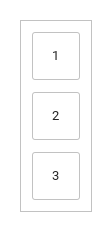
direction picks the main axis and the order.

Qt capture · image
direction · Default
QML code
import QtQuick
import Syidax.Core

Item {
    component FlexBox: Rectangle {
    property string label: ""
    property real side: 48
    width: side
    height: side
    radius: Foundation.borderRadiusMedium
    color: Theme.flex.itemBackgroundEnabled
    border.width: 1
    border.color: Theme.flex.containerBorderEnabled
    Text {
        anchors.centerIn: parent
        text: parent.label
        font.family: Theme.fontFamily
        font.pixelSize: 13
        color: Theme.semantic.textDefault
    }
}

    implicitWidth: Math.max(360, childrenRect.width)
    implicitHeight: childrenRect.height
    property QtObject settings: QtObject {
        id: storyArgs
        property string direction: "vertical"
    }


    Rectangle {
        width: flex.implicitWidth
        height: flex.implicitHeight
        color: "transparent"
        border.width: 1
        border.color: Theme.flex.containerBorderEnabled
        SyFlex {
            id: flex
            width: implicitWidth
            height: implicitHeight
            direction: storyArgs.direction
            padding: "small"
            rowGap: "small"
            columnGap: "small"
            FlexBox { label: "1" }
            FlexBox { label: "2" }
            FlexBox { label: "3" }
        }
    }
}

06 Spread actions evenly

Spread actions evenly, configured with justify.

Qt capture · image
Spread actions evenly · Result
Default execution
QML code
import QtQuick
import Syidax.Core

Item {
    component FlexBox: Rectangle {
    property string label: ""
    property real side: 48
    width: side
    height: side
    radius: Foundation.borderRadiusMedium
    color: Theme.flex.itemBackgroundEnabled
    border.width: 1
    border.color: Theme.flex.containerBorderEnabled
    Text {
        anchors.centerIn: parent
        text: parent.label
        font.family: Theme.fontFamily
        font.pixelSize: 13
        color: Theme.semantic.textDefault
    }
}

    implicitWidth: Math.max(360, childrenRect.width)
    implicitHeight: childrenRect.height
    id: story

    property QtObject settings: QtObject {
        id: storyArgs
        property string direction: "horizontal"
        property string justify: "space-between"
        property string align: "start"
        property string wrap: "nowrap"
        property string rowGap: "medium"
        property string columnGap: "medium"
        property string padding: "medium"
    }


    Rectangle {
        width: 480
        height: flex.height
        color: "transparent"
        border.width: 1
        border.color: Theme.flex.containerBorderEnabled
        SyFlex {
            id: flex
            width: parent.width
            height: storyArgs.direction.indexOf("vertical") === 0 ? 320 : Math.max(implicitHeight, 48 + 2 * paddingPx)
            direction: storyArgs.direction
            justify: storyArgs.justify
            align: storyArgs.align
            wrap: storyArgs.wrap
            rowGap: storyArgs.rowGap
            columnGap: storyArgs.columnGap
            padding: storyArgs.padding
            FlexBox { label: "1" }
            FlexBox { label: "2"; height: 64 }
            FlexBox { label: "3"; width: 72 }
            FlexBox { label: "4" }
            FlexBox { label: "5" }
        }
    }

}

API 35

Hover or select an item for its QML example and copy button.

Properties

PropertyTypeDefaultDescription
list (default property)—The children to lay out (hidden ones are skipped)
string"horizontal"horizontal · vertical · horizontal-reverse · vertical-reverse
string"start"Along the main axis: start · center · end · space-between · space-around · space-evenly
string"start"Across the main axis: start · end · center · stretch · baseline (like start)
string"nowrap"nowrap · wrap · wrap-reverse
string"medium"Spacing name: between lines in a row, between children in a column
string"medium"Spacing name: between children in a row, between lines in a column
string"medium"Spacing name: the inner margin on every side
int0Lines after the last layout (0 without children)
bool (read-only)—The main axis is the width
bool (read-only)—the order is reversed
real (read-only)—The spacing names in pixels
real0The laid-out children plus padding — one line, or with wrap the stacked lines plus cross gaps — the implicit size (maintained by the flex)

Methods

MethodDescription
Places the children now; the flex schedules it itself after every change, so it is rarely needed

Signals

ItemBehavior / conditions
SyFlex has no signals of its own; lineCount and the children's positions change after each layout.

Behavior

ItemBehavior / conditions
horizontal · vertical · horizontal-reverse · vertical-reverse
direction: "horizontal" (default) is a row, "vertical" a column; the -reverse variants keep the axis and reverse the order inside every line.
Spacing name: between children in a row, between lines in a column
Spacing name: between lines in a row, between children in a column
nowrap · wrap · wrap-reverse
Lines after the last layout (0 without children)
Along the main axis: start · center · end · space-between · space-around · space-evenly
Across the main axis: start · end · center · stretch · baseline (like start)
The container takes the width and height it is given and never resizes a child except under stretch.
Spacing name: the inner margin on every side
rowGap, columnGap and padding take a spacing name: none 0 · xsmall 8 · small 12 · medium 16 · large 20 · xlarge 28 px (an unknown name counts as medium); rowGapPx, columnGapPx and paddingPx expose the pixels.
Do not bind a child's x / y — the flex sets them.

Keyboard

ItemBehavior / conditions
SyLayout frames a page; SyButtonGroup joins buttons without gaps; SyDivider separates groups laid out by a flex.