QML
← All components

Steps

Show the current stage and overall progress of a process such as setup or checkout.

import Syidax.Core.Steps

Supported QML types

TypeDefinition / role
Container showing the order and current state of a multi-step process.
One labelled stage inside SySteps, with its status and optional description.

Learn by example

Previews are images of native Qt runs. Use the buttons below each image to view a result.

01 Basic composition

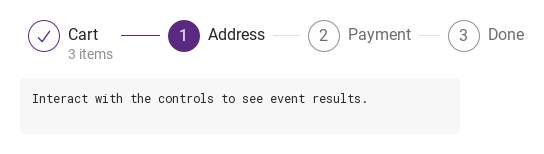
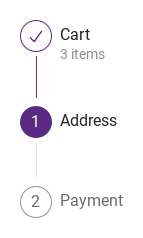
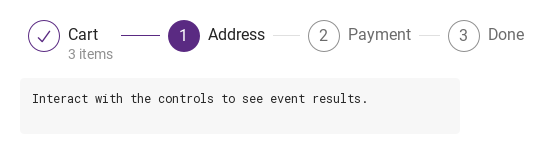
SySteps shows progress through a process: the SyStep items declared inside it, each a numbered disc with a title and an optional description, joined by a tail line.

Qt capture · image
Basic composition · Default
Default execution
QML code
import QtQuick
import Syidax.Core

Item {
    component EventLog: Rectangle {
        id: logBox
        property var lines: []
        implicitWidth: 440
        implicitHeight: Math.max(56, logText.implicitHeight + 24)
        radius: 4; color: Theme.semantic.backgroundBold
        function log(value) { lines = lines.slice(-3).concat([String(value)]) }
        Text {
            id: logText; x: 12; y: 12; width: parent.width - 24
            text: logBox.lines.length ? logBox.lines.join("\n") : "Interact with the controls to see event results."
            wrapMode: Text.Wrap; color: Theme.semantic.textDefault
            font.family: Theme.monoFontFamily; font.pixelSize: 12
        }
    }

    implicitWidth: Math.max(360, childrenRect.width)
    implicitHeight: childrenRect.height
    id: story

    property QtObject settings: QtObject {
        id: storyArgs
        property int current: 1
        property bool clickable: false
        property bool complete: false
        property string type: "horizontal"
        property string size: "medium"
        property int startIndex: 0
    }

    readonly property string members: [
        "SyStep { title: " + JSON.stringify("Cart") + "; description: " + JSON.stringify("3 items") + " }",
        "SyStep { title: " + JSON.stringify("Address") + " }",
        "SyStep { title: " + JSON.stringify("Payment") + " }",
        "SyStep { title: " + JSON.stringify("Done") + " }"
    ].join("\n")

    Column {
        spacing: 12
        SySteps {
            width: storyArgs.type === "vertical" ? implicitWidth : 560
            current: storyArgs.current
            clickable: storyArgs.clickable
            complete: storyArgs.complete
            type: storyArgs.type
            size: storyArgs.size
            startIndex: storyArgs.startIndex
            onSelected: (index) => output.log(("selected: step %1").arg(index))
            SyStep { title: "Cart"; description: "3 items" }
            SyStep { title: "Address" }
            SyStep { title: "Payment" }
            SyStep { title: "Done" }
        }
        EventLog { id: output }
    }

}

02 status · loading · disabled

Each step draws itself from currentStatus, which is decided in this order:

Qt capture · image
status · loading · disabled · Default
Default execution
QML code
import QtQuick
import Syidax.Core

Item {
    implicitWidth: Math.max(360, childrenRect.width)
    implicitHeight: childrenRect.height
    // Focused Gallery routes: keep only the selected API and its prerequisites.
    id: featureStory

    SySteps {
        width: 560
        current: 2
        SyStep { title: "Cart" }
        SyStep { id: featureTarget0; title: "Address"; status: "error" }
        SyStep { id: featureTarget1; title: "Payment"; loading: true }
        SyStep { id: featureTarget2; title: "Done"; disabled: true }
    }
}

03 type · size

Compare the configuration and result of type · size.

Qt capture · image
type · size · Default
QML code
import QtQuick
import Syidax.Core

Item {
    implicitWidth: Math.max(360, childrenRect.width)
    implicitHeight: childrenRect.height
    // Focused Gallery routes: keep only the selected API and its prerequisites.
    id: featureStory

    property QtObject settings: QtObject {
        id: storyArgs
        property string size: "medium"
    }


    SySteps { id: featureTarget0;
        type: "vertical"
        current: 1
        size: storyArgs.size
        SyStep { title: "Cart"; description: "3 items" }
        SyStep { title: "Address" }
        SyStep { title: "Payment" }
    }
}

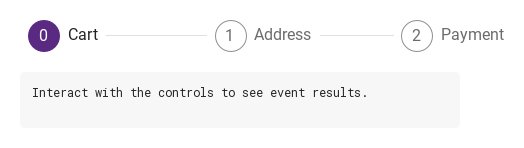
04 selected

selected(index: int) fires when the user clicks a step while the container's clickable is true.

Qt capture · image
selected · Default
Default execution
QML code
import QtQuick
import Syidax.Core

Item {
    component EventLog: Rectangle {
        id: logBox
        property var lines: []
        implicitWidth: 440
        implicitHeight: Math.max(56, logText.implicitHeight + 24)
        radius: 4; color: Theme.semantic.backgroundBold
        function log(value) { lines = lines.slice(-3).concat([String(value)]) }
        Text {
            id: logText; x: 12; y: 12; width: parent.width - 24
            text: logBox.lines.length ? logBox.lines.join("\n") : "Interact with the controls to see event results."
            wrapMode: Text.Wrap; color: Theme.semantic.textDefault
            font.family: Theme.monoFontFamily; font.pixelSize: 12
        }
    }

    implicitWidth: Math.max(360, childrenRect.width)
    implicitHeight: childrenRect.height

    Column {
        spacing: 12
        SySteps {
            id: checkout
            width: 560; current: 0; clickable: true
            onSelected: (index) => { current = index; output.log(("selected: step %1").arg(index)) }
            SyStep { title: "Cart" }
            SyStep { title: "Address" }
            SyStep { title: "Payment" }
        }
        EventLog { id: output }
    }
}

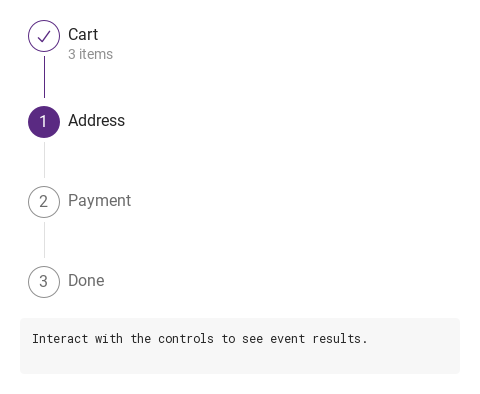
05 Vertical process

Vertical process, configured with type.

Qt capture · image
Vertical process · Result
Default execution
QML code
import QtQuick
import Syidax.Core

Item {
    component EventLog: Rectangle {
        id: logBox
        property var lines: []
        implicitWidth: 440
        implicitHeight: Math.max(56, logText.implicitHeight + 24)
        radius: 4; color: Theme.semantic.backgroundBold
        function log(value) { lines = lines.slice(-3).concat([String(value)]) }
        Text {
            id: logText; x: 12; y: 12; width: parent.width - 24
            text: logBox.lines.length ? logBox.lines.join("\n") : "Interact with the controls to see event results."
            wrapMode: Text.Wrap; color: Theme.semantic.textDefault
            font.family: Theme.monoFontFamily; font.pixelSize: 12
        }
    }

    implicitWidth: Math.max(360, childrenRect.width)
    implicitHeight: childrenRect.height
    id: story

    property QtObject settings: QtObject {
        id: storyArgs
        property int current: 1
        property bool clickable: false
        property bool complete: false
        property string type: "vertical"
        property string size: "medium"
        property int startIndex: 0
    }

    readonly property string members: [
        "SyStep { title: " + JSON.stringify("Cart") + "; description: " + JSON.stringify("3 items") + " }",
        "SyStep { title: " + JSON.stringify("Address") + " }",
        "SyStep { title: " + JSON.stringify("Payment") + " }",
        "SyStep { title: " + JSON.stringify("Done") + " }"
    ].join("\n")

    Column {
        spacing: 12
        SySteps {
            width: storyArgs.type === "vertical" ? implicitWidth : 560
            current: storyArgs.current
            clickable: storyArgs.clickable
            complete: storyArgs.complete
            type: storyArgs.type
            size: storyArgs.size
            startIndex: storyArgs.startIndex
            onSelected: (index) => output.log(("selected: step %1").arg(index))
            SyStep { title: "Cart"; description: "3 items" }
            SyStep { title: "Address" }
            SyStep { title: "Payment" }
            SyStep { title: "Done" }
        }
        EventLog { id: output }
    }

}

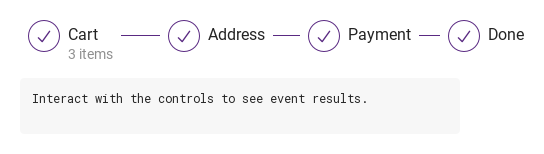
06 Completed process

Completed process, configured with complete.

Qt capture · image
Completed process · Result
Default execution
QML code
import QtQuick
import Syidax.Core

Item {
    component EventLog: Rectangle {
        id: logBox
        property var lines: []
        implicitWidth: 440
        implicitHeight: Math.max(56, logText.implicitHeight + 24)
        radius: 4; color: Theme.semantic.backgroundBold
        function log(value) { lines = lines.slice(-3).concat([String(value)]) }
        Text {
            id: logText; x: 12; y: 12; width: parent.width - 24
            text: logBox.lines.length ? logBox.lines.join("\n") : "Interact with the controls to see event results."
            wrapMode: Text.Wrap; color: Theme.semantic.textDefault
            font.family: Theme.monoFontFamily; font.pixelSize: 12
        }
    }

    implicitWidth: Math.max(360, childrenRect.width)
    implicitHeight: childrenRect.height
    id: story

    property QtObject settings: QtObject {
        id: storyArgs
        property int current: 1
        property bool clickable: false
        property bool complete: true
        property string type: "horizontal"
        property string size: "medium"
        property int startIndex: 0
    }

    readonly property string members: [
        "SyStep { title: " + JSON.stringify("Cart") + "; description: " + JSON.stringify("3 items") + " }",
        "SyStep { title: " + JSON.stringify("Address") + " }",
        "SyStep { title: " + JSON.stringify("Payment") + " }",
        "SyStep { title: " + JSON.stringify("Done") + " }"
    ].join("\n")

    Column {
        spacing: 12
        SySteps {
            width: storyArgs.type === "vertical" ? implicitWidth : 560
            current: storyArgs.current
            clickable: storyArgs.clickable
            complete: storyArgs.complete
            type: storyArgs.type
            size: storyArgs.size
            startIndex: storyArgs.startIndex
            onSelected: (index) => output.log(("selected: step %1").arg(index))
            SyStep { title: "Cart"; description: "3 items" }
            SyStep { title: "Address" }
            SyStep { title: "Payment" }
            SyStep { title: "Done" }
        }
        EventLog { id: output }
    }

}

07 Start from one

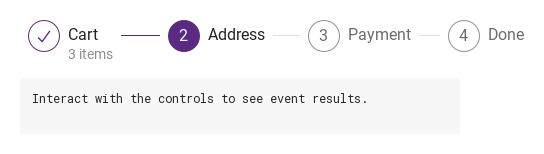
Start from one, configured with startIndex, current.

Qt capture · image
Start from one · Result
Default execution
QML code
import QtQuick
import Syidax.Core

Item {
    component EventLog: Rectangle {
        id: logBox
        property var lines: []
        implicitWidth: 440
        implicitHeight: Math.max(56, logText.implicitHeight + 24)
        radius: 4; color: Theme.semantic.backgroundBold
        function log(value) { lines = lines.slice(-3).concat([String(value)]) }
        Text {
            id: logText; x: 12; y: 12; width: parent.width - 24
            text: logBox.lines.length ? logBox.lines.join("\n") : "Interact with the controls to see event results."
            wrapMode: Text.Wrap; color: Theme.semantic.textDefault
            font.family: Theme.monoFontFamily; font.pixelSize: 12
        }
    }

    implicitWidth: Math.max(360, childrenRect.width)
    implicitHeight: childrenRect.height
    id: story

    property QtObject settings: QtObject {
        id: storyArgs
        property int current: 2
        property bool clickable: false
        property bool complete: false
        property string type: "horizontal"
        property string size: "medium"
        property int startIndex: 1
    }

    readonly property string members: [
        "SyStep { title: " + JSON.stringify("Cart") + "; description: " + JSON.stringify("3 items") + " }",
        "SyStep { title: " + JSON.stringify("Address") + " }",
        "SyStep { title: " + JSON.stringify("Payment") + " }",
        "SyStep { title: " + JSON.stringify("Done") + " }"
    ].join("\n")

    Column {
        spacing: 12
        SySteps {
            width: storyArgs.type === "vertical" ? implicitWidth : 560
            current: storyArgs.current
            clickable: storyArgs.clickable
            complete: storyArgs.complete
            type: storyArgs.type
            size: storyArgs.size
            startIndex: storyArgs.startIndex
            onSelected: (index) => output.log(("selected: step %1").arg(index))
            SyStep { title: "Cart"; description: "3 items" }
            SyStep { title: "Address" }
            SyStep { title: "Payment" }
            SyStep { title: "Done" }
        }
        EventLog { id: output }
    }

}

08 Click to change step

Click to change step, configured with clickable.

Qt capture · image
Click to change step · Result
Default execution
QML code
import QtQuick
import Syidax.Core

Item {
    component EventLog: Rectangle {
        id: logBox
        property var lines: []
        implicitWidth: 440
        implicitHeight: Math.max(56, logText.implicitHeight + 24)
        radius: 4; color: Theme.semantic.backgroundBold
        function log(value) { lines = lines.slice(-3).concat([String(value)]) }
        Text {
            id: logText; x: 12; y: 12; width: parent.width - 24
            text: logBox.lines.length ? logBox.lines.join("\n") : "Interact with the controls to see event results."
            wrapMode: Text.Wrap; color: Theme.semantic.textDefault
            font.family: Theme.monoFontFamily; font.pixelSize: 12
        }
    }

    implicitWidth: Math.max(360, childrenRect.width)
    implicitHeight: childrenRect.height
    id: story

    property QtObject settings: QtObject {
        id: storyArgs
        property int current: 1
        property bool clickable: true
        property bool complete: false
        property string type: "horizontal"
        property string size: "medium"
        property int startIndex: 0
    }

    readonly property string members: [
        "SyStep { title: " + JSON.stringify("Cart") + "; description: " + JSON.stringify("3 items") + " }",
        "SyStep { title: " + JSON.stringify("Address") + " }",
        "SyStep { title: " + JSON.stringify("Payment") + " }",
        "SyStep { title: " + JSON.stringify("Done") + " }"
    ].join("\n")

    Column {
        spacing: 12
        SySteps {
            width: storyArgs.type === "vertical" ? implicitWidth : 560
            current: storyArgs.current
            clickable: storyArgs.clickable
            complete: storyArgs.complete
            type: storyArgs.type
            size: storyArgs.size
            startIndex: storyArgs.startIndex
            onSelected: (index) => output.log(("selected: step %1").arg(index))
            SyStep { title: "Cart"; description: "3 items" }
            SyStep { title: "Address" }
            SyStep { title: "Payment" }
            SyStep { title: "Done" }
        }
        EventLog { id: output }
    }

}

API 45

Hover or select an item for its QML example and copy button.

Properties · SySteps

PropertyTypeDefaultDescription
list (default property)—The SyStep items, in order
int0The number of the step in progress; values outside startIndex … startIndex + count act as the nearest bound
boolfalseSteps can be clicked; each click emits selected(index)
boolfalseEvery step finish, whatever current and status say
string"horizontal"horizontal (equal shares of width) · vertical (stacked)
string"medium"medium (32 px disc) · small (24 px disc, smaller text)
int0The first step's number
list (read-only)—The steps inside, in order
bool—type === "vertical" · current after clamping
int (read-only)—type === "vertical" · current after clamping

Properties · SyStep

PropertyTypeDefaultDescription
string""The step title (16 px; 14 px small)
string""Text under the title (14 px); hidden when empty
string"none"none (follow current) · finish · current · wait · error
boolfalseA turning ring on a white disc, unless disabled, finished or in error
boolfalseGreyed and not clickable (except in error, which keeps its colors)
boolfalseSet by the container from its own clickable on every layout
int0The step's number — set by the container (startIndex + position)
int—Set by the container: its current, size, type, "finish" when complete, whether this is the last step
string—Set by the container: its current, size, type, "finish" when complete, whether this is the last step
bool—Set by the container: its current, size, type, "finish" when complete, whether this is the last step
string (read-only)—The state drawn: finish · current · wait · error
bool (read-only)—The ring is showing
bool (read-only)—a click would report

Methods

ItemBehavior / conditions
SySteps and SyStep have no methods; drive them with current, complete and the per-step properties.

Signals

SignalArgumentsWhen
index: intA clickable step was clicked (its number); re-emitted right after the step's own
index: intThis step was clicked while clickable, not disabled and not in error

Behavior

ItemBehavior / conditions
The first step's number
The step's number — set by the container (startIndex + position)
current names the step in progress by that number; a value outside startIndex … startIndex + the step count acts as the nearest bound (clampedCurrent; one past the last step means "all finished"): a step with a smaller number is finish, the equal one current, larger ones wait. complete: true makes every step finish regardless of current. A step's drawn state is currentStatus, decided as: the container's complete → finish; else the step's own status when it is not "none" (finish · current · wait · error); else the comparison with current. The container does not move current itself.
current names the step in progress by that number; a value outside startIndex … startIndex + the step count acts as the nearest bound (clampedCurrent; one past the last step means "all finished"): a step with a smaller number is finish, the equal one current, larger ones wait.
The number of the step in progress; values outside startIndex … startIndex + count act as the nearest bound
Every step finish, whatever current and status say
The state drawn: finish · current · wait · error
none (follow current) · finish · current · wait · error
A turning ring on a white disc, unless disabled, finished or in error
Greyed and not clickable (except in error, which keeps its colors)
medium (32 px disc) · small (24 px disc, smaller text)
The disc is 32 px (24 px with size: "small") and shows the step's number (16 / 12 px) — or ✓ when finish, ✕ when error.
Horizontal (the default): every step gets an equal share of the container's width, with the disc and texts at its left and the tail line from the end of the title to the step's right edge; the container's implicit width is at least 320 px, so set width.
Steps can be clicked; each click emits selected(index)
A clickable step was clicked (its number); re-emitted right after the step's own

Keyboard

ItemBehavior / conditions
SyProgressBar for a single percentage; SyBreadcrumb for a path; SyTabGroup for views the user switches freely.