QML
← 전체 컴포넌트

Avatar

사진, 아이콘이나 이니셜로 사용자 또는 계정을 표시합니다.

import Syidax.Core.Avatar

지원 QML 타입

타입정의 / 역할
프로필 이미지·아이콘·글자·이니셜을 표시합니다.
아바타를 겹쳐 묶고 표시 한도를 넘은 개수를 보여줍니다.

예제로 보기

미리보기는 Qt 실행 화면의 이미지입니다. 아래 버튼으로 결과를 전환하세요.

01 기본 구성

SyAvatar는 사람이나 사물을 나타내는 둥근 원판입니다: 사진(image), 글리프(icon), 고정된 한두 글자(letter), 또는 — 가장 흔하게 — text에서 계산한 이니셜("Jane Doe"의 첫 두 단어 첫 글자는 *JD*; 한 단어면 첫 두 글자).

Qt 실행 화면 · 이미지
기본 구성 · 기본
기본 실행 화면
QML 코드
import QtQuick
import Syidax.Core

Item {
    component EventLog: Rectangle {
        id: logBox
        property var lines: []
        implicitWidth: 440
        implicitHeight: Math.max(56, logText.implicitHeight + 24)
        radius: 4; color: Theme.semantic.backgroundBold
        function log(value) { lines = lines.slice(-3).concat([String(value)]) }
        Text {
            id: logText; x: 12; y: 12; width: parent.width - 24
            text: logBox.lines.length ? logBox.lines.join("\n") : "컨트롤을 조작하면 이벤트 결과가 표시됩니다."
            wrapMode: Text.Wrap; color: Theme.semantic.textDefault
            font.family: Theme.monoFontFamily; font.pixelSize: 12
        }
    }

    implicitWidth: Math.max(360, childrenRect.width)
    implicitHeight: childrenRect.height
    id: story

    property QtObject settings: QtObject {
        id: storyArgs
        property string text: "홍길동"
        property string letter: ""
        property string content: "text"
        property string variant: "lightgray"
        property string size: "medium"
        property bool clickable: false
        property bool disabled: false
    }


    Column {
        spacing: 12
        SyAvatar {
            text: storyArgs.text
            letter: storyArgs.letter
            icon: storyArgs.content === "icon" ? Icons.globalHeaderBell : ""
            image: storyArgs.content === "image" ? Qt.resolvedUrl("portrait.svg") : ""
            variant: storyArgs.variant
            size: storyArgs.size
            clickable: storyArgs.clickable
            disabled: storyArgs.disabled
            onSelected: (detail) => output.log(("선택: %1").arg(detail.text))
        }
        EventLog { id: output }
    }

}

02 variant

variant는 원판의 색 조합을 고릅니다 — 배경, 1 px 테두리, 글자 / 글리프 색이 테마의 해당 아바타 토큰에서 오므로 밝은 테마와 어두운 테마를 따릅니다: lightgray(기본) · red · orange · yellow · lime · green · teal · blue · purple · magenta · darkgray.

Qt 실행 화면 · 이미지
variant · 기본
기본 실행 화면
QML 코드
import QtQuick
import Syidax.Core

pragma ComponentBehavior: Bound

Item {
    implicitWidth: Math.max(360, childrenRect.width)
    implicitHeight: childrenRect.height
    id: story
    readonly property var variants: ["lightgray", "red", "orange", "yellow", "lime", "green", "teal", "blue", "purple", "magenta", "darkgray"]

    Row {
        spacing: 8
        Repeater {
            model: story.variants
            delegate: Column {
                id: cell
                required property string modelData
                spacing: 6
                SyAvatar { anchors.horizontalCenter: parent.horizontalCenter; text: "홍길동"; variant: cell.modelData }
                Text { anchors.horizontalCenter: parent.horizontalCenter; text: cell.modelData; font.family: Theme.fontFamily; font.pixelSize: 10; color: Theme.semantic.textSubtle }
            }
        }
    }
}

03 size

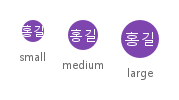
size는 이름입니다: small 24 px, medium 32 px(기본), large 40 px — 원판의 implicitWidth와 implicitHeight(diameter)입니다.

Qt 실행 화면 · 이미지
size · 기본
기본 실행 화면
QML 코드
import QtQuick
import Syidax.Core

pragma ComponentBehavior: Bound

Item {
    implicitWidth: Math.max(360, childrenRect.width)
    implicitHeight: childrenRect.height
    id: story
    readonly property var sizes: ["small", "medium", "large"]

    Row {
        spacing: 16
        Repeater {
            model: story.sizes
            delegate: Column {
                id: cell
                required property string modelData
                spacing: 6
                SyAvatar { anchors.horizontalCenter: parent.horizontalCenter; text: "홍길동"; variant: "purple"; size: cell.modelData }
                Text { anchors.horizontalCenter: parent.horizontalCenter; text: cell.modelData; font.family: Theme.fontFamily; font.pixelSize: 11; color: Theme.semantic.textSubtle }
            }
        }
    }
}

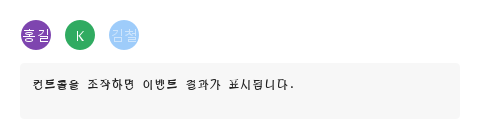
04 image · icon · letter · text

원을 채우는 것, 우선순위 순서대로:

Qt 실행 화면 · 이미지
image · icon · letter · text · 기본
기본 실행 화면
QML 코드
import QtQuick
import Syidax.Core

Item {
    implicitWidth: Math.max(360, childrenRect.width)
    implicitHeight: childrenRect.height
    // Focused Gallery routes: keep only the selected API and its prerequisites.
    id: featureStory

    Row {
        spacing: 12
        SyAvatar { id: featureTarget0; visible: true; image: Qt.resolvedUrl("portrait.svg"); text: "홍길동" }
        SyAvatar { id: featureTarget1; visible: true; icon: Icons.globalHeaderBell; variant: "blue" }
        SyAvatar { id: featureTarget2; visible: true; letter: "k"; variant: "green" }
        SyAvatar { id: featureTarget3; visible: true; text: "김철수"; variant: "orange" }
    }
}

05 selected

selected(detail)은 아바타의 유일한 시그널입니다.

Qt 실행 화면 · 이미지
selected · 기본
기본 실행 화면
QML 코드
import QtQuick
import Syidax.Core

Item {
    component EventLog: Rectangle {
        id: logBox
        property var lines: []
        implicitWidth: 440
        implicitHeight: Math.max(56, logText.implicitHeight + 24)
        radius: 4; color: Theme.semantic.backgroundBold
        function log(value) { lines = lines.slice(-3).concat([String(value)]) }
        Text {
            id: logText; x: 12; y: 12; width: parent.width - 24
            text: logBox.lines.length ? logBox.lines.join("\n") : "컨트롤을 조작하면 이벤트 결과가 표시됩니다."
            wrapMode: Text.Wrap; color: Theme.semantic.textDefault
            font.family: Theme.monoFontFamily; font.pixelSize: 12
        }
    }

    implicitWidth: Math.max(360, childrenRect.width)
    implicitHeight: childrenRect.height

    Column {
        spacing: 12
        Row {
            spacing: 12
            SyAvatar {
                text: "홍길동"; variant: "purple"; clickable: true
                onSelected: (detail) => output.log(("선택: %1").arg(detail.text))
            }
            SyAvatar {
                letter: "k"; variant: "green"; clickable: true
                onSelected: (detail) => output.log(("선택: %1").arg(detail.letter))
            }
            SyAvatar { text: "김철수"; variant: "blue"; clickable: true; disabled: true }
        }
        EventLog { id: output }
    }
}

06 이미지 아바타

content 설정을 적용한 이미지 아바타 예제입니다.

Qt 실행 화면 · 이미지
이미지 아바타 · 실행 결과
기본 실행 화면
QML 코드
import QtQuick
import Syidax.Core

Item {
    component EventLog: Rectangle {
        id: logBox
        property var lines: []
        implicitWidth: 440
        implicitHeight: Math.max(56, logText.implicitHeight + 24)
        radius: 4; color: Theme.semantic.backgroundBold
        function log(value) { lines = lines.slice(-3).concat([String(value)]) }
        Text {
            id: logText; x: 12; y: 12; width: parent.width - 24
            text: logBox.lines.length ? logBox.lines.join("\n") : "컨트롤을 조작하면 이벤트 결과가 표시됩니다."
            wrapMode: Text.Wrap; color: Theme.semantic.textDefault
            font.family: Theme.monoFontFamily; font.pixelSize: 12
        }
    }

    implicitWidth: Math.max(360, childrenRect.width)
    implicitHeight: childrenRect.height
    id: story

    property QtObject settings: QtObject {
        id: storyArgs
        property string text: "홍길동"
        property string letter: ""
        property string content: "image"
        property string variant: "lightgray"
        property string size: "medium"
        property bool clickable: false
        property bool disabled: false
    }


    Column {
        spacing: 12
        SyAvatar {
            text: storyArgs.text
            letter: storyArgs.letter
            icon: storyArgs.content === "icon" ? Icons.globalHeaderBell : ""
            image: storyArgs.content === "image" ? Qt.resolvedUrl("portrait.svg") : ""
            variant: storyArgs.variant
            size: storyArgs.size
            clickable: storyArgs.clickable
            disabled: storyArgs.disabled
            onSelected: (detail) => output.log(("선택: %1").arg(detail.text))
        }
        EventLog { id: output }
    }

}

07 비활성 아바타

disabled · clickable 설정을 적용한 비활성 아바타 예제입니다.

Qt 실행 화면 · 이미지
비활성 아바타 · 실행 결과
기본 실행 화면
QML 코드
import QtQuick
import Syidax.Core

Item {
    component EventLog: Rectangle {
        id: logBox
        property var lines: []
        implicitWidth: 440
        implicitHeight: Math.max(56, logText.implicitHeight + 24)
        radius: 4; color: Theme.semantic.backgroundBold
        function log(value) { lines = lines.slice(-3).concat([String(value)]) }
        Text {
            id: logText; x: 12; y: 12; width: parent.width - 24
            text: logBox.lines.length ? logBox.lines.join("\n") : "컨트롤을 조작하면 이벤트 결과가 표시됩니다."
            wrapMode: Text.Wrap; color: Theme.semantic.textDefault
            font.family: Theme.monoFontFamily; font.pixelSize: 12
        }
    }

    implicitWidth: Math.max(360, childrenRect.width)
    implicitHeight: childrenRect.height
    id: story

    property QtObject settings: QtObject {
        id: storyArgs
        property string text: "홍길동"
        property string letter: ""
        property string content: "text"
        property string variant: "lightgray"
        property string size: "medium"
        property bool clickable: true
        property bool disabled: true
    }


    Column {
        spacing: 12
        SyAvatar {
            text: storyArgs.text
            letter: storyArgs.letter
            icon: storyArgs.content === "icon" ? Icons.globalHeaderBell : ""
            image: storyArgs.content === "image" ? Qt.resolvedUrl("portrait.svg") : ""
            variant: storyArgs.variant
            size: storyArgs.size
            clickable: storyArgs.clickable
            disabled: storyArgs.disabled
            onSelected: (detail) => output.log(("선택: %1").arg(detail.text))
        }
        EventLog { id: output }
    }

}

08 색상이 있는 이니셜

variant 설정을 적용한 색상이 있는 이니셜 예제입니다.

Qt 실행 화면 · 이미지
색상이 있는 이니셜 · 실행 결과
기본 실행 화면
QML 코드
import QtQuick
import Syidax.Core

Item {
    component EventLog: Rectangle {
        id: logBox
        property var lines: []
        implicitWidth: 440
        implicitHeight: Math.max(56, logText.implicitHeight + 24)
        radius: 4; color: Theme.semantic.backgroundBold
        function log(value) { lines = lines.slice(-3).concat([String(value)]) }
        Text {
            id: logText; x: 12; y: 12; width: parent.width - 24
            text: logBox.lines.length ? logBox.lines.join("\n") : "컨트롤을 조작하면 이벤트 결과가 표시됩니다."
            wrapMode: Text.Wrap; color: Theme.semantic.textDefault
            font.family: Theme.monoFontFamily; font.pixelSize: 12
        }
    }

    implicitWidth: Math.max(360, childrenRect.width)
    implicitHeight: childrenRect.height
    id: story

    property QtObject settings: QtObject {
        id: storyArgs
        property string text: "홍길동"
        property string letter: ""
        property string content: "text"
        property string variant: "purple"
        property string size: "medium"
        property bool clickable: false
        property bool disabled: false
    }


    Column {
        spacing: 12
        SyAvatar {
            text: storyArgs.text
            letter: storyArgs.letter
            icon: storyArgs.content === "icon" ? Icons.globalHeaderBell : ""
            image: storyArgs.content === "image" ? Qt.resolvedUrl("portrait.svg") : ""
            variant: storyArgs.variant
            size: storyArgs.size
            clickable: storyArgs.clickable
            disabled: storyArgs.disabled
            onSelected: (detail) => output.log(("선택: %1").arg(detail.text))
        }
        EventLog { id: output }
    }

}

API 43

항목을 가리키거나 선택하면 QML 예제와 복사 버튼이 나타납니다.

속성 · SyAvatar

속성타입기본값설명
url—사진. 로딩되면 원에 잘라 그림(덮도록 확대).
url—글리프(Icons.* 또는 파일). 로딩된 이미지가 없을 때 사용.
string""최대 두 글자, 대문자. 이니셜보다 먼저 사용.
string""이름. 다른 것이 없으면 이니셜이 원판을 채움. 접근성 이름이기도 함.
string"lightgray"lightgray · red · orange · yellow · lime · green · teal · blue · purple · magenta · darkgray.
string"medium"small 24 · medium 32 · large 40 px.
boolfalse포인터 커서와 탭 시 selected.
boolfalse50 % 불투명도, 클릭 없음.
string""설정되면 접근성 이름(과 "+n" 목록 라벨). 눈에 보이는 툴팁 없음.
string (읽기 전용)—그려질 두 글자.
string (읽기 전용)—tooltipContent, 아니면 text, 아니면 letter.
real (읽기 전용)—size에 따라 24 / 32 / 40.
bool (읽기 전용)—로딩된 사진 · 글리프가 보임 · clickable && !disabled.
color (읽기 전용)—변형의 결정된 색.

속성 · SyAvatarGroup

속성타입기본값설명
——그룹의 SyAvatar 아이템.
string"stack"stack(겹침) 또는 grid(간격).
string"medium"모든 아바타에 적용.
boolfalse모든 아바타에 적용. "+n" 목록 행도 켬.
int0최대 이만큼 보이고 나머지는 "+n"으로. 0 = 전부.

추가 속성

이름타입 / 기본값설명
이미지·아이콘·직접 지정한 글자·텍스트의 이니셜 중 샘플 콘텐츠를 선택합니다.

메서드

메서드설명
"bg", "border", "text"에 대한 변형의 색(읽기 전용 색이 쓰는 것).
구성원에 크기, 클릭 가능 여부, 위치를 다시 적용(자동 실행).

시그널

시그널인자시점
detail: { letter, text, icon, image }clickable이고 활성인 아바타의 탭.
detail: { letter, text, icon, image }구성원 아바타가 클릭됨, 또는 "+n" 목록의 행(그룹의 clickable 필요).

동작

항목동작 / 조건
hasImage는 image가 설정되어 있고 로딩이 끝났을 때(Image.Ready)만 참입니다.
사진. 로딩되면 원에 잘라 그림(덮도록 확대).
아니면 hasIcon(icon url)이 변형의 글자 색으로 글리프를 그리고, 아니면 글자가 그려집니다: letter가 있으면(앞뒤 공백 제거, 첫 두 글자, 대문자) 그것, 아니면 text의 이니셜(첫 두 단어의 첫 글자, 또는 한 단어의 첫 두 글자, 대문자), 아니면 아무것도 없음.
글리프(Icons.* 또는 파일). 로딩된 이미지가 없을 때 사용.
최대 두 글자, 대문자. 이니셜보다 먼저 사용.
이름. 다른 것이 없으면 이니셜이 원판을 채움. 접근성 이름이기도 함.
lightgray · red · orange · yellow · lime · green · teal · blue · purple · magenta · darkgray.
small 24 · medium 32 · large 40 px.
50 % 불투명도, 클릭 없음.
포인터 커서와 탭 시 selected.
clickable이고 disabled가 아니면(interactive) 포인터가 손 모양이 되고 탭이 selected({ letter, text, icon, image })를 냅니다.
clickable이고 활성인 아바타의 탭.
설정되면 접근성 이름(과 "+n" 목록 라벨). 눈에 보이는 툴팁 없음.
tooltipContent, 아니면 text, 아니면 letter.

키보드

항목동작 / 조건
글리프(Icons.* 또는 파일). 로딩된 이미지가 없을 때 사용.