QML
← 전체 컴포넌트

Tree Select

계층형 목록에서 값을 선택하는 필드입니다. 분류나 조직처럼 상하 관계가 있는 항목을 고를 때 사용합니다.

import Syidax.Core.TreeSelect

지원 QML 타입

타입정의 / 역할
트리 팝업에서 하나 이상의 값을 선택하는 폼 필드입니다.

예제로 보기

미리보기는 Qt 실행 화면의 이미지입니다. 아래 버튼으로 결과를 전환하세요.

01 기본 구성

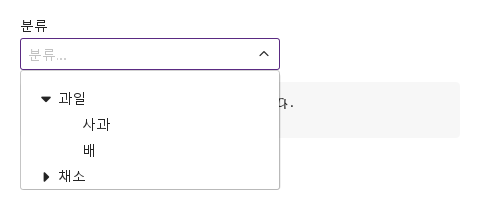
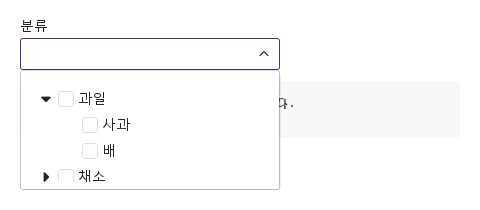
SyTreeSelect는 목록이 트리인 폼 필드입니다.

Qt 실행 화면 · 이미지
기본 구성 · 열린 화면
QML 코드
import QtQuick
import Syidax.Core

Item {
    component EventLog: Rectangle {
        id: logBox
        property var lines: []
        implicitWidth: 440
        implicitHeight: Math.max(56, logText.implicitHeight + 24)
        radius: 4; color: Theme.semantic.backgroundBold
        function log(value) { lines = lines.slice(-3).concat([String(value)]) }
        Text {
            id: logText; x: 12; y: 12; width: parent.width - 24
            text: logBox.lines.length ? logBox.lines.join("\n") : "컨트롤을 조작하면 이벤트 결과가 표시됩니다."
            wrapMode: Text.Wrap; color: Theme.semantic.textDefault
            font.family: Theme.monoFontFamily; font.pixelSize: 12
        }
    }

    implicitWidth: Math.max(360, childrenRect.width)
    implicitHeight: childrenRect.height
    id: story

    property QtObject settings: QtObject {
        id: storyArgs
        property string label: "분류"
        property string placeholder: "분류를 고르세요"
        property bool checkable: false
        property bool clearable: true
        property bool expandable: true
        property bool expandAll: false
        property bool line: false
        property bool required: false
        property bool disabled: false
        property bool readonly: false
        property bool loading: false
        property int maxTagCount: 0
        property bool appendParent: false
    }

    readonly property var nodes: [
        { value: "fruit", label: "과일", expanded: true, children: [
            { value: "apple", label: "사과" },
            { value: "pear", label: "배" }
        ] },
        { value: "veg", label: "채소", children: [
            { value: "kale", label: "케일" },
            { value: "leek", label: "대파" }
        ] }
    ]

    Column {
        spacing: 12
        SyTreeSelect { id: exampleControl1; 
            width: 260
            label: storyArgs.label
            placeholder: storyArgs.placeholder
            checkable: storyArgs.checkable
            clearable: storyArgs.clearable
            expandable: storyArgs.expandable
            expandAll: storyArgs.expandAll
            line: storyArgs.line
            required: storyArgs.required
            disabled: storyArgs.disabled
            readonly: storyArgs.readonly
            loading: storyArgs.loading
            maxTagCount: storyArgs.maxTagCount
            appendParent: storyArgs.appendParent
            nodes: story.nodes
            onChanged: (detail) => output.log(detail.selectedItem.map((i) => i.label).join(", "))
        }
        EventLog { id: output }
    }

}

02 changed

changed(detail)는 선택에 관한 트리 셀렉트의 시그널입니다: 노드 클릭(단일 모드) 뒤, 박스를 체크하거나 해제한(checkable 모드, 태그의 × 포함) 뒤, 지우기 ×나 clearValue() 뒤에 발생합니다.

Qt 실행 화면 · 이미지
changed · 열린 화면
QML 코드
import QtQuick
import Syidax.Core

Item {
    component EventLog: Rectangle {
        id: logBox
        property var lines: []
        implicitWidth: 440
        implicitHeight: Math.max(56, logText.implicitHeight + 24)
        radius: 4; color: Theme.semantic.backgroundBold
        function log(value) { lines = lines.slice(-3).concat([String(value)]) }
        Text {
            id: logText; x: 12; y: 12; width: parent.width - 24
            text: logBox.lines.length ? logBox.lines.join("\n") : "컨트롤을 조작하면 이벤트 결과가 표시됩니다."
            wrapMode: Text.Wrap; color: Theme.semantic.textDefault
            font.family: Theme.monoFontFamily; font.pixelSize: 12
        }
    }

    implicitWidth: Math.max(360, childrenRect.width)
    implicitHeight: childrenRect.height
    id: story

    readonly property var nodes: [
        { value: "fruit", label: "과일", expanded: true, children: [ { value: "apple", label: "사과" }, { value: "pear", label: "배" } ] },
        { value: "veg", label: "채소", children: [ { value: "kale", label: "케일" } ] }
    ]

    Column {
        spacing: 12
        SyTreeSelect { id: exampleControl1; 
            width: 260
            label: "분류"
            checkable: true; expandable: true; clearable: true
            onChanged: (detail) => output.log(("changed: %1 (valid %2)").arg(detail.selectedItem.map((i) => i.label).join(", ")).arg(detail.isValid))
            nodes: story.nodes
        }
        EventLog { id: output }
    }
}

03 setValue · clearValue · open · close · reportValidity

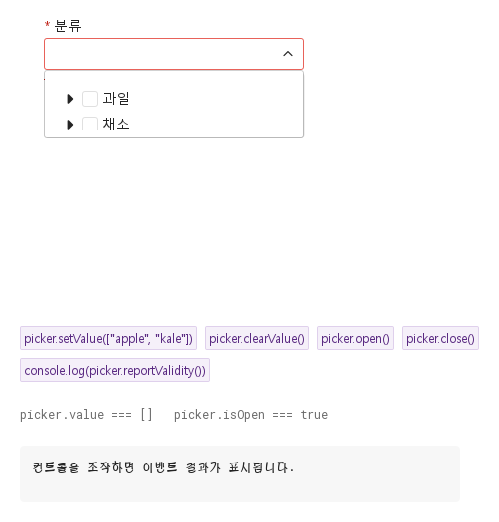
setValue(values)는 코드에서 고릅니다: 값 하나 또는 값 목록.

Qt 실행 화면 · 이미지
setValue · clearValue · open · close · reportValidity · 열린 화면
QML 코드
import QtQuick
import Syidax.Core

Item {
    component EventLog: Rectangle {
        id: logBox
        property var lines: []
        implicitWidth: 440
        implicitHeight: Math.max(56, logText.implicitHeight + 24)
        radius: 4; color: Theme.semantic.backgroundBold
        function log(value) { lines = lines.slice(-3).concat([String(value)]) }
        Text {
            id: logText; x: 12; y: 12; width: parent.width - 24
            text: logBox.lines.length ? logBox.lines.join("\n") : "컨트롤을 조작하면 이벤트 결과가 표시됩니다."
            wrapMode: Text.Wrap; color: Theme.semantic.textDefault
            font.family: Theme.monoFontFamily; font.pixelSize: 12
        }
    }

    implicitWidth: Math.max(360, childrenRect.width)
    implicitHeight: childrenRect.height
    // Focused Gallery routes: keep only the selected API and its prerequisites.

    id: story
    readonly property var nodes: [
        { value: "fruit", label: "과일", children: [ { value: "apple", label: "사과" }, { value: "pear", label: "배" } ] },
        { value: "veg", label: "채소", children: [ { value: "kale", label: "케일" } ] }
    ]

    Column {
        spacing: 24
        Item {
            width: 560; height: 310
            SyTreeSelect {
                x: 24; y: 24
 id: picker; width: 260; label: "분류"; checkable: true; expandable: true; required: true; nodes: story.nodes }
        }
        Flow {
            objectName: "exampleCommands"

            width: 520
            spacing: 8
            SyButton { id: exampleControl1;  visible: true; text: "picker.setValue([\"apple\", \"kale\"])"; variant: "secondary"; size: "small"; onClicked: picker.setValue(["apple", "kale"]) }
            SyButton { id: exampleControl2;  visible: true; text: "picker.clearValue()"; variant: "secondary"; size: "small"; onClicked: picker.clearValue() }
            SyButton { visible: true; text: "picker.open()"; variant: "secondary"; size: "small"; onClicked: picker.open() }
            SyButton { id: exampleControl3;  visible: true; text: "picker.close()"; variant: "secondary"; size: "small"; onClicked: picker.close() }
            SyButton { id: exampleControl4;  visible: true; text: "console.log(picker.reportValidity())"; variant: "secondary"; size: "small"; onClicked: output.log(picker.reportValidity()) }
        }
        Text {
            text: "picker.value === " + JSON.stringify(picker.value) + "   picker.isOpen === " + picker.isOpen
            font.family: Theme.monoFontFamily
            font.pixelSize: 12
            color: Theme.semantic.textSubtle
        }
        EventLog { id: output }
    }
}

04 여러 노드 선택

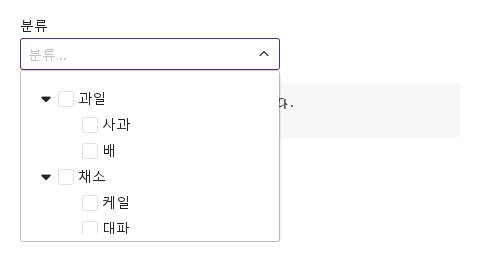
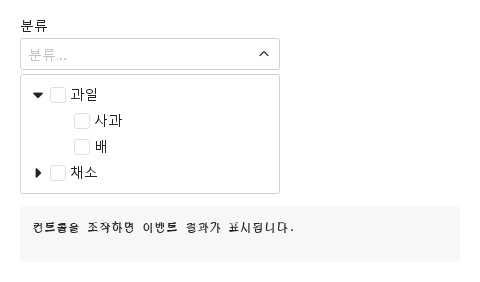
checkable · expandAll 설정을 적용한 여러 노드 선택 예제입니다.

Qt 실행 화면 · 이미지
여러 노드 선택 · 열린 화면
QML 코드
import QtQuick
import Syidax.Core

Item {
    component EventLog: Rectangle {
        id: logBox
        property var lines: []
        implicitWidth: 440
        implicitHeight: Math.max(56, logText.implicitHeight + 24)
        radius: 4; color: Theme.semantic.backgroundBold
        function log(value) { lines = lines.slice(-3).concat([String(value)]) }
        Text {
            id: logText; x: 12; y: 12; width: parent.width - 24
            text: logBox.lines.length ? logBox.lines.join("\n") : "컨트롤을 조작하면 이벤트 결과가 표시됩니다."
            wrapMode: Text.Wrap; color: Theme.semantic.textDefault
            font.family: Theme.monoFontFamily; font.pixelSize: 12
        }
    }

    implicitWidth: Math.max(360, childrenRect.width)
    implicitHeight: childrenRect.height
    id: story

    property QtObject settings: QtObject {
        id: storyArgs
        property string label: "분류"
        property string placeholder: "분류를 고르세요"
        property bool checkable: true
        property bool clearable: true
        property bool expandable: true
        property bool expandAll: true
        property bool line: false
        property bool required: false
        property bool disabled: false
        property bool readonly: false
        property bool loading: false
        property int maxTagCount: 0
        property bool appendParent: false
    }

    readonly property var nodes: [
        { value: "fruit", label: "과일", expanded: true, children: [
            { value: "apple", label: "사과" },
            { value: "pear", label: "배" }
        ] },
        { value: "veg", label: "채소", children: [
            { value: "kale", label: "케일" },
            { value: "leek", label: "대파" }
        ] }
    ]

    Column {
        spacing: 12
        SyTreeSelect { id: exampleControl1; 
            width: 260
            label: storyArgs.label
            placeholder: storyArgs.placeholder
            checkable: storyArgs.checkable
            clearable: storyArgs.clearable
            expandable: storyArgs.expandable
            expandAll: storyArgs.expandAll
            line: storyArgs.line
            required: storyArgs.required
            disabled: storyArgs.disabled
            readonly: storyArgs.readonly
            loading: storyArgs.loading
            maxTagCount: storyArgs.maxTagCount
            appendParent: storyArgs.appendParent
            nodes: story.nodes
            onChanged: (detail) => output.log(detail.selectedItem.map((i) => i.label).join(", "))
        }
        EventLog { id: output }
    }

}

05 읽기 전용 선택

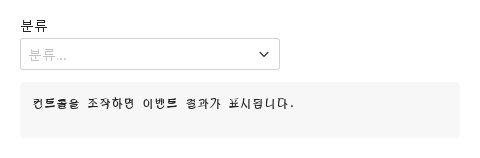
readonly 설정을 적용한 읽기 전용 선택 예제입니다.

Qt 실행 화면 · 이미지
읽기 전용 선택 · 실행 결과
기본 실행 화면
QML 코드
import QtQuick
import Syidax.Core

Item {
    component EventLog: Rectangle {
        id: logBox
        property var lines: []
        implicitWidth: 440
        implicitHeight: Math.max(56, logText.implicitHeight + 24)
        radius: 4; color: Theme.semantic.backgroundBold
        function log(value) { lines = lines.slice(-3).concat([String(value)]) }
        Text {
            id: logText; x: 12; y: 12; width: parent.width - 24
            text: logBox.lines.length ? logBox.lines.join("\n") : "컨트롤을 조작하면 이벤트 결과가 표시됩니다."
            wrapMode: Text.Wrap; color: Theme.semantic.textDefault
            font.family: Theme.monoFontFamily; font.pixelSize: 12
        }
    }

    implicitWidth: Math.max(360, childrenRect.width)
    implicitHeight: childrenRect.height
    id: story

    property QtObject settings: QtObject {
        id: storyArgs
        property string label: "분류"
        property string placeholder: "분류를 고르세요"
        property bool checkable: false
        property bool clearable: true
        property bool expandable: true
        property bool expandAll: false
        property bool line: false
        property bool required: false
        property bool disabled: false
        property bool readonly: true
        property bool loading: false
        property int maxTagCount: 0
        property bool appendParent: false
    }

    readonly property var nodes: [
        { value: "fruit", label: "과일", expanded: true, children: [
            { value: "apple", label: "사과" },
            { value: "pear", label: "배" }
        ] },
        { value: "veg", label: "채소", children: [
            { value: "kale", label: "케일" },
            { value: "leek", label: "대파" }
        ] }
    ]

    Column {
        spacing: 12
        SyTreeSelect {
            width: 260
            label: storyArgs.label
            placeholder: storyArgs.placeholder
            checkable: storyArgs.checkable
            clearable: storyArgs.clearable
            expandable: storyArgs.expandable
            expandAll: storyArgs.expandAll
            line: storyArgs.line
            required: storyArgs.required
            disabled: storyArgs.disabled
            readonly: storyArgs.readonly
            loading: storyArgs.loading
            maxTagCount: storyArgs.maxTagCount
            appendParent: storyArgs.appendParent
            nodes: story.nodes
            onChanged: (detail) => output.log(detail.selectedItem.map((i) => i.label).join(", "))
        }
        EventLog { id: output }
    }

}

06 노드 로딩

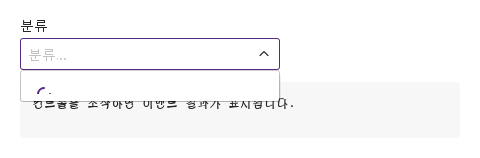
loading 설정을 적용한 노드 로딩 예제입니다.

Qt 실행 화면 · 이미지
노드 로딩 · 열린 화면
QML 코드
import QtQuick
import Syidax.Core

Item {
    component EventLog: Rectangle {
        id: logBox
        property var lines: []
        implicitWidth: 440
        implicitHeight: Math.max(56, logText.implicitHeight + 24)
        radius: 4; color: Theme.semantic.backgroundBold
        function log(value) { lines = lines.slice(-3).concat([String(value)]) }
        Text {
            id: logText; x: 12; y: 12; width: parent.width - 24
            text: logBox.lines.length ? logBox.lines.join("\n") : "컨트롤을 조작하면 이벤트 결과가 표시됩니다."
            wrapMode: Text.Wrap; color: Theme.semantic.textDefault
            font.family: Theme.monoFontFamily; font.pixelSize: 12
        }
    }

    implicitWidth: Math.max(360, childrenRect.width)
    implicitHeight: childrenRect.height
    id: story

    property QtObject settings: QtObject {
        id: storyArgs
        property string label: "분류"
        property string placeholder: "분류를 고르세요"
        property bool checkable: false
        property bool clearable: true
        property bool expandable: true
        property bool expandAll: false
        property bool line: false
        property bool required: false
        property bool disabled: false
        property bool readonly: false
        property bool loading: true
        property int maxTagCount: 0
        property bool appendParent: false
    }

    readonly property var nodes: [
        { value: "fruit", label: "과일", expanded: true, children: [
            { value: "apple", label: "사과" },
            { value: "pear", label: "배" }
        ] },
        { value: "veg", label: "채소", children: [
            { value: "kale", label: "케일" },
            { value: "leek", label: "대파" }
        ] }
    ]

    Column {
        spacing: 12
        SyTreeSelect { id: exampleControl1; 
            width: 260
            label: storyArgs.label
            placeholder: storyArgs.placeholder
            checkable: storyArgs.checkable
            clearable: storyArgs.clearable
            expandable: storyArgs.expandable
            expandAll: storyArgs.expandAll
            line: storyArgs.line
            required: storyArgs.required
            disabled: storyArgs.disabled
            readonly: storyArgs.readonly
            loading: storyArgs.loading
            maxTagCount: storyArgs.maxTagCount
            appendParent: storyArgs.appendParent
            nodes: story.nodes
            onChanged: (detail) => output.log(detail.selectedItem.map((i) => i.label).join(", "))
        }
        EventLog { id: output }
    }

}

07 부모 노드 포함

checkable · appendParent 설정을 적용한 부모 노드 포함 예제입니다.

Qt 실행 화면 · 이미지
부모 노드 포함 · 열린 화면
QML 코드
import QtQuick
import Syidax.Core

Item {
    component EventLog: Rectangle {
        id: logBox
        property var lines: []
        implicitWidth: 440
        implicitHeight: Math.max(56, logText.implicitHeight + 24)
        radius: 4; color: Theme.semantic.backgroundBold
        function log(value) { lines = lines.slice(-3).concat([String(value)]) }
        Text {
            id: logText; x: 12; y: 12; width: parent.width - 24
            text: logBox.lines.length ? logBox.lines.join("\n") : "컨트롤을 조작하면 이벤트 결과가 표시됩니다."
            wrapMode: Text.Wrap; color: Theme.semantic.textDefault
            font.family: Theme.monoFontFamily; font.pixelSize: 12
        }
    }

    implicitWidth: Math.max(360, childrenRect.width)
    implicitHeight: childrenRect.height
    id: story

    property QtObject settings: QtObject {
        id: storyArgs
        property string label: "분류"
        property string placeholder: "분류를 고르세요"
        property bool checkable: true
        property bool clearable: true
        property bool expandable: true
        property bool expandAll: false
        property bool line: false
        property bool required: false
        property bool disabled: false
        property bool readonly: false
        property bool loading: false
        property int maxTagCount: 0
        property bool appendParent: true
    }

    readonly property var nodes: [
        { value: "fruit", label: "과일", expanded: true, children: [
            { value: "apple", label: "사과" },
            { value: "pear", label: "배" }
        ] },
        { value: "veg", label: "채소", children: [
            { value: "kale", label: "케일" },
            { value: "leek", label: "대파" }
        ] }
    ]

    Column {
        spacing: 12
        SyTreeSelect { id: exampleControl1; 
            width: 260
            label: storyArgs.label
            placeholder: storyArgs.placeholder
            checkable: storyArgs.checkable
            clearable: storyArgs.clearable
            expandable: storyArgs.expandable
            expandAll: storyArgs.expandAll
            line: storyArgs.line
            required: storyArgs.required
            disabled: storyArgs.disabled
            readonly: storyArgs.readonly
            loading: storyArgs.loading
            maxTagCount: storyArgs.maxTagCount
            appendParent: storyArgs.appendParent
            nodes: story.nodes
            onChanged: (detail) => output.log(detail.selectedItem.map((i) => i.label).join(", "))
        }
        EventLog { id: output }
    }

}

08 계층 연결선

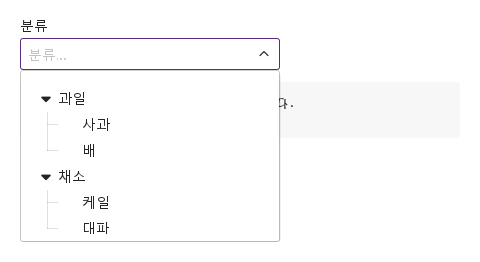
line · expandAll 설정을 적용한 계층 연결선 예제입니다.

Qt 실행 화면 · 이미지
계층 연결선 · 열린 화면
QML 코드
import QtQuick
import Syidax.Core

Item {
    component EventLog: Rectangle {
        id: logBox
        property var lines: []
        implicitWidth: 440
        implicitHeight: Math.max(56, logText.implicitHeight + 24)
        radius: 4; color: Theme.semantic.backgroundBold
        function log(value) { lines = lines.slice(-3).concat([String(value)]) }
        Text {
            id: logText; x: 12; y: 12; width: parent.width - 24
            text: logBox.lines.length ? logBox.lines.join("\n") : "컨트롤을 조작하면 이벤트 결과가 표시됩니다."
            wrapMode: Text.Wrap; color: Theme.semantic.textDefault
            font.family: Theme.monoFontFamily; font.pixelSize: 12
        }
    }

    implicitWidth: Math.max(360, childrenRect.width)
    implicitHeight: childrenRect.height
    id: story

    property QtObject settings: QtObject {
        id: storyArgs
        property string label: "분류"
        property string placeholder: "분류를 고르세요"
        property bool checkable: false
        property bool clearable: true
        property bool expandable: true
        property bool expandAll: true
        property bool line: true
        property bool required: false
        property bool disabled: false
        property bool readonly: false
        property bool loading: false
        property int maxTagCount: 0
        property bool appendParent: false
    }

    readonly property var nodes: [
        { value: "fruit", label: "과일", expanded: true, children: [
            { value: "apple", label: "사과" },
            { value: "pear", label: "배" }
        ] },
        { value: "veg", label: "채소", children: [
            { value: "kale", label: "케일" },
            { value: "leek", label: "대파" }
        ] }
    ]

    Column {
        spacing: 12
        SyTreeSelect { id: exampleControl1; 
            width: 260
            label: storyArgs.label
            placeholder: storyArgs.placeholder
            checkable: storyArgs.checkable
            clearable: storyArgs.clearable
            expandable: storyArgs.expandable
            expandAll: storyArgs.expandAll
            line: storyArgs.line
            required: storyArgs.required
            disabled: storyArgs.disabled
            readonly: storyArgs.readonly
            loading: storyArgs.loading
            maxTagCount: storyArgs.maxTagCount
            appendParent: storyArgs.appendParent
            nodes: story.nodes
            onChanged: (detail) => output.log(detail.selectedItem.map((i) => i.label).join(", "))
        }
        EventLog { id: output }
    }

}

09 필수 입력과 초기화

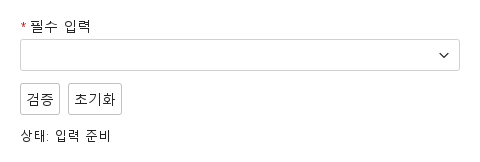
검증 전·오류 표시·초기화 결과를 비교합니다.

Qt 실행 화면 · 이미지
필수 입력과 초기화 · 입력 전
QML 코드
import QtQuick
import Syidax.Core

Column {
    width: 440; spacing: 12
    SyTreeSelect {
        id: field; width: parent.width; name: "selection"; required: true
        label: "필수 입력"; nodes: [{value: "design", label: "디자인"}, {value: "dev", label: "개발"}]
        
        error: "계속하려면 이 항목을 입력하세요."
    }
    Row {
        spacing: 8
        SyButton { id: check; text: "검증"; onClicked: field.reportValidity() }
        SyButton { id: reset; text: "초기화"; onClicked: field.reset() }
    }
    Text { text: "상태: " + (field.invalid ? "오류" : "입력 준비"); color: Theme.semantic.textDefault }
}

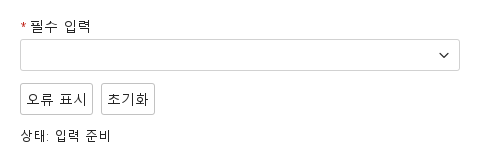
10 사용자 지정 오류

업무 규칙에 맞는 오류를 표시하고 초기화합니다.

Qt 실행 화면 · 이미지
사용자 지정 오류 · 입력 전
QML 코드
import QtQuick
import Syidax.Core

Column {
    width: 440; spacing: 12
    SyTreeSelect {
        id: field; width: parent.width; name: "selection"; required: true
        label: "필수 입력"; nodes: [{value: "design", label: "디자인"}, {value: "dev", label: "개발"}]
        
        error: "현재 사용할 수 없는 선택입니다. 다른 값을 선택하세요."
    }
    Row {
        spacing: 8
        SyButton { id: check; text: "오류 표시"; onClicked: field.setCustomError() }
        SyButton { id: reset; text: "초기화"; onClicked: field.reset() }
    }
    Text { text: "상태: " + (field.invalid ? "오류" : "입력 준비"); color: Theme.semantic.textDefault }
}

API 84

항목을 가리키거나 선택하면 QML 예제와 복사 버튼이 나타납니다.

속성

속성타입기본값설명
list[]트리 모델 [{ value, label, children, expanded, checked, disabled, icon, … }](SyTree와 같음). 변화마다 트리 상태를 반영합니다.
boolfalse체크 박스로 여럿을 고르고 태그로 보임. 바꾸면 선택이 비워집니다.
boolfalse선택이 있는 동안 선택을 비우는 ×(disabled / readonly면 없음).
var""다시 적용하려면 setValue(defaultValue)를 부르십시오.
string""아무것도 선택되거나 입력되지 않은 동안 보입니다.
string"default"default · error — error는 오류 테두리를 강제.
boolfalse부모에 캐럿. 없으면 모든 단계가 보임.
boolfalse모든 부모를 엶.
boolfalse단계 사이 안내선.
boolfalse트리 대신 스피너.
int0나머지가 "+n"으로 접히기 전에 보이는 태그 수. 0은 전부.
real0고정 행 너비(0 = 자연 너비).
boolfalse팝업 대신 트리가 상자 아래에 항상 있음.
boolfalse읽을 수 있고 열리지 않음. 항상 유효.
list[][{ value, label }] — 고른 것, 또는 가장 위의 체크된 노드들.
string""상자에 입력한 필터 글자.
string 또는 list(읽기 전용 바인딩)—고른 값, 또는 checkable이면 값 목록.
읽기 전용—selectedItem의 값들 · 첫 라벨.
bool(읽기 전용)—팝업이 열려 있는지(appendParent면 항상 true).
SyTree(읽기 전용)—안의 트리. expandNode(), collapseNode(), findNode() 등에 씁니다.
bool(읽기 전용)—포커스 또는 열린 팝업
bool(읽기 전용)—상자 위의 포인터.
string""프레임의 제목, 폼 키, 도움말, 사용자 오류 문구.
string"medium"small · medium · large — 상자 높이 24 / 32 / 40 px.
boolfalse흐리고 반응 없음, 항상 유효
boolfalse선택 없음은 valueMissing.
읽기 전용—유효성: "" · valueMissing · custom. invalid는 touched 되거나 report 된 뒤.
읽기 전용—invalid는 touched 되거나 report 된 뒤.
읽기 전용—유효성: "" · valueMissing · custom. invalid는 touched 되거나 report 된 뒤.
real240앱이 너비를 정하지 않을 때의 너비.

메서드

메서드설명
코드에서 고름 — 값 또는 목록. checkable: 전부 해제하고 이것들을 체크(하위 트리가 따름). 단일: 처음 찾은 노드. 모르는 값은 무시. 시그널 없음.
선택과 검색 글자를 비우고 touched로 표시하며 changed를 발생시킵니다. disabled / readonly면 무시됩니다.
팝업을 엶(touched로 표시, disabled·readonly·appendParent면 무시)
닫음.
검색 상자에 키보드 포커스를 줌
거두고 팝업을 닫음.
상태가 ""인지 조용히
같지만 오류 줄을 드러냄.
"", "valueMissing" 또는 "custom".
custom 상태를 강제 · 해제.
custom 상태를 강제 · 해제.
defaultValue를 복원하고(트리의 체크가 따름) touched / submitted / custom 플래그를 지웁니다. 시그널 없음.

시그널

시그널인자시점
detail: { selectedItem, isValid }사용자가 노드를 고르거나, 체크 또는 해제하거나(태그의 × 포함), 비움. defaultValue, setValue(), reset()에는 없음.
detail: { selectedItem, isValid }상자가 포커스를 얻음 / 잃음(포커스가 필드를 touched로 표시).

동작

항목동작 / 조건
트리 모델 [{ value, label, children, expanded, checked, disabled, icon, … }](SyTree와 같음). 변화마다 트리 상태를 반영합니다.
고른 값, 또는 checkable이면 값 목록.
nodes는 SyTree 모델입니다: { value, label, children, expanded, checked, disabled, icon, … }의 목록이며 value는 트리 안에서 고유해야 합니다. checkable이 아니면 행을 클릭할 수 있습니다: 클릭이 노드를 고르고, selectedItem = [{ value, label }]을 쓰고, 라벨을 상자에 보이고, 검색 글자를 지우고, changed를 발생시키고, 팝업을 닫습니다.
nodes는 SyTree 모델입니다: { value, label, children, expanded, checked, disabled, icon, … }의 목록이며 value는 트리 안에서 고유해야 합니다.
nodes는 SyTree 모델입니다: { value, label, children, expanded, checked, disabled, icon, … }의 목록이며 value는 트리 안에서 고유해야 합니다. disabled: 흐린 상자, 반응 없음, 지우기 × 없음, 항상 유효.
부모에 캐럿. 없으면 모든 단계가 보임.
모든 부모를 엶.
단계 사이 안내선.
고정 행 너비(0 = 자연 너비).
체크 박스로 여럿을 고르고 태그로 보임. 바꾸면 선택이 비워집니다.
[{ value, label }] — 고른 것, 또는 가장 위의 체크된 노드들.
사용자가 노드를 고르거나, 체크 또는 해제하거나(태그의 × 포함), 비움. defaultValue, setValue(), reset()에는 없음.
나머지가 "+n"으로 접히기 전에 보이는 태그 수. 0은 전부.
생성 시와 바뀔 때마다 적용할 선택: 값, "a,b", 또는 목록. 다시 적용하려면 setValue(defaultValue)를 부르십시오.
코드에서 고름 — 값 또는 목록. checkable: 전부 해제하고 이것들을 체크(하위 트리가 따름). 단일: 처음 찾은 노드. 모르는 값은 무시. 시그널 없음.
defaultValue를 복원하고(트리의 체크가 따름) touched / submitted / custom 플래그를 지웁니다. 시그널 없음.
상자에 입력한 필터 글자.
상자 아래, 상자와 같은 너비, 최대 300 px 높이(넘으면 스크롤)이며, 상자 클릭, 입력, ArrowDown, open()으로 열리고, Escape, 바깥 누름, 단일 모드의 선택, close()로 닫힙니다. appendParent면 트리가 상자 바로 아래 필드 안에 틀을 두르고 그려지며 open() / close()는 아무 일도 하지 않습니다. readonly: 읽을 수 있고, 열리거나 입력되지 않으며, 태그는 ×를 잃고, clearValue() / open()은 무시되고, 항상 유효. 필드는 상자가 포커스를 얻는 즉시(또는 선택, 비우기, open()에) touched로 간주되므로, 필수인데 비어 있는 필드는 포커스를 받자마자 오류 줄을 보입니다 — 블러를 기다리는 다른 필드보다 이릅니다.
상자 아래, 상자와 같은 너비, 최대 300 px 높이(넘으면 스크롤)이며, 상자 클릭, 입력, ArrowDown, open()으로 열리고, Escape, 바깥 누름, 단일 모드의 선택, close()로 닫힙니다. appendParent면 트리가 상자 바로 아래 필드 안에 틀을 두르고 그려지며 open() / close()는 아무 일도 하지 않습니다.
팝업이 열려 있는지(appendParent면 항상 true).
팝업 대신 트리가 상자 아래에 항상 있음.
트리 대신 스피너.
읽을 수 있고 열리지 않음. 항상 유효.
선택과 검색 글자를 비우고 touched로 표시하며 changed를 발생시킵니다. disabled / readonly면 무시됩니다.
default · error — error는 오류 테두리를 강제.
status: "error"는 오류 테두리를 강제합니다.
hasFocus는 상자에 포커스가 있거나 팝업이 열린 동안 true입니다.
required인데 아무것도 선택되지 않으면 valueMissing, setCustomError()면 custom, disabled나 readonly면 "".
name이 SyForm.values()의 키가 됩니다: 값, 또는 checkable이면 값 목록.
small · medium · large — 상자 높이 24 / 32 / 40 px.
상자는 size 높이(24 / 32 / 40 px)이고 태그 줄에 따라 커지며, 너비는 앱이 width를 정하지 않으면 preferredWidth 240입니다.
앱이 너비를 정하지 않을 때의 너비.

키보드

항목동작 / 조건
키보드: Tab과 Shift+Tab으로 필드에 진입하고 이동합니다. 숨김·비활성 필드는 건너뜁니다. 열린 선택기는 Escape로 닫을 수 있습니다. Textarea의 Tab은 들여쓰기 대신 포커스를 이동하며 Modal 안에서는 포커스 경계를 유지합니다.