QML
← 전체 컴포넌트

Banner

페이지 전체에 중요한 공지나 상태를 지속적으로 표시하는 배너입니다. 동작 버튼과 닫기 기능을 함께 제공할 수 있습니다.

import Syidax.Core.Banner

지원 QML 타입

타입정의 / 역할
페이지 안에서 안내 문구와 동작을 보여주는 넓은 메시지 영역입니다.

예제로 보기

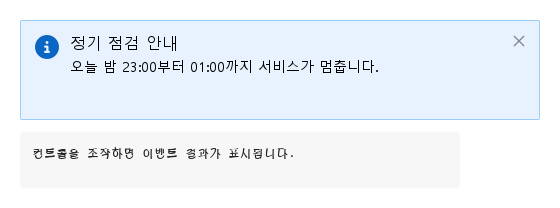
미리보기는 Qt 실행 화면의 이미지입니다. 아래 버튼으로 결과를 전환하세요.

01 기본 구성

SyBannerMessage는 페이지 전체를 위한 전체 폭 공지입니다

Qt 실행 화면 · 이미지
기본 구성 · 기본
기본 실행 화면
QML 코드
import QtQuick
import Syidax.Core

Item {
    component EventLog: Rectangle {
        id: logBox
        property var lines: []
        implicitWidth: 440
        implicitHeight: Math.max(56, logText.implicitHeight + 24)
        radius: 4; color: Theme.semantic.backgroundBold
        function log(value) { lines = lines.slice(-3).concat([String(value)]) }
        Text {
            id: logText; x: 12; y: 12; width: parent.width - 24
            text: logBox.lines.length ? logBox.lines.join("\n") : "컨트롤을 조작하면 이벤트 결과가 표시됩니다."
            wrapMode: Text.Wrap; color: Theme.semantic.textDefault
            font.family: Theme.monoFontFamily; font.pixelSize: 12
        }
    }

    implicitWidth: Math.max(360, childrenRect.width)
    implicitHeight: childrenRect.height

    property QtObject settings: QtObject {
        id: storyArgs
        property string variant: "info"
        property string header: "정기 점검 안내"
        property string message: "오늘 밤 23:00부터 01:00까지 서비스가 멈춥니다."
        property bool showIcon: true
        property bool closable: true
    }


    Column {
        spacing: 12
        Item {
            width: 520
            height: banner.visible ? banner.implicitHeight : 0
            SyBannerMessage {
                id: banner
                variant: storyArgs.variant
                header: storyArgs.header
                message: storyArgs.message
                showIcon: storyArgs.showIcon
                neutralIcon: Icons.bannerInfo
                closable: storyArgs.closable
                onDismissed: output.log("dismissed")
            }
        }
        EventLog { id: output }
    }

}

02 content · footer

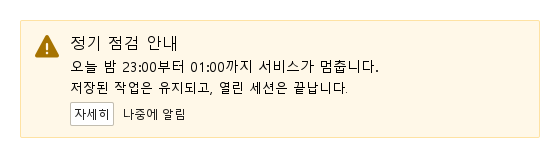
직접 아이템을 둘 자리가 둘 있습니다.

Qt 실행 화면 · 이미지
content · footer · 기본
기본 실행 화면
QML 코드
import QtQuick
import Syidax.Core

Item {
    implicitWidth: Math.max(360, childrenRect.width)
    implicitHeight: childrenRect.height
    // Focused Gallery routes: keep only the selected API and its prerequisites.
    id: featureStory

    Item {
        width: 520
        height: banner.implicitHeight
        SyBannerMessage {
            id: banner
            variant: "warning"
            showIcon: true
            header: "정기 점검 안내"
            message: "오늘 밤 23:00부터 01:00까지 서비스가 멈춥니다."
            footer: [
                SyButton { text: "자세히"; size: "small" },
                SyButton { text: "나중에 알림"; variant: "borderless"; size: "small" }
            ]
            Text { text: "저장된 작업은 유지되고, 열린 세션은 끝납니다."; width: parent ? parent.width : 0; wrapMode: Text.Wrap; font.family: Theme.fontFamily; font.pixelSize: 13; color: banner.textColor }
        }
    }
}

03 dismissed

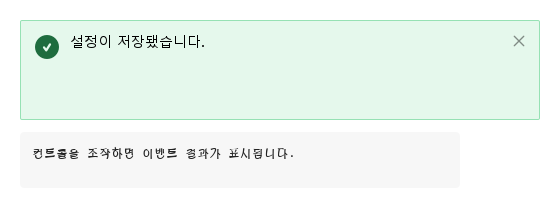
dismissed()는 배너의 유일한 시그널입니다.

Qt 실행 화면 · 이미지
dismissed · 기본
기본 실행 화면
QML 코드
import QtQuick
import Syidax.Core

Item {
    component EventLog: Rectangle {
        id: logBox
        property var lines: []
        implicitWidth: 440
        implicitHeight: Math.max(56, logText.implicitHeight + 24)
        radius: 4; color: Theme.semantic.backgroundBold
        function log(value) { lines = lines.slice(-3).concat([String(value)]) }
        Text {
            id: logText; x: 12; y: 12; width: parent.width - 24
            text: logBox.lines.length ? logBox.lines.join("\n") : "컨트롤을 조작하면 이벤트 결과가 표시됩니다."
            wrapMode: Text.Wrap; color: Theme.semantic.textDefault
            font.family: Theme.monoFontFamily; font.pixelSize: 12
        }
    }

    implicitWidth: Math.max(360, childrenRect.width)
    implicitHeight: childrenRect.height

    Column {
        spacing: 12
        Item {
            width: 520
            height: banner.visible ? banner.implicitHeight : 0
            SyBannerMessage {
                id: banner
                variant: "success"
                showIcon: true
                closable: true
                message: "설정이 저장됐습니다."
                onDismissed: output.log("dismissed")
            }
        }
        EventLog { id: output }
    }
}

04 removeBanner

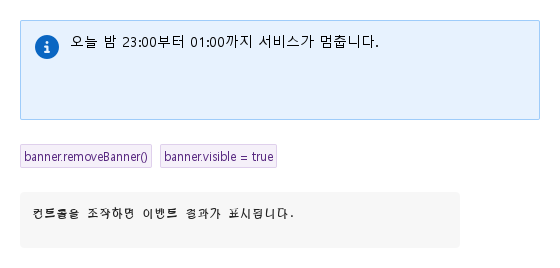
removeBanner()가 유일한 메서드입니다: dismissed()를 발생시킨 뒤 배너를 숨깁니다(visible = false).

Qt 실행 화면 · 이미지
removeBanner · 기본
QML 코드
import QtQuick
import Syidax.Core

Item {
    component EventLog: Rectangle {
        id: logBox
        property var lines: []
        implicitWidth: 440
        implicitHeight: Math.max(56, logText.implicitHeight + 24)
        radius: 4; color: Theme.semantic.backgroundBold
        function log(value) { lines = lines.slice(-3).concat([String(value)]) }
        Text {
            id: logText; x: 12; y: 12; width: parent.width - 24
            text: logBox.lines.length ? logBox.lines.join("\n") : "컨트롤을 조작하면 이벤트 결과가 표시됩니다."
            wrapMode: Text.Wrap; color: Theme.semantic.textDefault
            font.family: Theme.monoFontFamily; font.pixelSize: 12
        }
    }

    implicitWidth: Math.max(360, childrenRect.width)
    implicitHeight: childrenRect.height

    Column {
        spacing: 24
        Item {
            width: 520
            height: banner.implicitHeight
            SyBannerMessage { id: banner; variant: "info"; showIcon: true; message: "오늘 밤 23:00부터 01:00까지 서비스가 멈춥니다."; onDismissed: output.log("dismissed") }
        }
        Row {
            spacing: 8
            SyButton { id: exampleControl1;  text: "banner.removeBanner()"; variant: "secondary"; size: "small"; onClicked: banner.removeBanner() }
            SyButton { id: exampleControl2;  text: "banner.visible = true"; variant: "secondary"; size: "small"; onClicked: banner.visible = true }
        }
        EventLog { id: output }
    }
}

05 성공 안내

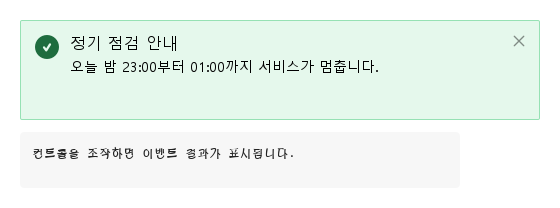
variant 설정을 적용한 성공 안내 예제입니다.

Qt 실행 화면 · 이미지
성공 안내 · 실행 결과
기본 실행 화면
QML 코드
import QtQuick
import Syidax.Core

Item {
    component EventLog: Rectangle {
        id: logBox
        property var lines: []
        implicitWidth: 440
        implicitHeight: Math.max(56, logText.implicitHeight + 24)
        radius: 4; color: Theme.semantic.backgroundBold
        function log(value) { lines = lines.slice(-3).concat([String(value)]) }
        Text {
            id: logText; x: 12; y: 12; width: parent.width - 24
            text: logBox.lines.length ? logBox.lines.join("\n") : "컨트롤을 조작하면 이벤트 결과가 표시됩니다."
            wrapMode: Text.Wrap; color: Theme.semantic.textDefault
            font.family: Theme.monoFontFamily; font.pixelSize: 12
        }
    }

    implicitWidth: Math.max(360, childrenRect.width)
    implicitHeight: childrenRect.height

    property QtObject settings: QtObject {
        id: storyArgs
        property string variant: "success"
        property string header: "정기 점검 안내"
        property string message: "오늘 밤 23:00부터 01:00까지 서비스가 멈춥니다."
        property bool showIcon: true
        property bool closable: true
    }


    Column {
        spacing: 12
        Item {
            width: 520
            height: banner.visible ? banner.implicitHeight : 0
            SyBannerMessage {
                id: banner
                variant: storyArgs.variant
                header: storyArgs.header
                message: storyArgs.message
                showIcon: storyArgs.showIcon
                neutralIcon: Icons.bannerInfo
                closable: storyArgs.closable
                onDismissed: output.log("dismissed")
            }
        }
        EventLog { id: output }
    }

}

06 주의 안내

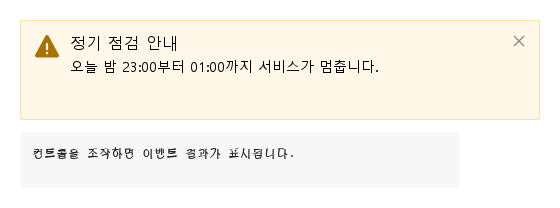
variant 설정을 적용한 주의 안내 예제입니다.

Qt 실행 화면 · 이미지
주의 안내 · 실행 결과
기본 실행 화면
QML 코드
import QtQuick
import Syidax.Core

Item {
    component EventLog: Rectangle {
        id: logBox
        property var lines: []
        implicitWidth: 440
        implicitHeight: Math.max(56, logText.implicitHeight + 24)
        radius: 4; color: Theme.semantic.backgroundBold
        function log(value) { lines = lines.slice(-3).concat([String(value)]) }
        Text {
            id: logText; x: 12; y: 12; width: parent.width - 24
            text: logBox.lines.length ? logBox.lines.join("\n") : "컨트롤을 조작하면 이벤트 결과가 표시됩니다."
            wrapMode: Text.Wrap; color: Theme.semantic.textDefault
            font.family: Theme.monoFontFamily; font.pixelSize: 12
        }
    }

    implicitWidth: Math.max(360, childrenRect.width)
    implicitHeight: childrenRect.height

    property QtObject settings: QtObject {
        id: storyArgs
        property string variant: "warning"
        property string header: "정기 점검 안내"
        property string message: "오늘 밤 23:00부터 01:00까지 서비스가 멈춥니다."
        property bool showIcon: true
        property bool closable: true
    }


    Column {
        spacing: 12
        Item {
            width: 520
            height: banner.visible ? banner.implicitHeight : 0
            SyBannerMessage {
                id: banner
                variant: storyArgs.variant
                header: storyArgs.header
                message: storyArgs.message
                showIcon: storyArgs.showIcon
                neutralIcon: Icons.bannerInfo
                closable: storyArgs.closable
                onDismissed: output.log("dismissed")
            }
        }
        EventLog { id: output }
    }

}

API 28

항목을 가리키거나 선택하면 QML 예제와 복사 버튼이 나타납니다.

속성

속성타입기본값설명
list (기본 속성)—메시지 아래에 글 영역만큼 넓게 쌓이는 아이템.
list—내용 아래 행의 아이템(4 px 간격). 비어 있으면 행이 숨겨집니다.
string"info""info" · "success" · "warning" · "error" · "neutral" — 색과 내장 아이콘.
string""16 px 제목 줄. 비어 있으면 숨김.
string""14 px 본문. 비어 있으면 숨김.
boolfalse종류 아이콘을 보입니다(neutral은 neutralIcon도 필요).
url""neutral 배너의 아이콘(Icons.* url 또는 SVG 파일). 다른 종류에서는 무시됩니다.
boolfalseremoveBanner()를 부르는 ×를 더합니다.
string (읽기 전용)—info를 informational로 바꾼 variant.
bool (읽기 전용)—아이콘이 실제로 그려지는지.
읽기 전용—결정된 글자색, 아이콘 색, 아이콘 소스.

메서드

메서드설명
dismissed()를 발생시키고 배너를 숨깁니다(visible = false). 인자 없음, 반환값 없음. 이미 숨겨진 상태에서 부르면 다시 발생합니다. 배너는 visible = true로 되살립니다.

시그널

시그널인자발생 시점
—×를 눌렀거나 removeBanner()를 불렀을 때 — visible이 false가 되기 전에 발생. visible = false로 직접 두면 발생하지 않습니다.

동작

항목동작 / 조건
너비와 높이 — width는 부모의 너비에 바인딩됩니다(부모가 없으면 480 px). 바꾸려면 width를 할당하거나 Layout.fillWidth를 쓰십시오.
info(기본, informational 색) · success · warning · error · neutral; 배경, 테두리, 글자, 아이콘 색을 정하고 neutral이 아닌 네 종류에서는 아이콘도 정합니다.
종류 아이콘을 보입니다(neutral은 neutralIcon도 필요).
neutral 배너의 아이콘(Icons.* url 또는 SVG 파일). 다른 종류에서는 무시됩니다.
14 px 본문. 비어 있으면 숨김.
16 px 제목 줄. 비어 있으면 숨김.
내용 아래 행의 아이템(4 px 간격). 비어 있으면 행이 숨겨집니다.
removeBanner()를 부르는 ×를 더합니다.
dismissed()를 발생시키고 배너를 숨깁니다(visible = false). 인자 없음, 반환값 없음. 이미 숨겨진 상태에서 부르면 다시 발생합니다. 배너는 visible = true로 되살립니다.
×를 눌렀거나 removeBanner()를 불렀을 때 — visible이 false가 되기 전에 발생. visible = false로 직접 두면 발생하지 않습니다.
닫기 — ×(closable)는 removeBanner()를 부르고, 이것은 dismissed()를 발생시킨 뒤 visible = false로 둡니다. 그 밖에는 dismissed를 발생시키지 않으며, visible을 직접 설정하면 조용합니다. visible = true는 배너를 다시 보여 줍니다.
배너는 × 외에 포인터 입력을 받지 않습니다. 푸터 버튼은 자기 클릭을 알립니다.

키보드

항목동작 / 조건
컨트롤 하나에 대한 피드백에는 SyInlineMessage, 지나가는 알림에는 SyToast, 푸터 동작에는 SyButton, neutral 아이콘에는 SyIcon / Icons.banner*.