QML
← 전체 컴포넌트

Menu

실행할 작업을 목록으로 보여 주는 메뉴입니다. 관련 명령을 그룹이나 하위 메뉴로 묶을 수 있습니다.

import Syidax.Core.Menu

지원 QML 타입

타입정의 / 역할
명령 항목·하위 메뉴·제목이 있는 그룹을 담는 메뉴입니다.
선택 유지나 체크 상태를 지원하는 개별 메뉴 명령입니다.
옆으로 하위 메뉴를 여는 메뉴 항목입니다.
관련 메뉴 항목을 제목 아래에 묶는 섹션입니다.

예제로 보기

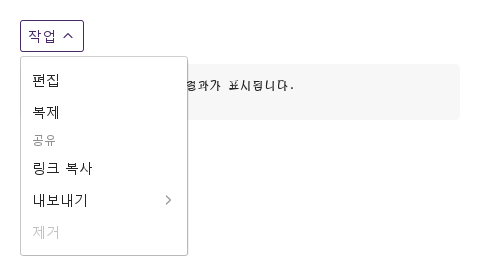
미리보기는 Qt 실행 화면의 이미지입니다. 아래 버튼으로 결과를 전환하세요.

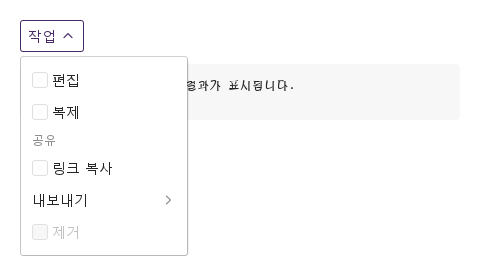
01 기본 구성

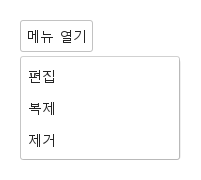
SyMenu는 작업 목록입니다.

Qt 실행 화면 · 이미지
기본 구성 · 열린 화면
QML 코드
import QtQuick
import Syidax.Core

Item {
    component EventLog: Rectangle {
        id: logBox
        property var lines: []
        implicitWidth: 440
        implicitHeight: Math.max(56, logText.implicitHeight + 24)
        radius: 4; color: Theme.semantic.backgroundBold
        function log(value) { lines = lines.slice(-3).concat([String(value)]) }
        Text {
            id: logText; x: 12; y: 12; width: parent.width - 24
            text: logBox.lines.length ? logBox.lines.join("\n") : "컨트롤을 조작하면 이벤트 결과가 표시됩니다."
            wrapMode: Text.Wrap; color: Theme.semantic.textDefault
            font.family: Theme.monoFontFamily; font.pixelSize: 12
        }
    }

    implicitWidth: Math.max(360, childrenRect.width)
    implicitHeight: childrenRect.height

    property QtObject settings: QtObject {
        id: storyArgs
        property bool checkable: false
        property string direction: "right"
        property bool disabled: false
    }

    readonly property string members: [
        "SyMenuItem { text: " + JSON.stringify("편집") + "; value: \"edit\" }",
        "SyMenuItem { text: " + JSON.stringify("복제") + "; value: \"duplicate\" }",
        "SyMenuGroup {",
        "    title: " + JSON.stringify("공유"),
        "    SyMenuItem { text: " + JSON.stringify("링크 복사") + "; value: \"link\" }",
        "    SyMenuSub {",
        "        title: " + JSON.stringify("내보내기"),
        "        SyMenuItem { text: \"PDF\"; value: \"pdf\" }",
        "        SyMenuItem { text: \"CSV\"; value: \"csv\" }",
        "    }",
        "}",
        "SyMenuItem { text: " + JSON.stringify("제거") + "; value: \"remove\"; disabled: true }"
    ].join("\n")

    Column {
        spacing: 12
        SyDropdown { id: exampleControl1; 
            title: "작업"
            SyMenu {
                checkable: storyArgs.checkable
                direction: storyArgs.direction
                disabled: storyArgs.disabled
                onItemSelected: (detail) => output.log(detail.value)
                SyMenuItem { text: "편집"; value: "edit" }
                SyMenuItem { text: "복제"; value: "duplicate" }
                SyMenuGroup {
                    title: "공유"
                    SyMenuItem { text: "링크 복사"; value: "link" }
                    SyMenuSub { id: exampleControl2; 
                        title: "내보내기"
                        SyMenuItem { text: "PDF"; value: "pdf" }
                        SyMenuItem { text: "CSV"; value: "csv" }
                    }
                }
                SyMenuItem { text: "제거"; value: "remove"; disabled: true }
            }
        }
        EventLog { id: output }
    }

}

02 trigger · position

hovered를 보고하는 컨트롤 — 여기서는 SyButton — 안에 선언하면 메뉴는 자기 자리를 차지하지 않고 그 컨트롤에 붙은 팝업으로 열립니다.

Qt 실행 화면 · 이미지
trigger · position · 열린 화면
QML 코드
import QtQuick
import Syidax.Core

Item {
    implicitWidth: Math.max(360, childrenRect.width)
    implicitHeight: childrenRect.height
    // Focused Gallery routes: keep only the selected API and its prerequisites.

    id: story
    property QtObject settings: QtObject {
        id: storyArgs
        property string trigger: "hover"
        property string position: "bottomLeft"
    }

    readonly property string label: (storyArgs.trigger === "contextmenu" ? "오른쪽 클릭" : "메뉴 열기")

    Item {
        width: 360
        height: 160
        SyButton {
            anchors.centerIn: parent
            text: story.label
            SyMenu { id: featureTarget0;
                trigger: storyArgs.trigger
                position: storyArgs.position
                SyMenuItem { text: "편집"; value: "edit" }
                SyMenuItem { text: "복제"; value: "duplicate" }
                SyMenuItem { text: "제거"; value: "remove" }
            }
        }
    }
}

03 selectable · checkable · disabled · loading

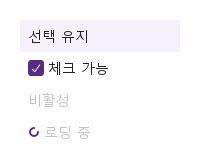
각 SyMenuItem은 text(라벨), value(선택 시 보고되는 값), 그리고 네 가지 상태 스위치를 가집니다.

Qt 실행 화면 · 이미지
selectable · checkable · disabled · loading · 열린 화면
QML 코드
import QtQuick
import Syidax.Core

Item {
    implicitWidth: Math.max(360, childrenRect.width)
    implicitHeight: childrenRect.height
    // Focused Gallery routes: keep only the selected API and its prerequisites.
    id: featureStory

    SyMenu { id: exampleControl1; 
        SyMenuItem { id: featureTarget0; text: "선택 유지"; value: "a"; selectable: true; select: true }
        SyMenuItem { id: featureTarget1; text: "체크 가능"; value: "b"; checkable: true; checked: true }
        SyMenuItem { id: featureTarget2; text: "비활성"; value: "c"; disabled: true }
        SyMenuItem { id: featureTarget3; text: "로딩 중"; value: "d"; loading: true }
    }
}

04 opened · itemSelected · itemChecked

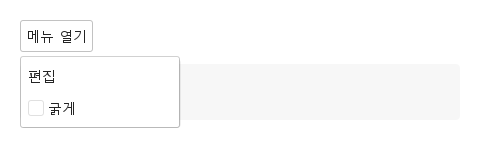
SyMenu에는 시그널이 셋 있습니다.

Qt 실행 화면 · 이미지
opened · itemSelected · itemChecked · 열린 화면
QML 코드
import QtQuick
import Syidax.Core

Item {
    component EventLog: Rectangle {
        id: logBox
        property var lines: []
        implicitWidth: 440
        implicitHeight: Math.max(56, logText.implicitHeight + 24)
        radius: 4; color: Theme.semantic.backgroundBold
        function log(value) { lines = lines.slice(-3).concat([String(value)]) }
        Text {
            id: logText; x: 12; y: 12; width: parent.width - 24
            text: logBox.lines.length ? logBox.lines.join("\n") : "컨트롤을 조작하면 이벤트 결과가 표시됩니다."
            wrapMode: Text.Wrap; color: Theme.semantic.textDefault
            font.family: Theme.monoFontFamily; font.pixelSize: 12
        }
    }

    implicitWidth: Math.max(360, childrenRect.width)
    implicitHeight: childrenRect.height
    // Focused Gallery routes: keep only the selected API and its prerequisites.
    id: featureStory


    Column {
        spacing: 12
        SyButton {
            text: "메뉴 열기"
            SyMenu { id: exampleControl1; 
                trigger: "click"
                onOpened: (state) => { if (true) { output.log(("opened: %1").arg(state)) } }
                onItemSelected: (detail) => { if (true) { output.log(("itemSelected: %1").arg(detail.value)) } }
                onItemChecked: (detail) => { if (true) { output.log(("itemChecked: %1 %2").arg(detail.value).arg(detail.checked)) } }
                SyMenuItem { text: "편집"; value: "edit" }
                SyMenuItem { text: "굵게"; value: "bold"; checkable: true }
            }
        }
        EventLog { id: output }
    }
}

05 setOpen · setClose · toggle · setSelectableAllItems · clearSelectedItem

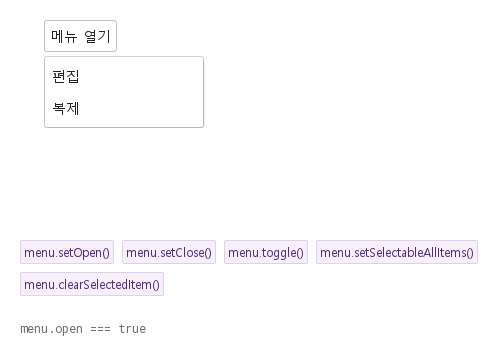
setOpen()은 팝업을 열고 opened(true)를 발생시킵니다.

Qt 실행 화면 · 이미지
setOpen · setClose · toggle · setSelectableAllItems · clearSelectedItem · 열린 화면
QML 코드
import QtQuick
import Syidax.Core

Item {
    implicitWidth: Math.max(360, childrenRect.width)
    implicitHeight: childrenRect.height
    // Focused Gallery routes: keep only the selected API and its prerequisites.
    id: featureStory

    Column {
        spacing: 24
        Item {
            width: 560; height: 220
            SyButton {
                x: 24; y: 24
 text: "메뉴 열기"; SyMenu { id: menu; trigger: "click"; SyMenuItem { text: "편집"; value: "edit" } SyMenuItem { text: "복제"; value: "duplicate" } } }
        }
        Flow {
            objectName: "exampleCommands"

            width: 460
            spacing: 8
            SyButton { id: exampleControl1;  visible: true; text: "menu.setOpen()"; variant: "secondary"; size: "small"; onClicked: menu.setOpen() }
            SyButton { id: exampleControl2;  visible: true; text: "menu.setClose()"; variant: "secondary"; size: "small"; onClicked: menu.setClose() }
            SyButton { id: exampleControl3;  visible: true; text: "menu.toggle()"; variant: "secondary"; size: "small"; onClicked: menu.toggle() }
            SyButton { id: exampleControl4;  visible: true; text: "menu.setSelectableAllItems()"; variant: "secondary"; size: "small"; onClicked: menu.setSelectableAllItems() }
            SyButton { id: exampleControl5;  visible: true; text: "menu.clearSelectedItem()"; variant: "secondary"; size: "small"; onClicked: menu.clearSelectedItem() }
        }
        Text {
            text: "menu.open === " + menu.open
            font.family: Theme.monoFontFamily
            font.pixelSize: 12
            color: Theme.semantic.textSubtle
        }
    }
}

06 선택 가능한 메뉴 항목

checkable 설정을 적용한 선택 가능한 메뉴 항목 예제입니다.

Qt 실행 화면 · 이미지
선택 가능한 메뉴 항목 · 열린 화면
QML 코드
import QtQuick
import Syidax.Core

Item {
    component EventLog: Rectangle {
        id: logBox
        property var lines: []
        implicitWidth: 440
        implicitHeight: Math.max(56, logText.implicitHeight + 24)
        radius: 4; color: Theme.semantic.backgroundBold
        function log(value) { lines = lines.slice(-3).concat([String(value)]) }
        Text {
            id: logText; x: 12; y: 12; width: parent.width - 24
            text: logBox.lines.length ? logBox.lines.join("\n") : "컨트롤을 조작하면 이벤트 결과가 표시됩니다."
            wrapMode: Text.Wrap; color: Theme.semantic.textDefault
            font.family: Theme.monoFontFamily; font.pixelSize: 12
        }
    }

    implicitWidth: Math.max(360, childrenRect.width)
    implicitHeight: childrenRect.height

    property QtObject settings: QtObject {
        id: storyArgs
        property bool checkable: true
        property string direction: "right"
        property bool disabled: false
    }

    readonly property string members: [
        "SyMenuItem { text: " + JSON.stringify("편집") + "; value: \"edit\" }",
        "SyMenuItem { text: " + JSON.stringify("복제") + "; value: \"duplicate\" }",
        "SyMenuGroup {",
        "    title: " + JSON.stringify("공유"),
        "    SyMenuItem { text: " + JSON.stringify("링크 복사") + "; value: \"link\" }",
        "    SyMenuSub {",
        "        title: " + JSON.stringify("내보내기"),
        "        SyMenuItem { text: \"PDF\"; value: \"pdf\" }",
        "        SyMenuItem { text: \"CSV\"; value: \"csv\" }",
        "    }",
        "}",
        "SyMenuItem { text: " + JSON.stringify("제거") + "; value: \"remove\"; disabled: true }"
    ].join("\n")

    Column {
        spacing: 12
        SyDropdown { id: exampleControl1; 
            title: "작업"
            SyMenu {
                checkable: storyArgs.checkable
                direction: storyArgs.direction
                disabled: storyArgs.disabled
                onItemSelected: (detail) => output.log(detail.value)
                SyMenuItem { text: "편집"; value: "edit" }
                SyMenuItem { text: "복제"; value: "duplicate" }
                SyMenuGroup {
                    title: "공유"
                    SyMenuItem { text: "링크 복사"; value: "link" }
                    SyMenuSub { id: exampleControl2; 
                        title: "내보내기"
                        SyMenuItem { text: "PDF"; value: "pdf" }
                        SyMenuItem { text: "CSV"; value: "csv" }
                    }
                }
                SyMenuItem { text: "제거"; value: "remove"; disabled: true }
            }
        }
        EventLog { id: output }
    }

}

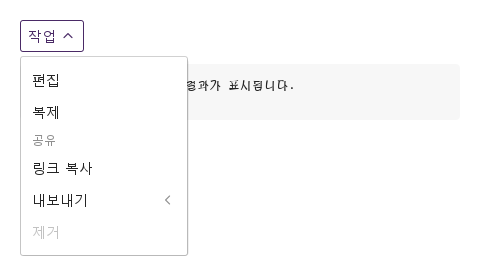
07 왼쪽으로 하위 메뉴 열기

direction 설정을 적용한 왼쪽으로 하위 메뉴 열기 예제입니다.

Qt 실행 화면 · 이미지
왼쪽으로 하위 메뉴 열기 · 열린 화면
QML 코드
import QtQuick
import Syidax.Core

Item {
    component EventLog: Rectangle {
        id: logBox
        property var lines: []
        implicitWidth: 440
        implicitHeight: Math.max(56, logText.implicitHeight + 24)
        radius: 4; color: Theme.semantic.backgroundBold
        function log(value) { lines = lines.slice(-3).concat([String(value)]) }
        Text {
            id: logText; x: 12; y: 12; width: parent.width - 24
            text: logBox.lines.length ? logBox.lines.join("\n") : "컨트롤을 조작하면 이벤트 결과가 표시됩니다."
            wrapMode: Text.Wrap; color: Theme.semantic.textDefault
            font.family: Theme.monoFontFamily; font.pixelSize: 12
        }
    }

    implicitWidth: Math.max(360, childrenRect.width)
    implicitHeight: childrenRect.height

    property QtObject settings: QtObject {
        id: storyArgs
        property bool checkable: false
        property string direction: "left"
        property bool disabled: false
    }

    readonly property string members: [
        "SyMenuItem { text: " + JSON.stringify("편집") + "; value: \"edit\" }",
        "SyMenuItem { text: " + JSON.stringify("복제") + "; value: \"duplicate\" }",
        "SyMenuGroup {",
        "    title: " + JSON.stringify("공유"),
        "    SyMenuItem { text: " + JSON.stringify("링크 복사") + "; value: \"link\" }",
        "    SyMenuSub {",
        "        title: " + JSON.stringify("내보내기"),
        "        SyMenuItem { text: \"PDF\"; value: \"pdf\" }",
        "        SyMenuItem { text: \"CSV\"; value: \"csv\" }",
        "    }",
        "}",
        "SyMenuItem { text: " + JSON.stringify("제거") + "; value: \"remove\"; disabled: true }"
    ].join("\n")

    Column {
        spacing: 12
        SyDropdown { id: exampleControl1; 
            title: "작업"
            SyMenu {
                checkable: storyArgs.checkable
                direction: storyArgs.direction
                disabled: storyArgs.disabled
                onItemSelected: (detail) => output.log(detail.value)
                SyMenuItem { text: "편집"; value: "edit" }
                SyMenuItem { text: "복제"; value: "duplicate" }
                SyMenuGroup {
                    title: "공유"
                    SyMenuItem { text: "링크 복사"; value: "link" }
                    SyMenuSub { id: exampleControl2; 
                        title: "내보내기"
                        SyMenuItem { text: "PDF"; value: "pdf" }
                        SyMenuItem { text: "CSV"; value: "csv" }
                    }
                }
                SyMenuItem { text: "제거"; value: "remove"; disabled: true }
            }
        }
        EventLog { id: output }
    }

}

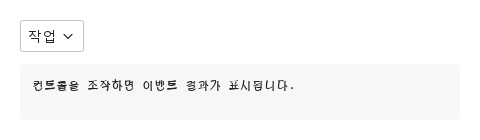
08 비활성 메뉴

disabled 설정을 적용한 비활성 메뉴 예제입니다.

Qt 실행 화면 · 이미지
비활성 메뉴 · 실행 결과
기본 실행 화면
QML 코드
import QtQuick
import Syidax.Core

Item {
    component EventLog: Rectangle {
        id: logBox
        property var lines: []
        implicitWidth: 440
        implicitHeight: Math.max(56, logText.implicitHeight + 24)
        radius: 4; color: Theme.semantic.backgroundBold
        function log(value) { lines = lines.slice(-3).concat([String(value)]) }
        Text {
            id: logText; x: 12; y: 12; width: parent.width - 24
            text: logBox.lines.length ? logBox.lines.join("\n") : "컨트롤을 조작하면 이벤트 결과가 표시됩니다."
            wrapMode: Text.Wrap; color: Theme.semantic.textDefault
            font.family: Theme.monoFontFamily; font.pixelSize: 12
        }
    }

    implicitWidth: Math.max(360, childrenRect.width)
    implicitHeight: childrenRect.height

    property QtObject settings: QtObject {
        id: storyArgs
        property bool checkable: false
        property string direction: "right"
        property bool disabled: true
    }

    readonly property string members: [
        "SyMenuItem { text: " + JSON.stringify("편집") + "; value: \"edit\" }",
        "SyMenuItem { text: " + JSON.stringify("복제") + "; value: \"duplicate\" }",
        "SyMenuGroup {",
        "    title: " + JSON.stringify("공유"),
        "    SyMenuItem { text: " + JSON.stringify("링크 복사") + "; value: \"link\" }",
        "    SyMenuSub {",
        "        title: " + JSON.stringify("내보내기"),
        "        SyMenuItem { text: \"PDF\"; value: \"pdf\" }",
        "        SyMenuItem { text: \"CSV\"; value: \"csv\" }",
        "    }",
        "}",
        "SyMenuItem { text: " + JSON.stringify("제거") + "; value: \"remove\"; disabled: true }"
    ].join("\n")

    Column {
        spacing: 12
        SyDropdown {
            title: "작업"
            SyMenu {
                checkable: storyArgs.checkable
                direction: storyArgs.direction
                disabled: storyArgs.disabled
                onItemSelected: (detail) => output.log(detail.value)
                SyMenuItem { text: "편집"; value: "edit" }
                SyMenuItem { text: "복제"; value: "duplicate" }
                SyMenuGroup {
                    title: "공유"
                    SyMenuItem { text: "링크 복사"; value: "link" }
                    SyMenuSub {
                        title: "내보내기"
                        SyMenuItem { text: "PDF"; value: "pdf" }
                        SyMenuItem { text: "CSV"; value: "csv" }
                    }
                }
                SyMenuItem { text: "제거"; value: "remove"; disabled: true }
            }
        }
        EventLog { id: output }
    }

}

API 86

항목을 가리키거나 선택하면 QML 예제와 복사 버튼이 나타납니다.

속성 · SyMenu

속성타입기본값설명
list (기본 속성)—안에 선언한 행: SyMenuItem, SyMenuSub, SyMenuGroup, 순서대로
boolfalse팝업 상태. 바인딩으로 열고 닫을 수 있고(opened 시그널 없음) 읽어서 알 수 있으며, 팝업이 동기화를 유지합니다. 인라인에서는 눈에 띄는 효과 없음
boolfalse모든 행에 체크 박스가 붙고 itemSelected 대신 itemChecked를 보고
string"bottomLeft"팝업 위치: bottomLeft · bottomRight · topLeft · topRight; 공간이 없으면 뒤집힘. 인라인에서는 무시
string"hover"팝업을 여는 것: hover · click · contextmenu(오른쪽 클릭). 인라인에서는 무시
string"right"서브메뉴가 열리는 쪽: right · left
boolfalse모든 행과 서브메뉴 멈춤; setOpen()과 오른쪽 클릭 트리거 거부
string"inline"inline 또는 popup — 선언된 자리에서 결정됨; 직접 설정하지 마십시오
boolfalsemode가 결정되면 true(생성 후 이벤트 루프 한 턴 뒤)
real160모든 행이 가지는 폭: 가장 넓은 행, 최소 160
var[]수집된 행 — 대신 items()를 읽으십시오

속성 · SyMenuItem

속성타입기본값설명
list (기본 속성)—글자 뒤에 놓이는 아이템(아이콘, 단축키 안내)
string""라벨; 시그널 detail에 label로 보고됨. 비어 있으면 숨김
string""선택 시 보고되는 값
boolfalse멈추고 회색으로
boolfalse글자 앞에 작은 스피너; 멈춤
boolfalse고른 것이 강조된 채 남음(select); 메뉴당 강조 행 하나
boolfalse강조: 선택 시 설정되고, 다른 곳의 다음 선택이나 clearSelectedItem()으로 지워짐. selectable일 때만 그려짐
boolfalse글자 앞 체크 박스; 선택이 checked를 토글하고 itemChecked를 보고
boolfalse체크 박스 상태
string (읽기 전용)—text와 같음
bool (읽기 전용)—disabled, loading, 또는 메뉴가 disabled
bool (읽기 전용)—selectable && select — 강조가 그려짐
bool (읽기 전용)—행 또는 메뉴의 checkable
bool (읽기 전용)—포인터가 행 위에 있음
bool (읽기 전용)—행에 키보드 포커스가 있음
varnull소유하는 SyMenu(메뉴가 설정)

속성 · SyMenuSub

속성타입기본값설명
list (기본 속성)—서브메뉴의 행(아이템, 그룹, 또 다른 서브메뉴)
string""행 글자
boolfalse서브메뉴 상태; 설정해서 열고 닫고, 읽어서 알 수 있음
string"hover"hover(포인터가 떠난 뒤 150 ms 후 닫힘) · click
boolfalse행 멈춤; 서브메뉴가 열리지 않음
bool (읽기 전용)—서브메뉴가 보이는 중인지
bool (읽기 전용)—행 또는 메뉴의 disabled
bool (읽기 전용)—포인터가 행 위에 있음
bool (읽기 전용)—키보드 포커스
varnull소유하는 SyMenu(메뉴가 설정)

속성 · SyMenuGroup

속성타입기본값설명
list (기본 속성)—제목 아래의 행
string""구역 제목(12 px); 비어 있으면 제목 행 생략
varnull소유하는 SyMenu(메뉴가 설정)

메서드

메서드설명
팝업을 열고 opened(true) 발생. disabled이면 무시; 호스트 컨트롤이 활성이어야 함. 인라인: open만 설정하고 발생
팝업을 닫고 opened(false) 발생. disabled여도 동작
open이면 setClose(), 아니면 setOpen()
중첩된 것까지 모든 SyMenuItem의 selectable을 true로
모든 SyMenuItem의 select를 false로 — 강조가 사라짐; checked는 그대로
SyMenuItem과 SyMenuSub 행을 선언 순서대로, 그룹과 서브메뉴 속까지 평평하게 반환
클릭이 하는 일: 선택, 또는 체크 박스 토글. 멈춘 동안 무시
서브메뉴 열기(disabled면 거부)
닫기
토글

시그널

시그널인자시점
state: bool팝업이 열림(true) 또는 닫힘(false): 트리거, 선택, Escape, 바깥 누름, 또는 setOpen() / setClose() / toggle() / close(). 바인딩으로 open을 바꿀 때는 아님. 인라인: 메서드로만
detail: { value, label }일반 행이나 selectable 행을 골랐음(클릭, Space, Enter). checkable 행, 멈춘 행, disabled 메뉴에서는 아님
detail: { value, label, checked }checkable 행이 토글됨; 팝업은 열린 채
위와 같음행 자신의 시그널, 메뉴의 것 직전에 발생

동작

항목동작 / 조건
그렇지 않고 네 단계 안의 조상이 bool hovered를 보고하면(Core 컨트롤은 모두 그렇습니다) 그 조상이 팝업의 앵커가 되고 모드는 popup입니다.
mode가 결정되면 true(생성 후 이벤트 루프 한 턴 뒤)
팝업 상태. 바인딩으로 열고 닫을 수 있고(opened 시그널 없음) 읽어서 알 수 있으며, 팝업이 동기화를 유지합니다. 인라인에서는 눈에 띄는 효과 없음
팝업을 여는 것: hover · click · contextmenu(오른쪽 클릭). 인라인에서는 무시
팝업 위치: bottomLeft · bottomRight · topLeft · topRight; 공간이 없으면 뒤집힘. 인라인에서는 무시
클릭이 하는 일: 선택, 또는 체크 박스 토글. 멈춘 동안 무시
일반 행이나 selectable 행을 골랐음(클릭, Space, Enter). checkable 행, 멈춘 행, disabled 메뉴에서는 아님
일반 행을 클릭, Space, Enter로 고르면 행의 itemSelected(detail)가 먼저, 메뉴의 것이 다음에 발생하며 detail = { value, label }입니다(label은 행의 text). 팝업 모드에서는 이어서 팝업이 닫히고(opened(false)), 드롭다운 안의 인라인이면 드롭다운의 select(detail)가 실행되어 드롭다운이 selected를 발생시키고 닫힙니다.
선택 시 보고되는 값
text와 같음
라벨; 시그널 detail에 label로 보고됨. 비어 있으면 숨김
팝업이 열림(true) 또는 닫힘(false): 트리거, 선택, Escape, 바깥 누름, 또는 setOpen() / setClose() / toggle() / close(). 바인딩으로 open을 바꿀 때는 아님. 인라인: 메서드로만
강조: 선택 시 설정되고, 다른 곳의 다음 선택이나 clearSelectedItem()으로 지워짐. selectable일 때만 그려짐
고른 것이 강조된 채 남음(select); 메뉴당 강조 행 하나
체크 박스 상태
selectable 없는 select는 아무것도 그리지 않습니다. checkable 행은 다르게 동작합니다: 클릭이 checked를 토글해 select에 복사하고, 행과 메뉴에서 itemChecked({ value, label, checked })를 발생시키며, itemSelected는 발생시키지 않고, 팝업을 열린 채 둡니다.
일반 행을 클릭, Space, Enter로 고르면 행의 itemSelected(detail)가 먼저, 메뉴의 것이 다음에 발생하며 detail = { value, label }입니다(label은 행의 text). selectable 없는 select는 아무것도 그리지 않습니다. checkable 행은 다르게 동작합니다: 클릭이 checked를 토글해 select에 복사하고, 행과 메뉴에서 itemChecked({ value, label, checked })를 발생시키며, itemSelected는 발생시키지 않고, 팝업을 열린 채 둡니다.
글자 앞 체크 박스; 선택이 checked를 토글하고 itemChecked를 보고
모든 행과 서브메뉴 멈춤; setOpen()과 오른쪽 클릭 트리거 거부
글자 앞에 작은 스피너; 멈춤
멈추고 회색으로
팝업을 열고 opened(true) 발생. disabled이면 무시; 호스트 컨트롤이 활성이어야 함. 인라인: open만 설정하고 발생
행 글자
서브메뉴가 열리는 쪽: right · left
서브메뉴가 보이는 중인지
SyMenuItem과 SyMenuSub 행을 선언 순서대로, 그룹과 서브메뉴 속까지 평평하게 반환
모든 행이 가지는 폭: 가장 넓은 행, 최소 160
Tab으로 행에 도달합니다. 포커스된 행에서 Up / Down은 이전 / 다음 활성 행으로 이동(순환), Space / Enter는 선택, Escape는 메뉴를 닫습니다. 포커스된 서브메뉴 행에서 Right는 열기, Left 또는 Escape는 닫기, Space / Enter는 토글입니다.
setClose()는 disabled여도 동작하고 setOpen()은 그렇지 않습니다.

키보드

항목동작 / 조건
SyDropdown은 제목 상자 아래에 인라인 메뉴를 품고, SyButton은 흔한 팝업 호스트이며, SyNav는 내비게이션용 사이드바 짝입니다.