Drawer 창 가장자리에서 패널을 열어 상세 정보, 필터나 편집 화면을 표시합니다. 현재 페이지를 유지한 채 보조 작업을 제공할 때 사용합니다.
import Syidax.Core.Drawer
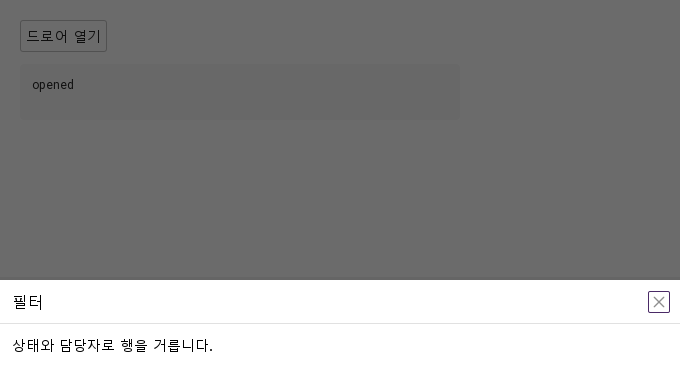
미리보기는 Qt 실행 화면의 이미지입니다. 아래 버튼으로 결과를 전환하세요.
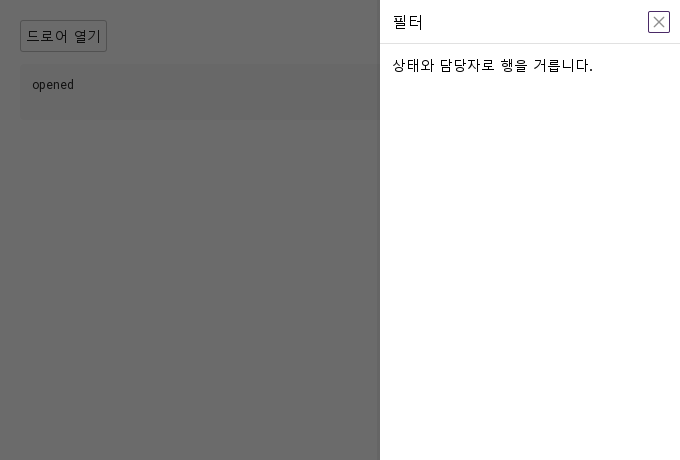
01 기본 구성SyDrawer는 애플리케이션 창의 한 가장자리(position: 기본 right, 또는 left, top, bottom)에 붙어 마스크 위로 미끄러져 들어오는 패널입니다.
Qt 실행 화면 · 이미지 기본 열린 화면 드로어 열기 실행 결과
QML 코드 QML 복사 import QtQuick
import Syidax.Core
Item {
component EventLog: Rectangle {
id: logBox
property var lines: []
implicitWidth: 440
implicitHeight: Math.max(56, logText.implicitHeight + 24)
radius: 4; color: Theme.semantic.backgroundBold
function log(value) { lines = lines.slice(-3).concat([String(value)]) }
Text {
id: logText; x: 12; y: 12; width: parent.width - 24
text: logBox.lines.length ? logBox.lines.join("\n") : "컨트롤을 조작하면 이벤트 결과가 표시됩니다."
wrapMode: Text.Wrap; color: Theme.semantic.textDefault
font.family: Theme.monoFontFamily; font.pixelSize: 12
}
}
implicitWidth: Math.max(360, childrenRect.width)
implicitHeight: childrenRect.height
property QtObject settings: QtObject {
id: storyArgs
property string position: "right"
property string size: "medium"
property int customSize: 100
property string title: "필터"
property bool closable: true
property bool maskless: false
property bool maskClosable: true
property bool preventClose: false
property string animation: "slide"
}
Column {
spacing: 12
SyDrawer {
id: drawer
position: storyArgs.position
size: storyArgs.size
customSize: storyArgs.customSize
title: storyArgs.title
closable: storyArgs.closable
maskless: storyArgs.maskless
maskClosable: storyArgs.maskClosable
preventClose: storyArgs.preventClose
animation: storyArgs.animation
onOpened: output.log("opened")
onClosed: output.log("closed")
Text { text: "상태와 담당자로 행을 거릅니다."; width: parent.width; wrapMode: Text.Wrap; font.family: Theme.fontFamily; font.pixelSize: 14; color: Theme.drawer.contentTextEnabled }
}
SyButton { id: exampleControl1; text: "드로어 열기"; onClicked: drawer.setOpen() }
EventLog { id: output }
}
}
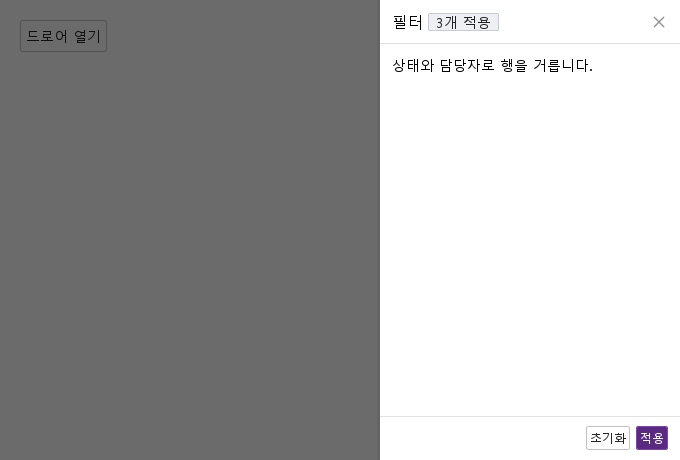
02 header · footer드로어에는 내용을 둘 자리가 셋 있습니다.
Qt 실행 화면 · 이미지 기본 열린 화면
QML 코드 QML 복사 import QtQuick
import Syidax.Core
Item {
implicitWidth: Math.max(360, childrenRect.width)
implicitHeight: childrenRect.height
// Focused Gallery routes: keep only the selected API and its prerequisites.
id: featureStory
Column {
spacing: 12
SyDrawer {
id: drawer
title: "필터"
closable: true
open: true
header: SyTag { text: "3개 적용"; size: "small" }
footer: [
SyButton { text: "초기화"; size: "small" },
SyButton { text: "적용"; variant: "primary"; size: "small"; onClicked: drawer.setClose() }
]
Text { text: "상태와 담당자로 행을 거릅니다."; width: parent.width; wrapMode: Text.Wrap; font.family: Theme.fontFamily; font.pixelSize: 14; color: Theme.drawer.contentTextEnabled }
}
SyButton { text: "드로어 열기"; onClicked: drawer.setOpen() }
}
}
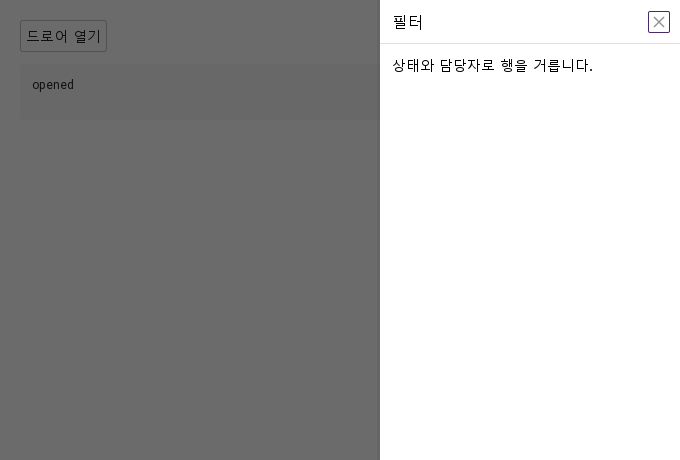
03 opened · closed- opened() — 패널이 완전히 들어오면 발생합니다: 진입 애니메이션 뒤, 또는 animation이 "none"이거나 Theme.reducedMotion이면 즉시.
Qt 실행 화면 · 이미지 기본 열린 화면 드로어 열기 실행 결과
QML 코드 QML 복사 import QtQuick
import Syidax.Core
Item {
component EventLog: Rectangle {
id: logBox
property var lines: []
implicitWidth: 440
implicitHeight: Math.max(56, logText.implicitHeight + 24)
radius: 4; color: Theme.semantic.backgroundBold
function log(value) { lines = lines.slice(-3).concat([String(value)]) }
Text {
id: logText; x: 12; y: 12; width: parent.width - 24
text: logBox.lines.length ? logBox.lines.join("\n") : "컨트롤을 조작하면 이벤트 결과가 표시됩니다."
wrapMode: Text.Wrap; color: Theme.semantic.textDefault
font.family: Theme.monoFontFamily; font.pixelSize: 12
}
}
implicitWidth: Math.max(360, childrenRect.width)
implicitHeight: childrenRect.height
// Focused Gallery routes: keep only the selected API and its prerequisites.
id: featureStory
Column {
spacing: 12
SyDrawer {
id: drawer
title: "필터"
closable: true
animation: "slide"
onOpened: { if (true) { output.log("opened") } }
onClosed: { if (true) { output.log("closed") } }
Text { text: "상태와 담당자로 행을 거릅니다."; width: parent.width; wrapMode: Text.Wrap; font.family: Theme.fontFamily; font.pixelSize: 14; color: Theme.drawer.contentTextEnabled }
}
SyButton { id: exampleControl1; text: "드로어 열기"; onClicked: drawer.setOpen() }
EventLog { id: output }
}
}
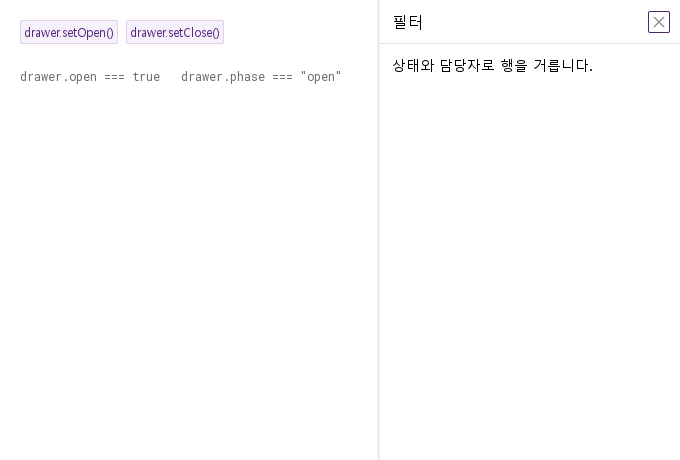
04 setOpen · setClose- setOpen() — open = true로 둡니다: 시트가 보이고, 패널이 자기 가장자리에서 진입을 재생하며, 시트가 키보드 포커스를 가져갑니다.
Qt 실행 화면 · 이미지 기본 열린 화면 drawer.setOpen() 실행 결과 drawer.setClose() 실행 결과
QML 코드 QML 복사 import QtQuick
import Syidax.Core
Item {
implicitWidth: Math.max(360, childrenRect.width)
implicitHeight: childrenRect.height
// Focused Gallery routes: keep only the selected API and its prerequisites.
id: featureStory
Column {
spacing: 24
SyDrawer { id: drawer; title: "필터"; maskless: true; closable: true; Text { text: "상태와 담당자로 행을 거릅니다."; width: parent.width; wrapMode: Text.Wrap; font.family: Theme.fontFamily; font.pixelSize: 14; color: Theme.drawer.contentTextEnabled } }
Row {
spacing: 8
SyButton { id: exampleControl1; visible: true; text: "drawer.setOpen()"; variant: "secondary"; size: "small"; onClicked: drawer.setOpen() }
SyButton { id: exampleControl2; visible: true; text: "drawer.setClose()"; variant: "secondary"; size: "small"; onClicked: drawer.setClose() }
}
Text {
text: "drawer.open === " + drawer.open + " drawer.phase === " + JSON.stringify(drawer.phase)
font.family: Theme.monoFontFamily
font.pixelSize: 12
color: Theme.semantic.textSubtle
}
}
}
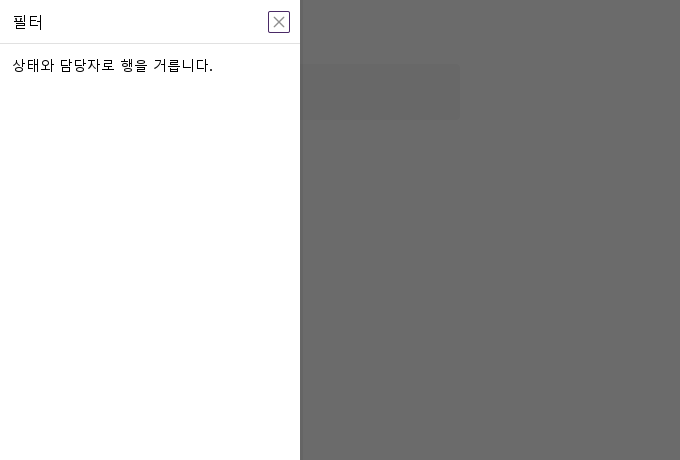
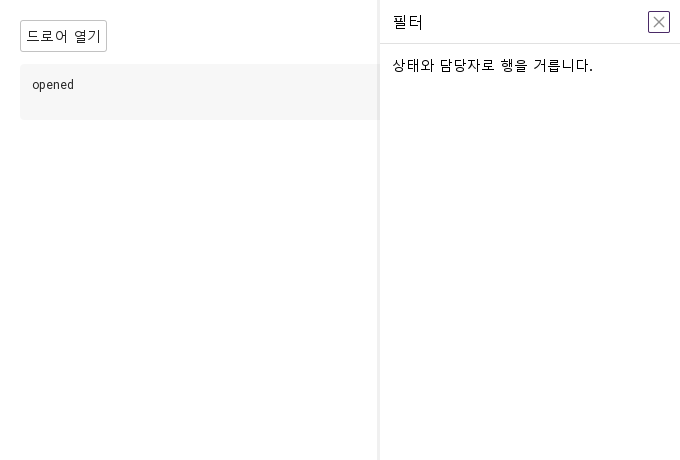
05 왼쪽 탐색 서랍position 설정을 적용한 왼쪽 탐색 서랍 예제입니다.
Qt 실행 화면 · 이미지 실행 결과 열린 화면
QML 코드 QML 복사 import QtQuick
import Syidax.Core
Item {
component EventLog: Rectangle {
id: logBox
property var lines: []
implicitWidth: 440
implicitHeight: Math.max(56, logText.implicitHeight + 24)
radius: 4; color: Theme.semantic.backgroundBold
function log(value) { lines = lines.slice(-3).concat([String(value)]) }
Text {
id: logText; x: 12; y: 12; width: parent.width - 24
text: logBox.lines.length ? logBox.lines.join("\n") : "컨트롤을 조작하면 이벤트 결과가 표시됩니다."
wrapMode: Text.Wrap; color: Theme.semantic.textDefault
font.family: Theme.monoFontFamily; font.pixelSize: 12
}
}
implicitWidth: Math.max(360, childrenRect.width)
implicitHeight: childrenRect.height
property QtObject settings: QtObject {
id: storyArgs
property string position: "left"
property string size: "medium"
property int customSize: 100
property string title: "필터"
property bool closable: true
property bool maskless: false
property bool maskClosable: true
property bool preventClose: false
property string animation: "slide"
}
Column {
spacing: 12
SyDrawer {
id: drawer
position: storyArgs.position
size: storyArgs.size
customSize: storyArgs.customSize
title: storyArgs.title
closable: storyArgs.closable
maskless: storyArgs.maskless
maskClosable: storyArgs.maskClosable
preventClose: storyArgs.preventClose
animation: storyArgs.animation
onOpened: output.log("opened")
onClosed: output.log("closed")
Text { text: "상태와 담당자로 행을 거릅니다."; width: parent.width; wrapMode: Text.Wrap; font.family: Theme.fontFamily; font.pixelSize: 14; color: Theme.drawer.contentTextEnabled }
}
SyButton { text: "드로어 열기"; onClicked: drawer.setOpen() }
EventLog { id: output }
}
}
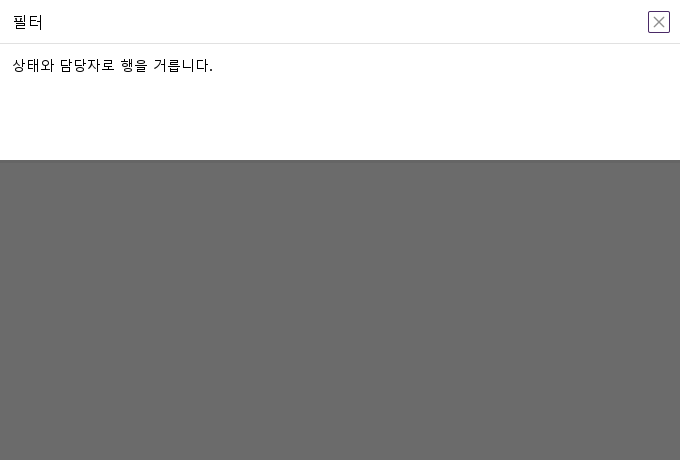
06 아래쪽 서랍position · size · customSize 설정을 적용한 아래쪽 서랍 예제입니다.
Qt 실행 화면 · 이미지 실행 결과 열린 화면
QML 코드 QML 복사 import QtQuick
import Syidax.Core
Item {
component EventLog: Rectangle {
id: logBox
property var lines: []
implicitWidth: 440
implicitHeight: Math.max(56, logText.implicitHeight + 24)
radius: 4; color: Theme.semantic.backgroundBold
function log(value) { lines = lines.slice(-3).concat([String(value)]) }
Text {
id: logText; x: 12; y: 12; width: parent.width - 24
text: logBox.lines.length ? logBox.lines.join("\n") : "컨트롤을 조작하면 이벤트 결과가 표시됩니다."
wrapMode: Text.Wrap; color: Theme.semantic.textDefault
font.family: Theme.monoFontFamily; font.pixelSize: 12
}
}
implicitWidth: Math.max(360, childrenRect.width)
implicitHeight: childrenRect.height
property QtObject settings: QtObject {
id: storyArgs
property string position: "bottom"
property string size: "custom"
property int customSize: 180
property string title: "필터"
property bool closable: true
property bool maskless: false
property bool maskClosable: true
property bool preventClose: false
property string animation: "slide"
}
Column {
spacing: 12
SyDrawer {
id: drawer
position: storyArgs.position
size: storyArgs.size
customSize: storyArgs.customSize
title: storyArgs.title
closable: storyArgs.closable
maskless: storyArgs.maskless
maskClosable: storyArgs.maskClosable
preventClose: storyArgs.preventClose
animation: storyArgs.animation
onOpened: output.log("opened")
onClosed: output.log("closed")
Text { text: "상태와 담당자로 행을 거릅니다."; width: parent.width; wrapMode: Text.Wrap; font.family: Theme.fontFamily; font.pixelSize: 14; color: Theme.drawer.contentTextEnabled }
}
SyButton { text: "드로어 열기"; onClicked: drawer.setOpen() }
EventLog { id: output }
}
}
07 위쪽 서랍position · size · customSize 설정을 적용한 위쪽 서랍 예제입니다.
Qt 실행 화면 · 이미지 실행 결과 열린 화면
QML 코드 QML 복사 import QtQuick
import Syidax.Core
Item {
component EventLog: Rectangle {
id: logBox
property var lines: []
implicitWidth: 440
implicitHeight: Math.max(56, logText.implicitHeight + 24)
radius: 4; color: Theme.semantic.backgroundBold
function log(value) { lines = lines.slice(-3).concat([String(value)]) }
Text {
id: logText; x: 12; y: 12; width: parent.width - 24
text: logBox.lines.length ? logBox.lines.join("\n") : "컨트롤을 조작하면 이벤트 결과가 표시됩니다."
wrapMode: Text.Wrap; color: Theme.semantic.textDefault
font.family: Theme.monoFontFamily; font.pixelSize: 12
}
}
implicitWidth: Math.max(360, childrenRect.width)
implicitHeight: childrenRect.height
property QtObject settings: QtObject {
id: storyArgs
property string position: "top"
property string size: "custom"
property int customSize: 160
property string title: "필터"
property bool closable: true
property bool maskless: false
property bool maskClosable: true
property bool preventClose: false
property string animation: "slide"
}
Column {
spacing: 12
SyDrawer {
id: drawer
position: storyArgs.position
size: storyArgs.size
customSize: storyArgs.customSize
title: storyArgs.title
closable: storyArgs.closable
maskless: storyArgs.maskless
maskClosable: storyArgs.maskClosable
preventClose: storyArgs.preventClose
animation: storyArgs.animation
onOpened: output.log("opened")
onClosed: output.log("closed")
Text { text: "상태와 담당자로 행을 거릅니다."; width: parent.width; wrapMode: Text.Wrap; font.family: Theme.fontFamily; font.pixelSize: 14; color: Theme.drawer.contentTextEnabled }
}
SyButton { text: "드로어 열기"; onClicked: drawer.setOpen() }
EventLog { id: output }
}
}
08 마스크 없는 서랍maskless 설정을 적용한 마스크 없는 서랍 예제입니다.
Qt 실행 화면 · 이미지 실행 결과 열린 화면
QML 코드 QML 복사 import QtQuick
import Syidax.Core
Item {
component EventLog: Rectangle {
id: logBox
property var lines: []
implicitWidth: 440
implicitHeight: Math.max(56, logText.implicitHeight + 24)
radius: 4; color: Theme.semantic.backgroundBold
function log(value) { lines = lines.slice(-3).concat([String(value)]) }
Text {
id: logText; x: 12; y: 12; width: parent.width - 24
text: logBox.lines.length ? logBox.lines.join("\n") : "컨트롤을 조작하면 이벤트 결과가 표시됩니다."
wrapMode: Text.Wrap; color: Theme.semantic.textDefault
font.family: Theme.monoFontFamily; font.pixelSize: 12
}
}
implicitWidth: Math.max(360, childrenRect.width)
implicitHeight: childrenRect.height
property QtObject settings: QtObject {
id: storyArgs
property string position: "right"
property string size: "medium"
property int customSize: 100
property string title: "필터"
property bool closable: true
property bool maskless: true
property bool maskClosable: true
property bool preventClose: false
property string animation: "slide"
}
Column {
spacing: 12
SyDrawer {
id: drawer
position: storyArgs.position
size: storyArgs.size
customSize: storyArgs.customSize
title: storyArgs.title
closable: storyArgs.closable
maskless: storyArgs.maskless
maskClosable: storyArgs.maskClosable
preventClose: storyArgs.preventClose
animation: storyArgs.animation
onOpened: output.log("opened")
onClosed: output.log("closed")
Text { text: "상태와 담당자로 행을 거릅니다."; width: parent.width; wrapMode: Text.Wrap; font.family: Theme.fontFamily; font.pixelSize: 14; color: Theme.drawer.contentTextEnabled }
}
SyButton { text: "드로어 열기"; onClicked: drawer.setOpen() }
EventLog { id: output }
}
}
API 62 항목을 가리키거나 선택하면 QML 예제와 복사 버튼이 나타납니다.