QML
← 전체 컴포넌트

Table

데이터를 행과 열로 표시하는 표입니다. 정렬, 필터와 선택 기능으로 여러 레코드를 비교하고 살펴볼 수 있습니다.

import Syidax.Core.Table

지원 QML 타입

타입정의 / 역할
열 정의·정렬·필터·선택을 지원하는 데이터 표입니다.

예제로 보기

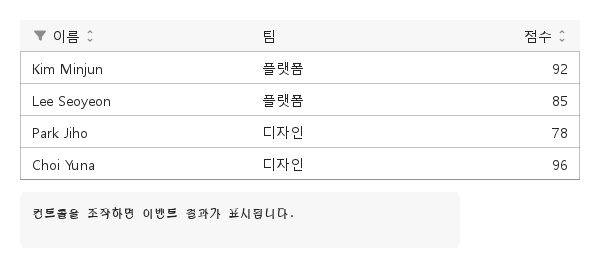
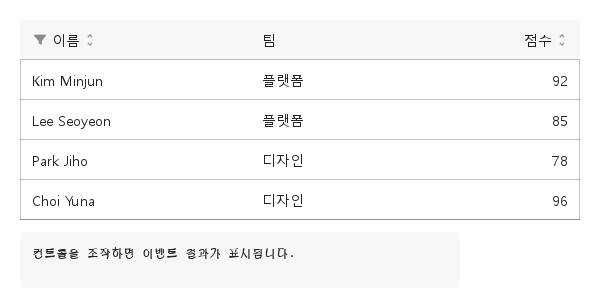
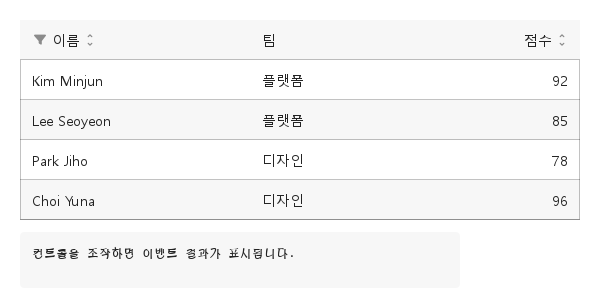
미리보기는 Qt 실행 화면의 이미지입니다. 아래 버튼으로 결과를 전환하세요.

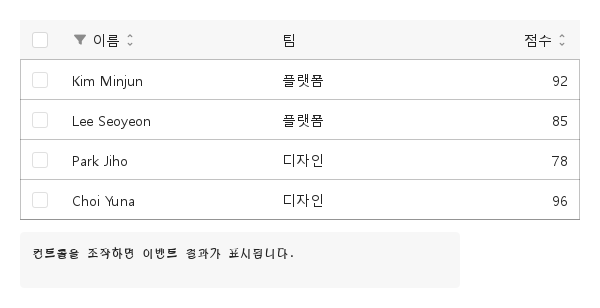
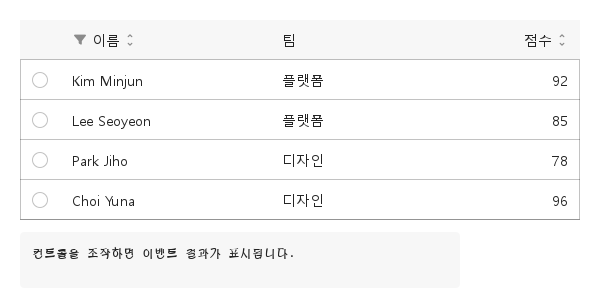
01 기본 구성

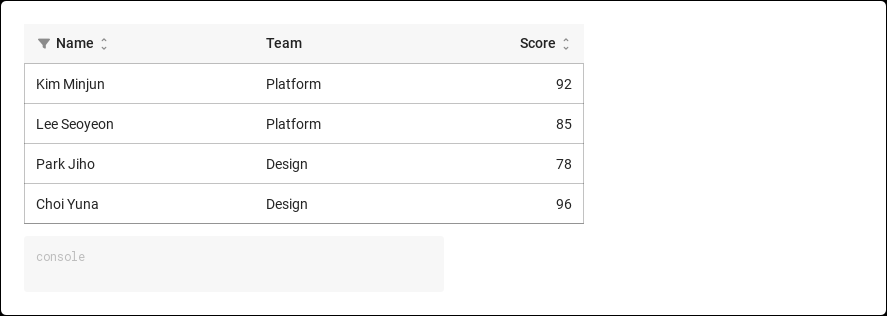
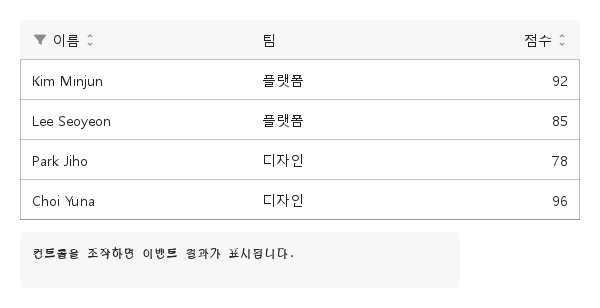
SyTable은 컬럼 아래에 행을 배치합니다.

Qt 실행 화면 · 이미지
기본 구성 · 기본
기본 실행 화면
QML 코드
import QtQuick
import Syidax.Core

Item {
    component EventLog: Rectangle {
        id: logBox
        property var lines: []
        implicitWidth: 440
        implicitHeight: Math.max(56, logText.implicitHeight + 24)
        radius: 4; color: Theme.semantic.backgroundBold
        function log(value) { lines = lines.slice(-3).concat([String(value)]) }
        Text {
            id: logText; x: 12; y: 12; width: parent.width - 24
            text: logBox.lines.length ? logBox.lines.join("\n") : "컨트롤을 조작하면 이벤트 결과가 표시됩니다."
            wrapMode: Text.Wrap; color: Theme.semantic.textDefault
            font.family: Theme.monoFontFamily; font.pixelSize: 12
        }
    }

    implicitWidth: Math.max(360, childrenRect.width)
    implicitHeight: childrenRect.height
    id: story

    property QtObject settings: QtObject {
        id: storyArgs
        property string variant: "horizontal"
        property string selectionMode: "none"
        property bool striped: false
        property bool compact: false
        property bool hideHeader: false
        property bool rowHeader: false
        property bool resizable: false
        property bool loading: false
    }

    readonly property var columns: [
        { key: "name", label: "이름", sortable: true, filterable: true },
        { key: "team", label: "팀" },
        { key: "score", label: "점수", align: "right", sortable: true, width: 100 }
    ]
    readonly property var rows: [
        { id: 1, name: "Kim Minjun", team: "플랫폼", score: 92 },
        { id: 2, name: "Lee Seoyeon", team: "플랫폼", score: 85 },
        { id: 3, name: "Park Jiho", team: "디자인", score: 78 },
        { id: 4, name: "Choi Yuna", team: "디자인", score: 96 }
    ]

    Column {
        spacing: 12
        SyTable {
            width: 560
            variant: storyArgs.variant
            selectionMode: storyArgs.selectionMode
            striped: storyArgs.striped
            compact: storyArgs.compact
            hideHeader: storyArgs.hideHeader
            rowHeader: storyArgs.rowHeader
            resizable: storyArgs.resizable
            loading: storyArgs.loading
            columns: story.columns
            rows: story.rows
            onRowClicked: (detail) => output.log(detail.row.name)
        }
        EventLog { id: output }
    }

}

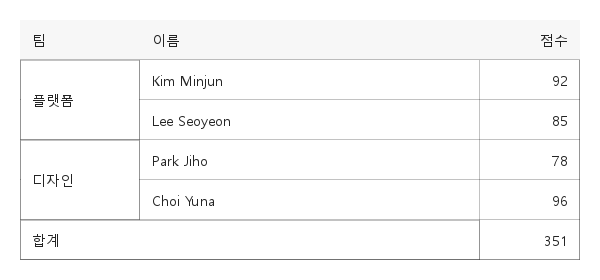
02 autoMerge · rowspan · colspan

셀을 합치는 방법은 두 가지이며, 둘 다 보이는 행(거르고 정렬한 뒤)을 기준으로 계산되므로 정렬 뒤에 인접한 것이 합쳐집니다.

Qt 실행 화면 · 이미지
autoMerge · rowspan · colspan · 기본
QML 코드
import QtQuick
import Syidax.Core

Item {
    implicitWidth: Math.max(360, childrenRect.width)
    implicitHeight: childrenRect.height
    // Focused Gallery routes: keep only the selected API and its prerequisites.

    id: story
    property QtObject settings: QtObject { id: storyArgs; property bool autoMerge: true; property int rowspan: 2; property int colspan: 2 }

    readonly property var columns: [
        { key: "team", label: "팀", autoMerge: true && storyArgs.autoMerge, width: 120 },
        { key: "name", label: "이름" },
        { key: "score", label: "점수", align: "right", width: 100 }
    ]
    readonly property var rows: [
        { id: 1, team: "플랫폼", name: "Kim Minjun", score: 92, rowspan: "" === "rowspan" ? Math.max(1, Math.min(4, storyArgs.rowspan)) : 1 },
        { id: 2, team: "플랫폼", name: "Lee Seoyeon", score: 85 },
        { id: 3, team: "디자인", name: "Park Jiho", score: 78 },
        { id: 4, team: "디자인", name: "Choi Yuna", score: 96 },
        { id: 5, team: "합계", name: "", score: 351, colspan: 2 }
    ]

    SyTable {
        width: 560
        variant: "full"
        columns: story.columns
        rows: story.rows
    }
}

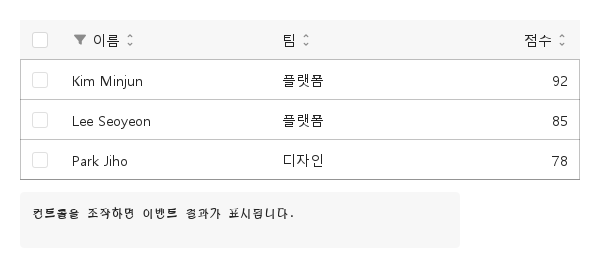
03 sortChanged · filterChanged · selectionChanged · rowClicked · columnResized

모든 시그널은 detail 객체 하나를 넘깁니다.

Qt 실행 화면 · 이미지
sortChanged · filterChanged · selectionChanged · rowClicked · columnResized · 기본
기본 실행 화면
QML 코드
import QtQuick
import Syidax.Core

Item {
    component EventLog: Rectangle {
        id: logBox
        property var lines: []
        implicitWidth: 440
        implicitHeight: Math.max(56, logText.implicitHeight + 24)
        radius: 4; color: Theme.semantic.backgroundBold
        function log(value) { lines = lines.slice(-3).concat([String(value)]) }
        Text {
            id: logText; x: 12; y: 12; width: parent.width - 24
            text: logBox.lines.length ? logBox.lines.join("\n") : "컨트롤을 조작하면 이벤트 결과가 표시됩니다."
            wrapMode: Text.Wrap; color: Theme.semantic.textDefault
            font.family: Theme.monoFontFamily; font.pixelSize: 12
        }
    }

    implicitWidth: Math.max(360, childrenRect.width)
    implicitHeight: childrenRect.height
    // Focused Gallery routes: keep only the selected API and its prerequisites.

    id: story

    readonly property var columns: [
        { key: "name", label: "이름", sortable: true, filterable: true },
        { key: "team", label: "팀", sortable: true },
        { key: "score", label: "점수", align: "right", sortable: true, width: 100 }
    ]
    readonly property var rows: [
        { id: 1, name: "Kim Minjun", team: "플랫폼", score: 92 },
        { id: 2, name: "Lee Seoyeon", team: "플랫폼", score: 85 },
        { id: 3, name: "Park Jiho", team: "디자인", score: 78 }
    ]

    Column {
        spacing: 12
        SyTable {
            width: 560
            selectionMode: "multiple"; resizable: true
            onSortChanged: (detail) => { if (true) { output.log(("sortChanged: %1 %2").arg(detail.key).arg(detail.direction)) } }
            onFilterChanged: (detail) => { if (true) { output.log(("filterChanged: %1 = %2").arg(detail.key).arg(detail.value)) } }
            onSelectionChanged: (detail) => { if (true) { output.log(("selectionChanged: %1").arg(detail.selectedKeys.join(", "))) } }
            onRowClicked: (detail) => { if (true) { output.log(("rowClicked: %1").arg(detail.row.name)) } }
            onColumnResized: (detail) => { if (true) { output.log(("columnResized: %1 %2").arg(detail.key).arg(detail.width)) } }
            columns: story.columns
            rows: story.rows
        }
        EventLog { id: output }
    }
}

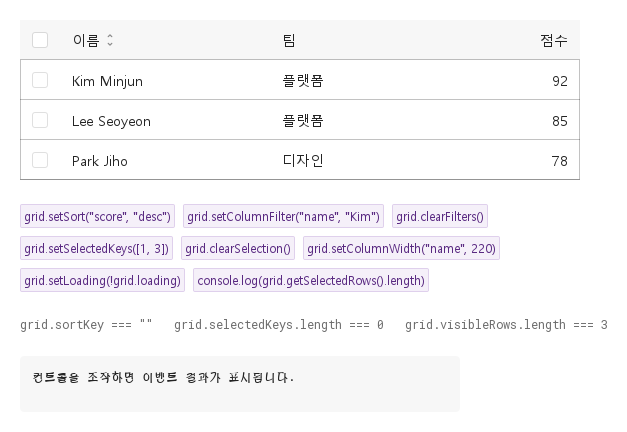
04 setSort · setColumnFilter · clearFilters · setSelectedKeys · clearSelection · setColumnWidth · setLoading

- setSort(key, direction) — sortKey와 sortDirection을 설정하고(direction 기본값 "asc"; "none"은 키는 두되 정렬을 끔) sortChanged를 냅니다.

Qt 실행 화면 · 이미지
setSort · setColumnFilter · clearFilters · setSelectedKeys · clearSelection · setColumnWidth · setLoading · 기본
QML 코드
import QtQuick
import Syidax.Core

Item {
    component EventLog: Rectangle {
        id: logBox
        property var lines: []
        implicitWidth: 440
        implicitHeight: Math.max(56, logText.implicitHeight + 24)
        radius: 4; color: Theme.semantic.backgroundBold
        function log(value) { lines = lines.slice(-3).concat([String(value)]) }
        Text {
            id: logText; x: 12; y: 12; width: parent.width - 24
            text: logBox.lines.length ? logBox.lines.join("\n") : "컨트롤을 조작하면 이벤트 결과가 표시됩니다."
            wrapMode: Text.Wrap; color: Theme.semantic.textDefault
            font.family: Theme.monoFontFamily; font.pixelSize: 12
        }
    }

    implicitWidth: Math.max(360, childrenRect.width)
    implicitHeight: childrenRect.height
    // Focused Gallery routes: keep only the selected API and its prerequisites.

    id: story
    readonly property var columns: [
        { key: "name", label: "이름", sortable: true },
        { key: "team", label: "팀" },
        { key: "score", label: "점수", align: "right", width: 100 }
    ]
    readonly property var rows: [
        { id: 1, name: "Kim Minjun", team: "플랫폼", score: 92 },
        { id: 2, name: "Lee Seoyeon", team: "플랫폼", score: 85 },
        { id: 3, name: "Park Jiho", team: "디자인", score: 78 }
    ]

    Column {
        spacing: 24
        SyTable { id: grid; width: 560; selectionMode: "multiple"; columns: story.columns; rows: story.rows }
        Flow {
            width: 560
            spacing: 8
            SyButton { id: exampleControl1;  visible: true; text: "grid.setSort(\"score\", \"desc\")"; variant: "secondary"; size: "small"; onClicked: grid.setSort("score", "desc") }
            SyButton { id: exampleControl2;  visible: true; text: "grid.setColumnFilter(\"name\", \"Kim\")"; variant: "secondary"; size: "small"; onClicked: grid.setColumnFilter("name", "Kim") }
            SyButton { id: exampleControl3;  visible: true; text: "grid.clearFilters()"; variant: "secondary"; size: "small"; onClicked: grid.clearFilters() }
            SyButton { visible: true; text: "grid.setSelectedKeys([1, 3])"; variant: "secondary"; size: "small"; onClicked: grid.setSelectedKeys([1, 3]) }
            SyButton { visible: true; text: "grid.clearSelection()"; variant: "secondary"; size: "small"; onClicked: grid.clearSelection() }
            SyButton { visible: true; text: "grid.setColumnWidth(\"name\", 220)"; variant: "secondary"; size: "small"; onClicked: grid.setColumnWidth("name", 220) }
            SyButton { visible: true; text: "grid.setLoading(!grid.loading)"; variant: "secondary"; size: "small"; onClicked: grid.setLoading(!grid.loading) }
            SyButton { visible: true; text: "console.log(grid.getSelectedRows().length)"; variant: "secondary"; size: "small"; onClicked: output.log(grid.getSelectedRows().length) }
        }
        Text {
            text: "grid.sortKey === " + JSON.stringify(grid.sortKey) + "   grid.selectedKeys.length === " + grid.selectedKeys.length + "   grid.visibleRows.length === " + grid.visibleRows.length
            font.family: Theme.monoFontFamily
            font.pixelSize: 12
            color: Theme.semantic.textSubtle
        }
        EventLog { id: output }
    }
}

05 여러 행 선택

selectionMode 설정을 적용한 여러 행 선택 예제입니다.

Qt 실행 화면 · 이미지
여러 행 선택 · 실행 결과
기본 실행 화면
QML 코드
import QtQuick
import Syidax.Core

Item {
    component EventLog: Rectangle {
        id: logBox
        property var lines: []
        implicitWidth: 440
        implicitHeight: Math.max(56, logText.implicitHeight + 24)
        radius: 4; color: Theme.semantic.backgroundBold
        function log(value) { lines = lines.slice(-3).concat([String(value)]) }
        Text {
            id: logText; x: 12; y: 12; width: parent.width - 24
            text: logBox.lines.length ? logBox.lines.join("\n") : "컨트롤을 조작하면 이벤트 결과가 표시됩니다."
            wrapMode: Text.Wrap; color: Theme.semantic.textDefault
            font.family: Theme.monoFontFamily; font.pixelSize: 12
        }
    }

    implicitWidth: Math.max(360, childrenRect.width)
    implicitHeight: childrenRect.height
    id: story

    property QtObject settings: QtObject {
        id: storyArgs
        property string variant: "horizontal"
        property string selectionMode: "multiple"
        property bool striped: false
        property bool compact: false
        property bool hideHeader: false
        property bool rowHeader: false
        property bool resizable: false
        property bool loading: false
    }

    readonly property var columns: [
        { key: "name", label: "이름", sortable: true, filterable: true },
        { key: "team", label: "팀" },
        { key: "score", label: "점수", align: "right", sortable: true, width: 100 }
    ]
    readonly property var rows: [
        { id: 1, name: "Kim Minjun", team: "플랫폼", score: 92 },
        { id: 2, name: "Lee Seoyeon", team: "플랫폼", score: 85 },
        { id: 3, name: "Park Jiho", team: "디자인", score: 78 },
        { id: 4, name: "Choi Yuna", team: "디자인", score: 96 }
    ]

    Column {
        spacing: 12
        SyTable {
            width: 560
            variant: storyArgs.variant
            selectionMode: storyArgs.selectionMode
            striped: storyArgs.striped
            compact: storyArgs.compact
            hideHeader: storyArgs.hideHeader
            rowHeader: storyArgs.rowHeader
            resizable: storyArgs.resizable
            loading: storyArgs.loading
            columns: story.columns
            rows: story.rows
            onRowClicked: (detail) => output.log(detail.row.name)
        }
        EventLog { id: output }
    }

}

06 한 행 선택

selectionMode 설정을 적용한 한 행 선택 예제입니다.

Qt 실행 화면 · 이미지
한 행 선택 · 실행 결과
기본 실행 화면
QML 코드
import QtQuick
import Syidax.Core

Item {
    component EventLog: Rectangle {
        id: logBox
        property var lines: []
        implicitWidth: 440
        implicitHeight: Math.max(56, logText.implicitHeight + 24)
        radius: 4; color: Theme.semantic.backgroundBold
        function log(value) { lines = lines.slice(-3).concat([String(value)]) }
        Text {
            id: logText; x: 12; y: 12; width: parent.width - 24
            text: logBox.lines.length ? logBox.lines.join("\n") : "컨트롤을 조작하면 이벤트 결과가 표시됩니다."
            wrapMode: Text.Wrap; color: Theme.semantic.textDefault
            font.family: Theme.monoFontFamily; font.pixelSize: 12
        }
    }

    implicitWidth: Math.max(360, childrenRect.width)
    implicitHeight: childrenRect.height
    id: story

    property QtObject settings: QtObject {
        id: storyArgs
        property string variant: "horizontal"
        property string selectionMode: "single"
        property bool striped: false
        property bool compact: false
        property bool hideHeader: false
        property bool rowHeader: false
        property bool resizable: false
        property bool loading: false
    }

    readonly property var columns: [
        { key: "name", label: "이름", sortable: true, filterable: true },
        { key: "team", label: "팀" },
        { key: "score", label: "점수", align: "right", sortable: true, width: 100 }
    ]
    readonly property var rows: [
        { id: 1, name: "Kim Minjun", team: "플랫폼", score: 92 },
        { id: 2, name: "Lee Seoyeon", team: "플랫폼", score: 85 },
        { id: 3, name: "Park Jiho", team: "디자인", score: 78 },
        { id: 4, name: "Choi Yuna", team: "디자인", score: 96 }
    ]

    Column {
        spacing: 12
        SyTable {
            width: 560
            variant: storyArgs.variant
            selectionMode: storyArgs.selectionMode
            striped: storyArgs.striped
            compact: storyArgs.compact
            hideHeader: storyArgs.hideHeader
            rowHeader: storyArgs.rowHeader
            resizable: storyArgs.resizable
            loading: storyArgs.loading
            columns: story.columns
            rows: story.rows
            onRowClicked: (detail) => output.log(detail.row.name)
        }
        EventLog { id: output }
    }

}

07 좁은 행 간격

compact 설정을 적용한 좁은 행 간격 예제입니다.

Qt 실행 화면 · 이미지
좁은 행 간격 · 실행 결과
기본 실행 화면
QML 코드
import QtQuick
import Syidax.Core

Item {
    component EventLog: Rectangle {
        id: logBox
        property var lines: []
        implicitWidth: 440
        implicitHeight: Math.max(56, logText.implicitHeight + 24)
        radius: 4; color: Theme.semantic.backgroundBold
        function log(value) { lines = lines.slice(-3).concat([String(value)]) }
        Text {
            id: logText; x: 12; y: 12; width: parent.width - 24
            text: logBox.lines.length ? logBox.lines.join("\n") : "컨트롤을 조작하면 이벤트 결과가 표시됩니다."
            wrapMode: Text.Wrap; color: Theme.semantic.textDefault
            font.family: Theme.monoFontFamily; font.pixelSize: 12
        }
    }

    implicitWidth: Math.max(360, childrenRect.width)
    implicitHeight: childrenRect.height
    id: story

    property QtObject settings: QtObject {
        id: storyArgs
        property string variant: "horizontal"
        property string selectionMode: "none"
        property bool striped: false
        property bool compact: true
        property bool hideHeader: false
        property bool rowHeader: false
        property bool resizable: false
        property bool loading: false
    }

    readonly property var columns: [
        { key: "name", label: "이름", sortable: true, filterable: true },
        { key: "team", label: "팀" },
        { key: "score", label: "점수", align: "right", sortable: true, width: 100 }
    ]
    readonly property var rows: [
        { id: 1, name: "Kim Minjun", team: "플랫폼", score: 92 },
        { id: 2, name: "Lee Seoyeon", team: "플랫폼", score: 85 },
        { id: 3, name: "Park Jiho", team: "디자인", score: 78 },
        { id: 4, name: "Choi Yuna", team: "디자인", score: 96 }
    ]

    Column {
        spacing: 12
        SyTable {
            width: 560
            variant: storyArgs.variant
            selectionMode: storyArgs.selectionMode
            striped: storyArgs.striped
            compact: storyArgs.compact
            hideHeader: storyArgs.hideHeader
            rowHeader: storyArgs.rowHeader
            resizable: storyArgs.resizable
            loading: storyArgs.loading
            columns: story.columns
            rows: story.rows
            onRowClicked: (detail) => output.log(detail.row.name)
        }
        EventLog { id: output }
    }

}

08 열 너비 조절

resizable 설정을 적용한 열 너비 조절 예제입니다.

Qt 실행 화면 · 이미지
열 너비 조절 · 실행 결과
기본 실행 화면
QML 코드
import QtQuick
import Syidax.Core

Item {
    component EventLog: Rectangle {
        id: logBox
        property var lines: []
        implicitWidth: 440
        implicitHeight: Math.max(56, logText.implicitHeight + 24)
        radius: 4; color: Theme.semantic.backgroundBold
        function log(value) { lines = lines.slice(-3).concat([String(value)]) }
        Text {
            id: logText; x: 12; y: 12; width: parent.width - 24
            text: logBox.lines.length ? logBox.lines.join("\n") : "컨트롤을 조작하면 이벤트 결과가 표시됩니다."
            wrapMode: Text.Wrap; color: Theme.semantic.textDefault
            font.family: Theme.monoFontFamily; font.pixelSize: 12
        }
    }

    implicitWidth: Math.max(360, childrenRect.width)
    implicitHeight: childrenRect.height
    id: story

    property QtObject settings: QtObject {
        id: storyArgs
        property string variant: "horizontal"
        property string selectionMode: "none"
        property bool striped: false
        property bool compact: false
        property bool hideHeader: false
        property bool rowHeader: false
        property bool resizable: true
        property bool loading: false
    }

    readonly property var columns: [
        { key: "name", label: "이름", sortable: true, filterable: true },
        { key: "team", label: "팀" },
        { key: "score", label: "점수", align: "right", sortable: true, width: 100 }
    ]
    readonly property var rows: [
        { id: 1, name: "Kim Minjun", team: "플랫폼", score: 92 },
        { id: 2, name: "Lee Seoyeon", team: "플랫폼", score: 85 },
        { id: 3, name: "Park Jiho", team: "디자인", score: 78 },
        { id: 4, name: "Choi Yuna", team: "디자인", score: 96 }
    ]

    Column {
        spacing: 12
        SyTable {
            width: 560
            variant: storyArgs.variant
            selectionMode: storyArgs.selectionMode
            striped: storyArgs.striped
            compact: storyArgs.compact
            hideHeader: storyArgs.hideHeader
            rowHeader: storyArgs.rowHeader
            resizable: storyArgs.resizable
            loading: storyArgs.loading
            columns: story.columns
            rows: story.rows
            onRowClicked: (detail) => output.log(detail.row.name)
        }
        EventLog { id: output }
    }

}

09 줄무늬 행

striped 설정을 적용한 줄무늬 행 예제입니다.

Qt 실행 화면 · 이미지
줄무늬 행 · 실행 결과
기본 실행 화면
QML 코드
import QtQuick
import Syidax.Core

Item {
    component EventLog: Rectangle {
        id: logBox
        property var lines: []
        implicitWidth: 440
        implicitHeight: Math.max(56, logText.implicitHeight + 24)
        radius: 4; color: Theme.semantic.backgroundBold
        function log(value) { lines = lines.slice(-3).concat([String(value)]) }
        Text {
            id: logText; x: 12; y: 12; width: parent.width - 24
            text: logBox.lines.length ? logBox.lines.join("\n") : "컨트롤을 조작하면 이벤트 결과가 표시됩니다."
            wrapMode: Text.Wrap; color: Theme.semantic.textDefault
            font.family: Theme.monoFontFamily; font.pixelSize: 12
        }
    }

    implicitWidth: Math.max(360, childrenRect.width)
    implicitHeight: childrenRect.height
    id: story

    property QtObject settings: QtObject {
        id: storyArgs
        property string variant: "horizontal"
        property string selectionMode: "none"
        property bool striped: true
        property bool compact: false
        property bool hideHeader: false
        property bool rowHeader: false
        property bool resizable: false
        property bool loading: false
    }

    readonly property var columns: [
        { key: "name", label: "이름", sortable: true, filterable: true },
        { key: "team", label: "팀" },
        { key: "score", label: "점수", align: "right", sortable: true, width: 100 }
    ]
    readonly property var rows: [
        { id: 1, name: "Kim Minjun", team: "플랫폼", score: 92 },
        { id: 2, name: "Lee Seoyeon", team: "플랫폼", score: 85 },
        { id: 3, name: "Park Jiho", team: "디자인", score: 78 },
        { id: 4, name: "Choi Yuna", team: "디자인", score: 96 }
    ]

    Column {
        spacing: 12
        SyTable {
            width: 560
            variant: storyArgs.variant
            selectionMode: storyArgs.selectionMode
            striped: storyArgs.striped
            compact: storyArgs.compact
            hideHeader: storyArgs.hideHeader
            rowHeader: storyArgs.rowHeader
            resizable: storyArgs.resizable
            loading: storyArgs.loading
            columns: story.columns
            rows: story.rows
            onRowClicked: (detail) => output.log(detail.row.name)
        }
        EventLog { id: output }
    }

}

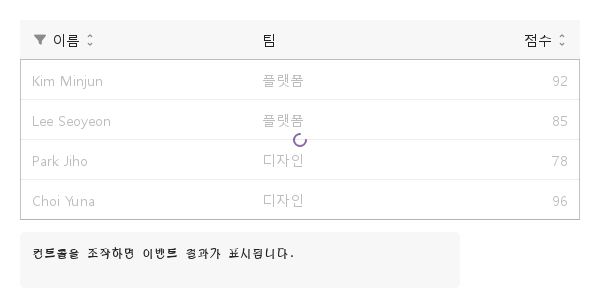
10 행 로딩

loading 설정을 적용한 행 로딩 예제입니다.

Qt 실행 화면 · 이미지
행 로딩 · 실행 결과
기본 실행 화면
QML 코드
import QtQuick
import Syidax.Core

Item {
    component EventLog: Rectangle {
        id: logBox
        property var lines: []
        implicitWidth: 440
        implicitHeight: Math.max(56, logText.implicitHeight + 24)
        radius: 4; color: Theme.semantic.backgroundBold
        function log(value) { lines = lines.slice(-3).concat([String(value)]) }
        Text {
            id: logText; x: 12; y: 12; width: parent.width - 24
            text: logBox.lines.length ? logBox.lines.join("\n") : "컨트롤을 조작하면 이벤트 결과가 표시됩니다."
            wrapMode: Text.Wrap; color: Theme.semantic.textDefault
            font.family: Theme.monoFontFamily; font.pixelSize: 12
        }
    }

    implicitWidth: Math.max(360, childrenRect.width)
    implicitHeight: childrenRect.height
    id: story

    property QtObject settings: QtObject {
        id: storyArgs
        property string variant: "horizontal"
        property string selectionMode: "none"
        property bool striped: false
        property bool compact: false
        property bool hideHeader: false
        property bool rowHeader: false
        property bool resizable: false
        property bool loading: true
    }

    readonly property var columns: [
        { key: "name", label: "이름", sortable: true, filterable: true },
        { key: "team", label: "팀" },
        { key: "score", label: "점수", align: "right", sortable: true, width: 100 }
    ]
    readonly property var rows: [
        { id: 1, name: "Kim Minjun", team: "플랫폼", score: 92 },
        { id: 2, name: "Lee Seoyeon", team: "플랫폼", score: 85 },
        { id: 3, name: "Park Jiho", team: "디자인", score: 78 },
        { id: 4, name: "Choi Yuna", team: "디자인", score: 96 }
    ]

    Column {
        spacing: 12
        SyTable {
            width: 560
            variant: storyArgs.variant
            selectionMode: storyArgs.selectionMode
            striped: storyArgs.striped
            compact: storyArgs.compact
            hideHeader: storyArgs.hideHeader
            rowHeader: storyArgs.rowHeader
            resizable: storyArgs.resizable
            loading: storyArgs.loading
            columns: story.columns
            rows: story.rows
            onRowClicked: (detail) => output.log(detail.row.name)
        }
        EventLog { id: output }
    }

}

API 79

항목을 가리키거나 선택하면 QML 예제와 복사 버튼이 나타납니다.

속성

속성타입기본값설명
var (array)[][{ key, label, sortable, filterable, width, minWidth, align, cellAlign, autoMerge, render }] — 각 필드의 기본값은 동작 절 참조.
var (array)[]행마다 객체 하나, 컬럼 키로 읽음. rowspan / colspan을 가질 수 있음.
string"id"행을 식별하는 필드(문자열로 비교).
string"none""none" · "single"(둥근 표시) · "multiple"(체크 박스 + 헤더 박스).
string"horizontal"선과 테두리: "horizontal" · "vertical" · "full" · "outline" · "none".
string"solid""solid"은 셀의 테두리로 선을 그림. "dashed" / "dotted"는 본문 위 선 레이어 하나에 대시 패턴으로 그림.
boolfalse짝수 행마다 음영.
boolfalse40 대신 32 px 행(헤더 포함).
booltrue헤더를 스크롤되는 행 위에 고정. false면 행과 함께 스크롤되어 사라짐.
boolfalse헤더 행을 숨김(포인터로 정렬·필터에 닿을 수 없게 됨).
boolfalse첫 컬럼을 헤더처럼 그림(배경 + 중간 굵기).
string"No data"보이는 행이 없고 loading이 꺼져 있을 때 본문 가운데.
string""정렬된 컬럼. 직접 대입하면 시그널 없이 정렬.
string"none""none" · "asc" · "desc".
var (array)[]선택된 행 키(문자열). 대입하면 selectionChanged 없이 선택이 바뀜.
boolfalse본문 위에 스피너 오버레이.
boolfalse모든 헤더 셀 오른쪽 가장자리에 끌기 손잡이.
var (object){}{ key: text } — 활성 필터. 보통 setColumnFilter / clearFilters로 바꿈.
var (object){}{ key: px } — 끌기나 setColumnWidth로 정한 폭. 컬럼 자체의 width를 덮어씀.
var (읽기 전용)—거르고 정렬한 뒤의 행.
var (읽기 전용)—모든 기본값이 채워진 컬럼.
var (읽기 전용)—{ widths, xs, total } — 컬럼 폭(px), x 오프셋, 전체 폭.
var (읽기 전용)—그려지는 셀: { r, c, x, y, w, h, text, merged, align, header }.
bool (읽기 전용)—selectionMode !== "none" · 보이는 행이 없고 로딩 아님.
real (읽기 전용)—행 높이(40 / 32)
real (읽기 전용)—선택 컬럼 폭(40 또는 0)
real (읽기 전용)—전체 콘텐츠 폭.
int (읽기 전용)—보이는 행 중 선택된 수(헤더 박스를 결정).
var (읽기 전용)—rows의 별칭.

메서드

메서드설명
sortKey / sortDirection을 설정하고 sortChanged를 냄. "none"은 정렬을 끔.
컬럼 필터를 설정(빈 값 / null이면 제거)하고 filterChanged를 냄.
columnFilters의 복사본.
모든 필터를 지우고 filterChanged({ key: "", value: "", filters: {} })를 냄.
선택을 교체하고(키는 문자열로 변환, 검증 없음) selectionChanged를 냄.
선택을 비우고 selectionChanged를 냄.
키가 선택된 행 객체를 rows 순서로.
컬럼을 width px로 고정(0 이하면 고정 해제)하고 columnResized를 냄.
loading을 설정.
본문을 첫 행으로 스크롤.
행 객체가 선택되었는지
그 키의 문자열.

시그널

시그널인자시점
detail: { key, direction }정렬 가능 헤더 클릭 또는 setSort() 실행. sortKey / sortDirection 대입 시에는 없음.
detail: { key, value, filters }필터 팝업의 모든 변경, setColumnFilter(), clearFilters()(그때 key: "", value: "", filters: {}).
detail: { selectedKeys, selectedRows }행 / 박스 / 헤더 박스 클릭, setSelectedKeys(), clearSelection(). selectedKeys 대입 시에는 없음. selectionMode가 "none"이면 클릭으로는 절대 없음.
detail: { row, index, key }행 본문의 모든 클릭(index는 보이는 행 기준), 선택 토글 전. 선택 셀에서는 없음.
detail: { key, width, widths }크기 조절 끌기가 끝남, 또는 setColumnWidth() 실행.

동작

항목동작 / 조건
[{ key, label, sortable, filterable, width, minWidth, align, cellAlign, autoMerge, render }] — 각 필드의 기본값은 동작 절 참조.
width(숫자 또는 숫자 문자열)가 0이면 *유동*, minWidth는 기본 80, align("left" · "center" · "right")은 헤더 글자를 배치하며 셀을 배치하는 cellAlign의 기본값입니다. 컬럼마다 끌어서 바꾼 폭이 우선이고, 그다음 컬럼 자체의 width, 아니면 유동입니다.
행마다 객체 하나, 컬럼 키로 읽음. rowspan / colspan을 가질 수 있음.
행을 식별하는 필드(문자열로 비교).
선택을 교체하고(키는 문자열로 변환, 검증 없음) selectionChanged를 냄.
거르고 정렬한 뒤의 행.
{ key: text } — 활성 필터. 보통 setColumnFilter / clearFilters로 바꿈.
정렬된 컬럼. 직접 대입하면 시그널 없이 정렬.
"none" · "asc" · "desc".
정렬 가능 헤더 클릭 또는 setSort() 실행. sortKey / sortDirection 대입 시에는 없음.
컬럼 필터를 설정(빈 값 / null이면 제거)하고 filterChanged를 냄.
모든 헤더 셀 오른쪽 가장자리에 끌기 손잡이.
{ key: px } — 끌기나 setColumnWidth로 정한 폭. 컬럼 자체의 width를 덮어씀.
크기 조절 끌기가 끝남, 또는 setColumnWidth() 실행.
"none" · "single"(둥근 표시) · "multiple"(체크 박스 + 헤더 박스).
행 본문의 모든 클릭(index는 보이는 행 기준), 선택 토글 전. 선택 셀에서는 없음.
선택된 행 키(문자열). 대입하면 selectionChanged 없이 선택이 바뀜.
보이는 행을 기준으로 계산합니다. 먼저 행 힌트 — rowspan > 1 또는 colspan > 1인 행은 0번 컬럼 셀이 그만큼의 행과 컬럼을 덮게 하고 덮인 셀을 차지된 것으로 표시 — 그다음 autoMerge 컬럼에서 동일한 값(그리고 차지된 셀 없음)이 연속되는 행들이 하나의 셀이 됩니다. 덮인 셀은 그려지지 않습니다. 합쳐진 셀은 기본 배경을 얻고, 행 선이 있으면 자기 테두리를 가지며, 글자는 원점 컬럼의 cellAlign을 따릅니다.
선과 테두리: "horizontal" · "vertical" · "full" · "outline" · "none".
짝수 행마다 음영.
40 대신 32 px 행(헤더 포함).
첫 컬럼을 헤더처럼 그림(배경 + 중간 굵기).
헤더 행을 숨김(포인터로 정렬·필터에 닿을 수 없게 됨).
"solid"은 셀의 테두리로 선을 그림. "dashed" / "dotted"는 본문 위 선 레이어 하나에 대시 패턴으로 그림.
헤더를 스크롤되는 행 위에 고정. false면 행과 함께 스크롤되어 사라짐.
본문 위에 스피너 오버레이.
보이는 행이 없고 loading이 꺼져 있을 때 본문 가운데.
implicitWidth는 480이고 implicitHeight는 헤더 더하기 행(최소 64 px)입니다.
테이블에 고정 height를 주면 본문이 스크롤됩니다 — 헤더는 제자리에 있습니다.

키보드

항목동작 / 조건
SyCheckbox(선택 박스), SySpinner(로딩 오버레이), SyInput(필터 필드), SyPagination(긴 데이터의 페이지 나누기), SyTree(계층 구조).

필터·선택 계약

항목동작 / 조건
필터는 입력 즉시 적용합니다. Escape/바깥 클릭은 닫기이며 값을 되돌리지 않습니다. 다시 열면 필터를 복원하되 filterChanged를 추가 발생시키지 않습니다. 필터 아이콘은 정렬과 별개입니다. 안정적이고 고유한 rowKey를 권장합니다. 누락·중복 키는 행 객체별 내부 키를 사용하므로 정렬·필터 동안 유지되지만 새 객체로 교체하면 선택을 제거합니다. width/minWidth는 양수 논리 px 숫자이며 CSS 문자열은 지원하지 않습니다.