QML
← 전체 컴포넌트

Pagination

목록이나 표의 결과 페이지를 이동하는 컨트롤입니다. 페이지당 항목 수를 바꾸거나 특정 페이지로 이동할 수 있습니다.

import Syidax.Core.Pagination

지원 QML 타입

타입정의 / 역할
전체 항목 수·페이지 크기·현재 페이지를 기준으로 페이지를 이동합니다.

예제로 보기

미리보기는 Qt 실행 화면의 이미지입니다. 아래 버튼으로 결과를 전환하세요.

01 기본 구성

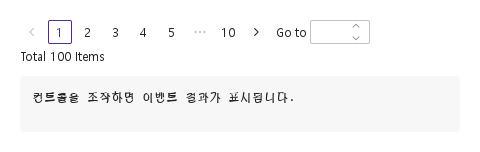
SyPagination은 목록이나 테이블 아래의 페이지 칸 행입니다: 화살표, 첫 페이지, 현재 페이지 주변의 페이지들(빈 곳은 ⋯), 마지막 페이지, 화살표 — 그리고 원하면 페이지 크기 셀렉트, Go-to 필드, 합계 줄.

Qt 실행 화면 · 이미지
기본 구성 · 기본
기본 실행 화면
QML 코드
import QtQuick
import Syidax.Core

Item {
    component EventLog: Rectangle {
        id: logBox
        property var lines: []
        implicitWidth: 440
        implicitHeight: Math.max(56, logText.implicitHeight + 24)
        radius: 4; color: Theme.semantic.backgroundBold
        function log(value) { lines = lines.slice(-3).concat([String(value)]) }
        Text {
            id: logText; x: 12; y: 12; width: parent.width - 24
            text: logBox.lines.length ? logBox.lines.join("\n") : "컨트롤을 조작하면 이벤트 결과가 표시됩니다."
            wrapMode: Text.Wrap; color: Theme.semantic.textDefault
            font.family: Theme.monoFontFamily; font.pixelSize: 12
        }
    }

    implicitWidth: Math.max(360, childrenRect.width)
    implicitHeight: childrenRect.height

    property QtObject settings: QtObject {
        id: storyArgs
        property int totalItems: 100
        property int pageSize: 10
        property int activePage: 1
        property string pageSizeOptions: ""
        property bool jumper: false
        property bool total: false
        property bool disabled: false
        property bool hideonSingle: false
    }


    Column {
        spacing: 12
        SyPagination {
            totalItems: storyArgs.totalItems
            pageSizeOptions: storyArgs.pageSizeOptions
            jumper: storyArgs.jumper
            total: storyArgs.total
            disabled: storyArgs.disabled
            hideonSingle: storyArgs.hideonSingle
            onPageChanged: (page) => output.log(page)
            Binding on pageSize { value: storyArgs.pageSize }
            Binding on activePage { value: storyArgs.activePage }
        }
        EventLog { id: output }
    }

}

02 pageSizeOptions · jumper · total

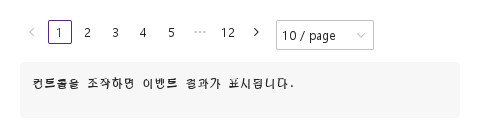
pageSizeOptions는 쉼표로 구분한 크기 목록, "10,20,50"입니다: 양수가 하나 이상 있으면 화살표 뒤에 98 px 셀렉트가 나타나 크기마다 "N / page" 행을 보이고 현재 pageSize를 표시합니다.

Qt 실행 화면 · 이미지
pageSizeOptions · jumper · total · 기본
QML 코드
import QtQuick
import Syidax.Core

Item {
    implicitWidth: Math.max(360, childrenRect.width)
    implicitHeight: childrenRect.height
    // Focused Gallery routes: keep only the selected API and its prerequisites.
    id: featureStory

    property QtObject settings: QtObject {
        id: storyArgs
        property string pageSizeOptions: "10,20,50"
        property bool jumper: true
        property bool total: true
    }


    SyPagination { id: featureTarget0;
        totalItems: 250
        pageSizeOptions: storyArgs.pageSizeOptions
        jumper: storyArgs.jumper
        total: storyArgs.total
    }
}

03 pageChanged · pageSizeChanged

pageChanged(page: int)는 컴포넌트를 통해 현재 페이지가 실제로 바뀔 때 발생합니다: 페이지 칸이나 화살표 클릭, Go-to 필드에 입력한 숫자, 또는 goTo(page).

Qt 실행 화면 · 이미지
pageChanged · pageSizeChanged · 기본
기본 실행 화면
QML 코드
import QtQuick
import Syidax.Core

Item {
    component EventLog: Rectangle {
        id: logBox
        property var lines: []
        implicitWidth: 440
        implicitHeight: Math.max(56, logText.implicitHeight + 24)
        radius: 4; color: Theme.semantic.backgroundBold
        function log(value) { lines = lines.slice(-3).concat([String(value)]) }
        Text {
            id: logText; x: 12; y: 12; width: parent.width - 24
            text: logBox.lines.length ? logBox.lines.join("\n") : "컨트롤을 조작하면 이벤트 결과가 표시됩니다."
            wrapMode: Text.Wrap; color: Theme.semantic.textDefault
            font.family: Theme.monoFontFamily; font.pixelSize: 12
        }
    }

    implicitWidth: Math.max(360, childrenRect.width)
    implicitHeight: childrenRect.height
    // Focused Gallery routes: keep only the selected API and its prerequisites.
    id: featureStory


    Column {
        spacing: 12
        SyPagination {
            id: pager
            totalItems: 120
            pageSizeOptions: "10,20,50"
            onPageChanged: (page) => { if (true) { output.log(("pageChanged: %1").arg(page)) } }
            onPageSizeChanged: { if (true) { output.log(("pageSizeChanged: %1").arg(pager.pageSize)) } }
        }
        EventLog { id: output }
    }
}

04 goTo

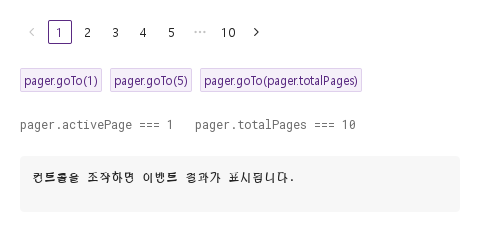
goTo(page)는 클릭과 같은 방식으로 코드에서 페이지를 옮깁니다: 페이지를 1 … totalPages로 제한하고, 결과가 activePage와 다르면 현재 페이지가 되어 pageChanged(page)가 발생합니다.

Qt 실행 화면 · 이미지
goTo · 기본
QML 코드
import QtQuick
import Syidax.Core

Item {
    component EventLog: Rectangle {
        id: logBox
        property var lines: []
        implicitWidth: 440
        implicitHeight: Math.max(56, logText.implicitHeight + 24)
        radius: 4; color: Theme.semantic.backgroundBold
        function log(value) { lines = lines.slice(-3).concat([String(value)]) }
        Text {
            id: logText; x: 12; y: 12; width: parent.width - 24
            text: logBox.lines.length ? logBox.lines.join("\n") : "컨트롤을 조작하면 이벤트 결과가 표시됩니다."
            wrapMode: Text.Wrap; color: Theme.semantic.textDefault
            font.family: Theme.monoFontFamily; font.pixelSize: 12
        }
    }

    implicitWidth: Math.max(360, childrenRect.width)
    implicitHeight: childrenRect.height

    Column {
        spacing: 24
        SyPagination { id: pager; totalItems: 100; onPageChanged: (page) => output.log(page) }
        Row {
            spacing: 8
            SyButton { id: exampleControl1;  text: "pager.goTo(1)"; variant: "secondary"; size: "small"; onClicked: pager.goTo(1) }
            SyButton { id: exampleControl2;  text: "pager.goTo(5)"; variant: "secondary"; size: "small"; onClicked: pager.goTo(5) }
            SyButton { id: exampleControl3;  text: "pager.goTo(pager.totalPages)"; variant: "secondary"; size: "small"; onClicked: pager.goTo(pager.totalPages) }
        }
        Text {
            text: "pager.activePage === " + pager.activePage + "   pager.totalPages === " + pager.totalPages
            font.family: Theme.monoFontFamily
            font.pixelSize: 12
            color: Theme.semantic.textSubtle
        }
        EventLog { id: output }
    }
}

05 페이지 크기와 바로 이동

jumper · total 설정을 적용한 페이지 크기와 바로 이동 예제입니다.

Qt 실행 화면 · 이미지
페이지 크기와 바로 이동 · 실행 결과
기본 실행 화면
QML 코드
import QtQuick
import Syidax.Core

Item {
    component EventLog: Rectangle {
        id: logBox
        property var lines: []
        implicitWidth: 440
        implicitHeight: Math.max(56, logText.implicitHeight + 24)
        radius: 4; color: Theme.semantic.backgroundBold
        function log(value) { lines = lines.slice(-3).concat([String(value)]) }
        Text {
            id: logText; x: 12; y: 12; width: parent.width - 24
            text: logBox.lines.length ? logBox.lines.join("\n") : "컨트롤을 조작하면 이벤트 결과가 표시됩니다."
            wrapMode: Text.Wrap; color: Theme.semantic.textDefault
            font.family: Theme.monoFontFamily; font.pixelSize: 12
        }
    }

    implicitWidth: Math.max(360, childrenRect.width)
    implicitHeight: childrenRect.height

    property QtObject settings: QtObject {
        id: storyArgs
        property int totalItems: 100
        property int pageSize: 10
        property int activePage: 1
        property string pageSizeOptions: ""
        property bool jumper: true
        property bool total: true
        property bool disabled: false
        property bool hideonSingle: false
    }


    Column {
        spacing: 12
        SyPagination {
            totalItems: storyArgs.totalItems
            pageSizeOptions: storyArgs.pageSizeOptions
            jumper: storyArgs.jumper
            total: storyArgs.total
            disabled: storyArgs.disabled
            hideonSingle: storyArgs.hideonSingle
            onPageChanged: (page) => output.log(page)
            Binding on pageSize { value: storyArgs.pageSize }
            Binding on activePage { value: storyArgs.activePage }
        }
        EventLog { id: output }
    }

}

06 페이지 이동 비활성

disabled 설정을 적용한 페이지 이동 비활성 예제입니다.

Qt 실행 화면 · 이미지
페이지 이동 비활성 · 실행 결과
기본 실행 화면
QML 코드
import QtQuick
import Syidax.Core

Item {
    component EventLog: Rectangle {
        id: logBox
        property var lines: []
        implicitWidth: 440
        implicitHeight: Math.max(56, logText.implicitHeight + 24)
        radius: 4; color: Theme.semantic.backgroundBold
        function log(value) { lines = lines.slice(-3).concat([String(value)]) }
        Text {
            id: logText; x: 12; y: 12; width: parent.width - 24
            text: logBox.lines.length ? logBox.lines.join("\n") : "컨트롤을 조작하면 이벤트 결과가 표시됩니다."
            wrapMode: Text.Wrap; color: Theme.semantic.textDefault
            font.family: Theme.monoFontFamily; font.pixelSize: 12
        }
    }

    implicitWidth: Math.max(360, childrenRect.width)
    implicitHeight: childrenRect.height

    property QtObject settings: QtObject {
        id: storyArgs
        property int totalItems: 100
        property int pageSize: 10
        property int activePage: 1
        property string pageSizeOptions: ""
        property bool jumper: false
        property bool total: false
        property bool disabled: true
        property bool hideonSingle: false
    }


    Column {
        spacing: 12
        SyPagination {
            totalItems: storyArgs.totalItems
            pageSizeOptions: storyArgs.pageSizeOptions
            jumper: storyArgs.jumper
            total: storyArgs.total
            disabled: storyArgs.disabled
            hideonSingle: storyArgs.hideonSingle
            onPageChanged: (page) => output.log(page)
            Binding on pageSize { value: storyArgs.pageSize }
            Binding on activePage { value: storyArgs.activePage }
        }
        EventLog { id: output }
    }

}

API 33

항목을 가리키거나 선택하면 QML 예제와 복사 버튼이 나타납니다.

속성

속성타입기본값설명
int0항목 수; pageSize와 함께 totalPages를 정함
int10페이지당 항목. 크기 셀렉트의 선택이나 앱이 설정; 어느 쪽이든 onPageSizeChanged 실행
int1현재 페이지, 1부터. 설정하면 조용히 이동; 클릭, 필드, goTo()는 설정하고 보고
string"""N / page" 셀렉트의 크기, 쉼표 구분, 예 "10,20,50"; 비면 셀렉트 숨김
boolfalse"Go to" 숫자 필드
boolfalse행 아래 "Total N Items" 줄
boolfalse전부 멈추고 흐림; goTo() 무시
boolfalsetotalPages ≤ 1인 동안 숨김
int (읽기 전용)—⌈totalItems / pageSize⌉, 최소 1
var (읽기 전용)—pageSizeOptions를 양수로 파싱한 것
var (읽기 전용)—첫·끝 페이지 사이의 칸: 숫자, 또는 ⋯을 뜻하는 "more"
int (읽기 전용)5양 끝 근처에서 모두 보이는 페이지 수
int (읽기 전용)1현재 페이지 양옆에 보이는 이웃 수
Item (읽기 전용)—안의 SySelect와 SyInputNumber, 스타일이나 포커스용

메서드

메서드설명
page를 1 … totalPages로 제한해 이동하고 pageChanged 발생. disabled면 무시; 이미 그 페이지면 조용. 반환값 없음

시그널

시그널인자시점
page: int칸, 화살표, Go-to 필드, goTo()로 현재 페이지가 바뀜. 코드에서 activePage를 설정할 때, 같은 페이지로의 이동, disabled 동안은 아님
—pageSize가 바뀜 — 크기 셀렉트의 선택 또는 할당; pageSize를 읽으십시오

동작

항목동작 / 조건
⌈totalItems / pageSize⌉, 최소 1
항목 수; pageSize와 함께 totalPages를 정함
페이지당 항목. 크기 셀렉트의 선택이나 앱이 설정; 어느 쪽이든 onPageSizeChanged 실행
현재 페이지, 1부터. 설정하면 조용히 이동; 클릭, 필드, goTo()는 설정하고 보고
page를 1 … totalPages로 제한해 이동하고 pageChanged 발생. disabled면 무시; 이미 그 페이지면 조용. 반환값 없음
칸, 화살표, Go-to 필드, goTo()로 현재 페이지가 바뀜. 코드에서 activePage를 설정할 때, 같은 페이지로의 이동, disabled 동안은 아님
"N / page" 셀렉트의 크기, 쉼표 구분, 예 "10,20,50"; 비면 셀렉트 숨김
pageSizeOptions를 양수로 파싱한 것
pageSize가 바뀜 — 크기 셀렉트의 선택 또는 할당; pageSize를 읽으십시오
"Go to" 숫자 필드
행 아래 "Total N Items" 줄
전부 멈추고 흐림; goTo() 무시
totalPages ≤ 1인 동안 숨김
페이지네이션은 세로 열입니다: 행(화살표, 칸, 셀렉트, 필드)과 그 아래 합계 줄. 암시 크기는 부분들을 따릅니다. 레이아웃에 두거나 앵커하십시오. 늘어나지 않습니다.

키보드

항목동작 / 조건
SyTable과 SyTree가 페이지네이션이 요청한 페이지를 보여 주고, SySelect와 SyInputNumber는 그것을 이루는 부품입니다.