QML
← 전체 컴포넌트

Divider

가로나 세로 구분선으로 콘텐츠의 영역이나 그룹을 나눕니다.

import Syidax.Core.Divider

지원 QML 타입

타입정의 / 역할
선택적으로 라벨을 넣을 수 있는 가로·세로 구분선입니다.

예제로 보기

미리보기는 Qt 실행 화면의 이미지입니다. 아래 버튼으로 결과를 전환하세요.

01 기본 구성

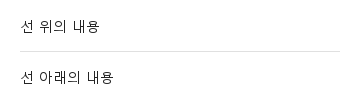
SyDivider는 내용 사이의 선입니다: 세로로 쌓인 아이템 사이를 가로지르는 가로선, 나란한 아이템 사이의 세로선.

Qt 실행 화면 · 이미지
기본 구성 · 기본
기본 실행 화면
QML 코드
import QtQuick
import Syidax.Core

Item {
    implicitWidth: Math.max(360, childrenRect.width)
    implicitHeight: childrenRect.height
    id: story

    property QtObject settings: QtObject {
        id: storyArgs
        property string type: "horizontal"
        property bool inset: false
        property real thickness: 1
        property string color: ""
    }


    Column {
        visible: storyArgs.type === "horizontal"
        width: 320
        Text { text: "선 위의 내용"; font.family: Theme.fontFamily; font.pixelSize: 14; color: Theme.semantic.textDefault }
        SyDivider {
            width: parent.width
            type: storyArgs.type
            inset: storyArgs.inset
            thickness: storyArgs.thickness
            color: storyArgs.color.length > 0 ? storyArgs.color : (type === "vertical" ? Theme.divider.verticalBorderEnabled : Theme.divider.horizontalBorderEnabled)
        }
        Text { text: "선 아래의 내용"; font.family: Theme.fontFamily; font.pixelSize: 14; color: Theme.semantic.textDefault }
    }
    Row {
        visible: storyArgs.type === "vertical"
        height: 80
        Text { anchors.verticalCenter: parent.verticalCenter; text: "왼쪽"; font.family: Theme.fontFamily; font.pixelSize: 14; color: Theme.semantic.textDefault }
        SyDivider {
            height: parent.height
            type: storyArgs.type
            inset: storyArgs.inset
            thickness: storyArgs.thickness
            color: storyArgs.color.length > 0 ? storyArgs.color : Theme.divider.verticalBorderEnabled
        }
        Text { anchors.verticalCenter: parent.verticalCenter; text: "오른쪽"; font.family: Theme.fontFamily; font.pixelSize: 14; color: Theme.semantic.textDefault }
    }

}

02 type

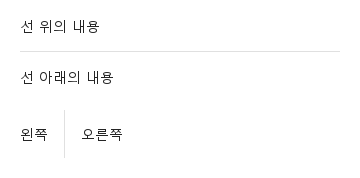
type: "horizontal"(기본)은 디바이더의 width를 가로질러 선을 그리고 위아래에 margin(기본 16 px)을 유지하므로 높이는 thickness + 2 × margin입니다.

Qt 실행 화면 · 이미지
type · 기본
기본 실행 화면
QML 코드
import QtQuick
import Syidax.Core

Item {
    implicitWidth: Math.max(360, childrenRect.width)
    implicitHeight: childrenRect.height

    Column {
        spacing: 24
        Column {
            width: 320
            Text { text: "선 위의 내용"; font.family: Theme.fontFamily; font.pixelSize: 14; color: Theme.semantic.textDefault }
            SyDivider { width: parent.width }
            Text { text: "선 아래의 내용"; font.family: Theme.fontFamily; font.pixelSize: 14; color: Theme.semantic.textDefault }
        }
        Row {
            height: 48
            Text { anchors.verticalCenter: parent.verticalCenter; text: "왼쪽"; font.family: Theme.fontFamily; font.pixelSize: 14; color: Theme.semantic.textDefault }
            SyDivider { type: "vertical"; height: parent.height }
            Text { anchors.verticalCenter: parent.verticalCenter; text: "오른쪽"; font.family: Theme.fontFamily; font.pixelSize: 14; color: Theme.semantic.textDefault }
        }
    }
}

03 inset

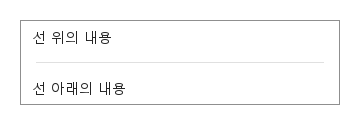
inset: true는 선을 양 끝에서 16 px씩 줄입니다 — 가로선은 왼쪽 가장자리에서 16 px 떨어져 시작해 오른쪽 가장자리 16 px 앞에서 멈추고, 세로선은 위아래에서 같습니다 — 디바이더 자체는 전체 크기를 유지하므로 이웃은 움직이지 않습니다.

Qt 실행 화면 · 이미지
inset · 기본
QML 코드
import QtQuick
import Syidax.Core

Item {
    implicitWidth: Math.max(360, childrenRect.width)
    implicitHeight: childrenRect.height
    property QtObject settings: QtObject {
        id: storyArgs
        property bool inset: true
    }


    Rectangle {
        width: 320
        height: column.implicitHeight
        color: "transparent"
        border.width: 1
        border.color: Theme.semantic.borderBold
        Column {
            id: column
            width: parent.width
            Text { leftPadding: 12; topPadding: 8; text: "선 위의 내용"; font.family: Theme.fontFamily; font.pixelSize: 14; color: Theme.semantic.textDefault }
            SyDivider { width: parent.width; inset: storyArgs.inset }
            Text { leftPadding: 12; bottomPadding: 8; text: "선 아래의 내용"; font.family: Theme.fontFamily; font.pixelSize: 14; color: Theme.semantic.textDefault }
        }
    }
}

04 thickness · color

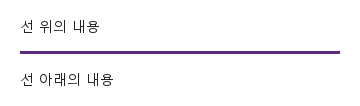
thickness는 선의 축을 가로지르는 방향의 크기(px)입니다(기본 1; 소수 허용).

Qt 실행 화면 · 이미지
thickness · color · 기본
기본 실행 화면
QML 코드
import QtQuick
import Syidax.Core

Item {
    implicitWidth: Math.max(360, childrenRect.width)
    implicitHeight: childrenRect.height
    // Focused Gallery routes: keep only the selected API and its prerequisites.
    id: featureStory

    property QtObject settings: QtObject {
        id: storyArgs
        property real thickness: 3
        property string color: "#5a2a82"
    }


    Column {
        width: 320
        Text { text: "선 위의 내용"; font.family: Theme.fontFamily; font.pixelSize: 14; color: Theme.semantic.textDefault }
        SyDivider { id: featureTarget0;
            width: parent.width
            thickness: storyArgs.thickness
            color: storyArgs.color.length > 0 ? storyArgs.color : Theme.divider.horizontalBorderEnabled
        }
        Text { text: "선 아래의 내용"; font.family: Theme.fontFamily; font.pixelSize: 14; color: Theme.semantic.textDefault }
    }
}

API 19

항목을 가리키거나 선택하면 QML 예제와 복사 버튼이 나타납니다.

속성

속성타입기본값설명
string"horizontal""horizontal"(폭을 가로질러) · "vertical"(높이를 따라)
boolfalse선을 양 끝에서 16 px씩 줄임
real1선의 축을 가로지르는 크기(px)
color디바이더 토큰선 색; 기본은 가로 또는 세로 토큰
real16선의 축을 가로지르는 양쪽에 유지하는 여백
bool (읽기 전용)—type !== "vertical"
real (읽기 전용)—inset이면 16, 아니면 0

메서드

항목동작 / 조건
없음.

시그널

항목동작 / 조건
없음.

동작

항목동작 / 조건
"horizontal"(폭을 가로질러) · "vertical"(높이를 따라)
type !== "vertical"
type: "horizontal"(기본)은 디바이더의 width를 가로질러 선을 그립니다.
선의 축을 가로지르는 크기(px)
선의 축을 가로지르는 양쪽에 유지하는 여백
type: "vertical"은 디바이더의 height를 따라 선을 그립니다.
선을 양 끝에서 16 px씩 줄임
선 색; 기본은 가로 또는 세로 토큰
디바이더에는 시그널도 메서드도 없고 입력에 반응하지 않습니다.

키보드

항목동작 / 조건
SyCard는 묶음을 감싸고, SyFlex와 Qt 레이아웃이 아이템 사이에 디바이더를 놓습니다.