QML
← 전체 컴포넌트

Colorpicker

색상 화면에서 색을 고르거나 색상값을 입력하는 필드입니다. 글자색이나 배경색 설정 등에 사용합니다.

import Syidax.Core.Colorpicker

지원 QML 타입

타입정의 / 역할
채도·색상·불투명도와 색상 형식 입력을 제공하는 독립 패널입니다.
팝업 패널을 열거나 인라인으로 표시하는 색상 선택기입니다.

예제로 보기

미리보기는 Qt 실행 화면의 이미지입니다. 아래 버튼으로 결과를 전환하세요.

01 기본 구성

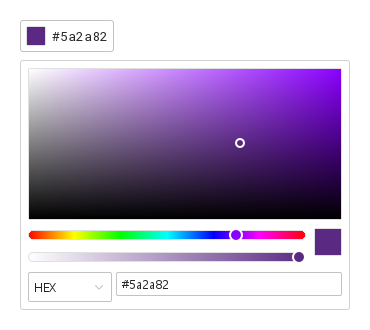
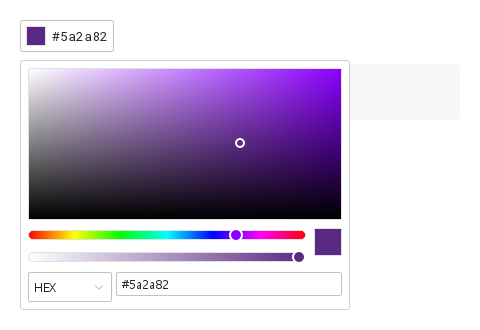
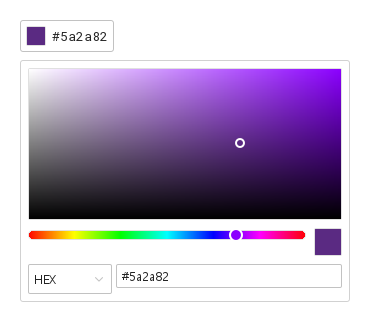
SyColorpicker는 위로 색 패널을 여는 색 견본입니다.

Qt 실행 화면 · 이미지
기본 구성 · 열린 화면
QML 코드
import QtQuick
import Syidax.Core

Item {
    implicitWidth: Math.max(360, childrenRect.width)
    implicitHeight: childrenRect.height

    property QtObject settings: QtObject {
        id: storyArgs
        property string value: "#5A2A82"
        property string format: "hex"
        property bool showText: true
        property string trigger: "click"
        property bool hideOpacity: false
        property bool disabled: false
        property bool readonly: false
        property bool inline: false
    }


    SyColorpicker { id: exampleControl1; 
        value: storyArgs.value
        format: storyArgs.format
        showText: storyArgs.showText
        trigger: storyArgs.trigger
        hideOpacity: storyArgs.hideOpacity
        disabled: storyArgs.disabled
        readonly: storyArgs.readonly
        inline: storyArgs.inline
        onChanged: (detail) => { if (storyArgs.value !== detail.value) storyArgs.value = detail.value }
    }

}

02 format

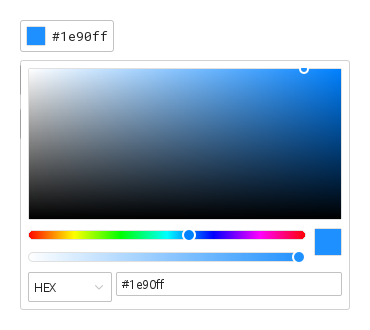
format은 피커가 보고하는 색의 표기입니다: "hex"(#1e90ff), "rgb"(rgb(30, 144, 255)), "hsb"(hsb(210, 88%, 100%)).

Qt 실행 화면 · 이미지
format · 열린 화면
QML 코드
import QtQuick
import Syidax.Core

Item {
    implicitWidth: Math.max(360, childrenRect.width)
    implicitHeight: childrenRect.height

    Column {
        spacing: 12
        SyColorpicker { id: exampleControl1;  value: "#1e90ff"; showText: true }
        SyColorpicker { value: "#1e90ff"; format: "rgb"; showText: true }
        SyColorpicker { value: "#1e90ff"; format: "hsb"; showText: true }
    }
}

03 inline

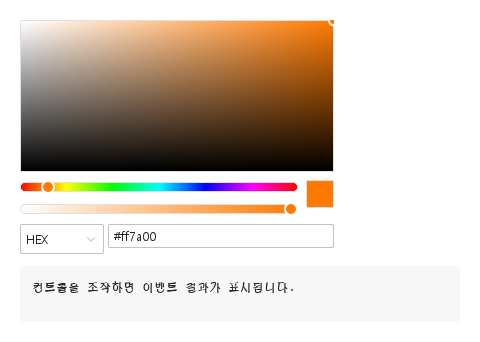
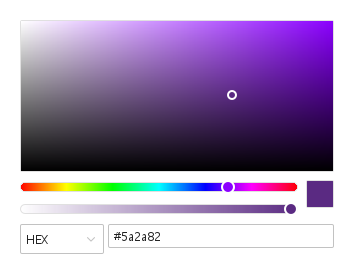
inline: true는 패널 자체를 그 자리에 보입니다 — 견본도 팝업도 opened / closed도 없고, open() / close()는 아무 일도 하지 않습니다.

Qt 실행 화면 · 이미지
inline · 기본
기본 실행 화면
QML 코드
import QtQuick
import Syidax.Core

Item {
    component EventLog: Rectangle {
        id: logBox
        property var lines: []
        implicitWidth: 440
        implicitHeight: Math.max(56, logText.implicitHeight + 24)
        radius: 4; color: Theme.semantic.backgroundBold
        function log(value) { lines = lines.slice(-3).concat([String(value)]) }
        Text {
            id: logText; x: 12; y: 12; width: parent.width - 24
            text: logBox.lines.length ? logBox.lines.join("\n") : "컨트롤을 조작하면 이벤트 결과가 표시됩니다."
            wrapMode: Text.Wrap; color: Theme.semantic.textDefault
            font.family: Theme.monoFontFamily; font.pixelSize: 12
        }
    }

    implicitWidth: Math.max(360, childrenRect.width)
    implicitHeight: childrenRect.height

    Column {
        spacing: 12
        SyColorpicker { inline: true; value: "#ff7a00"; onChanged: (detail) => output.log(detail.value) }
        EventLog { id: output }
    }
}

04 disabled · readonly · hideOpacity · trigger

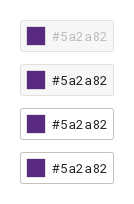
disabled는 견본을 비활성 톤으로 그리고 Tab 순서에서 빼며 패널을 절대 열지 않습니다.

Qt 실행 화면 · 이미지
disabled · readonly · hideOpacity · trigger · 기본
기본 실행 화면
QML 코드
import QtQuick
import Syidax.Core

Item {
    implicitWidth: Math.max(360, childrenRect.width)
    implicitHeight: childrenRect.height
    // Focused Gallery routes: keep only the selected API and its prerequisites.
    id: featureStory

    Column {
        spacing: 12
        SyColorpicker { id: featureTarget0; visible: true; value: "#5A2A82"; showText: true; disabled: true }
        SyColorpicker { id: featureTarget1; visible: true; value: "#5A2A82"; showText: true; readonly: true }
        SyColorpicker { id: featureTarget2; visible: true; value: "#5A2A82"; showText: true; hideOpacity: true }
        SyColorpicker { id: featureTarget3; visible: true; value: "#5A2A82"; showText: true; trigger: "hover" }
    }
}

05 changed · opened · closed · formatChange

changed(detail) — 패널에서 일어난 모든 변화(영역 드래그, 색상·불투명도 슬라이더, hex나 R G B / H S B 필드 편집, 형식 전환)와 setColor()에 발생합니다.

Qt 실행 화면 · 이미지
changed · opened · closed · formatChange · 열린 화면
QML 코드
import QtQuick
import Syidax.Core

Item {
    component EventLog: Rectangle {
        id: logBox
        property var lines: []
        implicitWidth: 440
        implicitHeight: Math.max(56, logText.implicitHeight + 24)
        radius: 4; color: Theme.semantic.backgroundBold
        function log(value) { lines = lines.slice(-3).concat([String(value)]) }
        Text {
            id: logText; x: 12; y: 12; width: parent.width - 24
            text: logBox.lines.length ? logBox.lines.join("\n") : "컨트롤을 조작하면 이벤트 결과가 표시됩니다."
            wrapMode: Text.Wrap; color: Theme.semantic.textDefault
            font.family: Theme.monoFontFamily; font.pixelSize: 12
        }
    }

    implicitWidth: Math.max(360, childrenRect.width)
    implicitHeight: childrenRect.height
    // Focused Gallery routes: keep only the selected API and its prerequisites.
    id: featureStory


    Column {
        spacing: 12
        SyColorpicker { id: exampleControl1; 
            value: "#5A2A82"; showText: true
            onChanged: (detail) => { if (true) { output.log(("changed: %1 · opacity %2").arg(detail.value).arg(detail.opacity)) } }
            onOpened: { if (true) { output.log("opened") } }
            onClosed: { if (true) { output.log("closed") } }
            onFormatChange: (detail) => { if (true) { output.log(("format: %1").arg(detail.format)) } }
        }
        EventLog { id: output }
    }
}

06 open · close · setColor

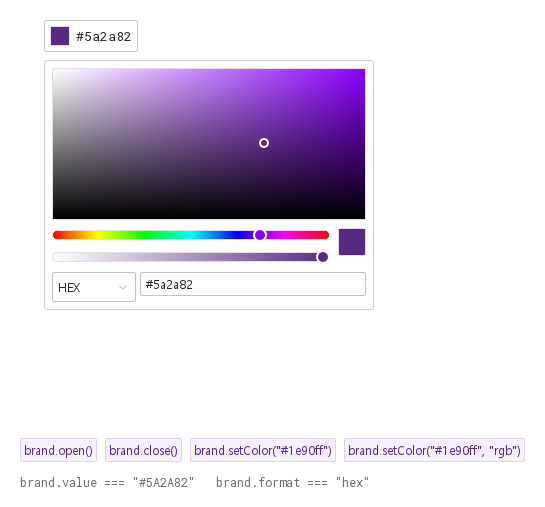
open()은 견본 위에 팝업 패널을 열고 opened를 발생시킵니다.

Qt 실행 화면 · 이미지
open · close · setColor · 열린 화면
QML 코드
import QtQuick
import Syidax.Core

Item {
    implicitWidth: Math.max(360, childrenRect.width)
    implicitHeight: childrenRect.height
    // Focused Gallery routes: keep only the selected API and its prerequisites.
    id: featureStory

    Column {
        spacing: 12
        Item {
            width: 560; height: 430
            SyColorpicker {
                x: 24; y: 24
 id: brand; value: "#5A2A82"; showText: true }
        }
        Flow {
            objectName: "exampleCommands"

            width: 560
            spacing: 8
            SyButton { id: exampleControl1;  visible: true; text: "brand.open()"; variant: "secondary"; size: "small"; onClicked: brand.open() }
            SyButton { id: exampleControl2;  visible: true; text: "brand.close()"; variant: "secondary"; size: "small"; onClicked: brand.close() }
            SyButton { id: exampleControl3;  visible: true; text: "brand.setColor(\"#1e90ff\")"; variant: "secondary"; size: "small"; onClicked: brand.setColor("#1e90ff") }
            SyButton { id: exampleControl4;  visible: true; text: "brand.setColor(\"#1e90ff\", \"rgb\")"; variant: "secondary"; size: "small"; onClicked: brand.setColor("#1e90ff", "rgb") }
        }
        Text {
            text: "brand.value === " + JSON.stringify(brand.value) + "   brand.format === " + JSON.stringify(brand.format)
            font.family: Theme.monoFontFamily
            font.pixelSize: 12
            color: Theme.semantic.textSubtle
        }
    }
}

07 불투명 색상

hideOpacity 설정을 적용한 불투명 색상 예제입니다.

Qt 실행 화면 · 이미지
불투명 색상 · 열린 화면
QML 코드
import QtQuick
import Syidax.Core

Item {
    implicitWidth: Math.max(360, childrenRect.width)
    implicitHeight: childrenRect.height

    property QtObject settings: QtObject {
        id: storyArgs
        property string value: "#5A2A82"
        property string format: "hex"
        property bool showText: true
        property string trigger: "click"
        property bool hideOpacity: true
        property bool disabled: false
        property bool readonly: false
        property bool inline: false
    }


    SyColorpicker { id: exampleControl1; 
        value: storyArgs.value
        format: storyArgs.format
        showText: storyArgs.showText
        trigger: storyArgs.trigger
        hideOpacity: storyArgs.hideOpacity
        disabled: storyArgs.disabled
        readonly: storyArgs.readonly
        inline: storyArgs.inline
        onChanged: (detail) => { if (storyArgs.value !== detail.value) storyArgs.value = detail.value }
    }

}

08 인라인 색상 편집

inline 설정을 적용한 인라인 색상 편집 예제입니다.

Qt 실행 화면 · 이미지
인라인 색상 편집 · 실행 결과
기본 실행 화면
QML 코드
import QtQuick
import Syidax.Core

Item {
    implicitWidth: Math.max(360, childrenRect.width)
    implicitHeight: childrenRect.height

    property QtObject settings: QtObject {
        id: storyArgs
        property string value: "#5A2A82"
        property string format: "hex"
        property bool showText: true
        property string trigger: "click"
        property bool hideOpacity: false
        property bool disabled: false
        property bool readonly: false
        property bool inline: true
    }


    SyColorpicker {
        value: storyArgs.value
        format: storyArgs.format
        showText: storyArgs.showText
        trigger: storyArgs.trigger
        hideOpacity: storyArgs.hideOpacity
        disabled: storyArgs.disabled
        readonly: storyArgs.readonly
        inline: storyArgs.inline
        onChanged: (detail) => { if (storyArgs.value !== detail.value) storyArgs.value = detail.value }
    }

}

API 63

항목을 가리키거나 선택하면 QML 예제와 복사 버튼이 나타납니다.

속성 · SyColorpicker

속성타입기본값설명
string"#5A2A82"어떤 표기든 되는 색: #rrggbb · rgb(r, g, b) · hsb(h, s%, b%). 패널은 format으로 다시 쓰고, 코드로 대입하면 시그널이 없습니다.
string""해석되면 생성 시 한 번 value를 대체합니다.
real1알파 0 … 1(불투명도 슬라이더). value에는 포함되지 않습니다.
string"hex"hex · rgb · hsb — formattedValue, 견본 글자, changed, 패널 입력의 표기.
boolfalse패널에 불투명도 슬라이더 없음.
string"click"click · hover — 패널을 여는 것(클릭은 항상 토글).
boolfalse견본 옆에 형식대로의 값.
boolfalse패널을 그 자리에. 트리거도 팝업도 opened / closed도 없음.
boolfalse비활성 톤, 포커스 없음, 열리지 않음. inline 패널은 반응 없음.
boolfalsereadonly 톤, 열리지 않음. inline 패널은 반응 없음.
bool(읽기 전용)—팝업 패널이 열려 있는지(inline이면 항상 false).
bool(읽기 전용)—!disabled && !readonly.
bool(읽기 전용)—견본에 키보드 포커스가 있는지.
list(읽기 전용)—해석된 [r, g, b](value가 해석되지 않으면 검정).
color(읽기 전용)—Qt 색으로서의 rgb(불투명).
string(읽기 전용)—format대로 쓴 색.

속성 · SyColorpickerContent(패널, 단독 사용 가능)

속성타입기본값설명
string"#ff0000"보일 색. 어떤 표기든 가능. 읽어 들이면 hue · saturation · brightness가 갱신됩니다.
real1불투명도 슬라이더가 보이는 알파.
boolfalse불투명도 슬라이더 없음.
string"hex"어떤 입력이 보이는지와 colorChange의 표기.
boolfalse패널이 흐려지고 반응하지 않음.
real0작업 중인 색(0–359 · 0–100 · 0–100).
real100작업 중인 색(0–359 · 0–100 · 0–100).
읽기 전용—작업 색의 [r, g, b], #rrggbb, Qt 색, 그리고 순수 색상.

메서드 · SyColorpicker

메서드설명
팝업 패널을 열고 opened를 발생시킵니다. disabled, readonly, inline, 이미 열림이면 무시됩니다.
팝업 패널을 닫습니다(열려 있었다면 closed 발생).
코드에서 색을 정합니다. value가 해석되지 않으면 무시됩니다. 다른 format이 먼저 적용되고(formatChange), 그다음 현재 형식의 색으로 changed가 발생합니다. colorOpacity는 건드리지 않습니다.

메서드 · SyColorpickerContent

메서드설명
시그널 없이 색을 보입니다(value 속성이 하는 일).
작업 색을 정하고(null 성분은 값 유지) colorChange를 발생시킵니다. disabled / readonly면 무시됩니다.
알파 0 … 1을 정하고 colorChange를 발생시킵니다. disabled / readonly면 무시됩니다.
format을 바꾸고 새 표기로 colorChange를 발생시킵니다.

시그널 · SyColorpicker

시그널인자시점
detail: { value, opacity, format }패널에서의 모든 변화, 또는 setColor(). value는 format 표기입니다. 코드가 value / colorOpacity를 대입할 때는 발생하지 않습니다.
—팝업 패널이 열림 / 닫힘(클릭, 호버, Escape, 바깥 누름, open() / close()). inline이면 절대 발생하지 않습니다.
detail: { format, value }형식 셀렉트가 바뀌었거나 setColor()가 다른 형식을 넘김. value는 이미 새 형식입니다. 뒤이어 changed가 발생합니다.

시그널 · SyColorpickerContent

시그널인자시점
detail: { value, opacity, format }패널에서의 모든 변화(value는 format 표기).

동작

항목동작 / 조건
어떤 표기든 되는 색: #rrggbb · rgb(r, g, b) · hsb(h, s%, b%). 패널은 format으로 다시 쓰고, 코드로 대입하면 시그널이 없습니다.
해석된 [r, g, b](value가 해석되지 않으면 검정).
Qt 색으로서의 rgb(불투명).
format대로 쓴 색.
hex · rgb · hsb — formattedValue, 견본 글자, changed, 패널 입력의 표기.
해석되면 생성 시 한 번 value를 대체합니다.
알파 0 … 1(불투명도 슬라이더). value에는 포함되지 않습니다.
견본 옆에 형식대로의 값.
click · hover — 패널을 여는 것(클릭은 항상 토글).
opened / closed가 팝업을 따르고 isOpen이 상태를 알려 줍니다. opened / closed는 팝업에만 해당합니다.
팝업 패널이 열려 있는지(inline이면 항상 false).
패널에 불투명도 슬라이더 없음.
보일 색. 어떤 표기든 가능. 읽어 들이면 hue · saturation · brightness가 갱신됩니다.
불투명도 슬라이더가 보이는 알파.
패널에서의 모든 변화, 또는 setColor(). value는 format 표기입니다. 코드가 value / colorOpacity를 대입할 때는 발생하지 않습니다.
코드에서 색을 정합니다. value가 해석되지 않으면 무시됩니다. 다른 format이 먼저 적용되고(formatChange), 그다음 현재 형식의 색으로 changed가 발생합니다. colorOpacity는 건드리지 않습니다.
형식 셀렉트가 바뀌었거나 setColor()가 다른 형식을 넘김. value는 이미 새 형식입니다. 뒤이어 changed가 발생합니다.
비활성 톤, 포커스 없음, 열리지 않음. inline 패널은 반응 없음.
readonly 톤, 열리지 않음. inline 패널은 반응 없음.
패널을 그 자리에. 트리거도 팝업도 opened / closed도 없음.