QML
← 전체 컴포넌트

Steps

설정이나 주문처럼 여러 단계로 진행되는 과정에서 현재 단계와 전체 흐름을 보여 줍니다.

import Syidax.Core.Steps

지원 QML 타입

타입정의 / 역할
여러 단계의 순서와 현재 진행 상태를 보여주는 컨테이너입니다.
SySteps 안에서 상태와 선택적 설명을 갖는 개별 단계입니다.

예제로 보기

미리보기는 Qt 실행 화면의 이미지입니다. 아래 버튼으로 결과를 전환하세요.

01 기본 구성

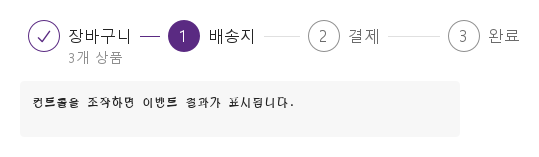
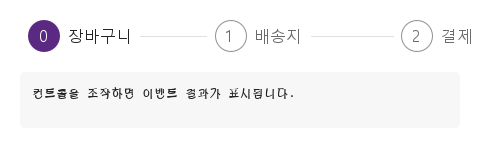
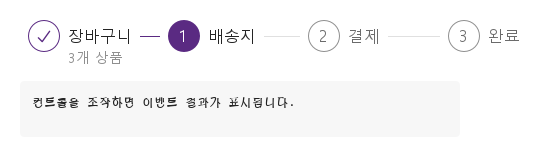
SySteps는 과정의 진행을 보여 줍니다: 안에 선언한 SyStep 항목들은 각각 title과 선택적 description이 달린 번호 원이며 꼬리선으로 이어집니다.

Qt 실행 화면 · 이미지
기본 구성 · 기본
기본 실행 화면
QML 코드
import QtQuick
import Syidax.Core

Item {
    component EventLog: Rectangle {
        id: logBox
        property var lines: []
        implicitWidth: 440
        implicitHeight: Math.max(56, logText.implicitHeight + 24)
        radius: 4; color: Theme.semantic.backgroundBold
        function log(value) { lines = lines.slice(-3).concat([String(value)]) }
        Text {
            id: logText; x: 12; y: 12; width: parent.width - 24
            text: logBox.lines.length ? logBox.lines.join("\n") : "컨트롤을 조작하면 이벤트 결과가 표시됩니다."
            wrapMode: Text.Wrap; color: Theme.semantic.textDefault
            font.family: Theme.monoFontFamily; font.pixelSize: 12
        }
    }

    implicitWidth: Math.max(360, childrenRect.width)
    implicitHeight: childrenRect.height
    id: story

    property QtObject settings: QtObject {
        id: storyArgs
        property int current: 1
        property bool clickable: false
        property bool complete: false
        property string type: "horizontal"
        property string size: "medium"
        property int startIndex: 0
    }

    readonly property string members: [
        "SyStep { title: " + JSON.stringify("장바구니") + "; description: " + JSON.stringify("3개 상품") + " }",
        "SyStep { title: " + JSON.stringify("배송지") + " }",
        "SyStep { title: " + JSON.stringify("결제") + " }",
        "SyStep { title: " + JSON.stringify("완료") + " }"
    ].join("\n")

    Column {
        spacing: 12
        SySteps {
            width: storyArgs.type === "vertical" ? implicitWidth : 560
            current: storyArgs.current
            clickable: storyArgs.clickable
            complete: storyArgs.complete
            type: storyArgs.type
            size: storyArgs.size
            startIndex: storyArgs.startIndex
            onSelected: (index) => output.log(("선택: %1단계").arg(index))
            SyStep { title: "장바구니"; description: "3개 상품" }
            SyStep { title: "배송지" }
            SyStep { title: "결제" }
            SyStep { title: "완료" }
        }
        EventLog { id: output }
    }

}

02 status · loading · disabled

각 단계는 currentStatus에 따라 그려지며, 이 순서로 정해집니다:

Qt 실행 화면 · 이미지
status · loading · disabled · 기본
기본 실행 화면
QML 코드
import QtQuick
import Syidax.Core

Item {
    implicitWidth: Math.max(360, childrenRect.width)
    implicitHeight: childrenRect.height
    // Focused Gallery routes: keep only the selected API and its prerequisites.
    id: featureStory

    SySteps {
        width: 560
        current: 2
        SyStep { title: "장바구니" }
        SyStep { id: featureTarget0; title: "배송지"; status: "error" }
        SyStep { id: featureTarget1; title: "결제"; loading: true }
        SyStep { id: featureTarget2; title: "완료"; disabled: true }
    }
}

03 type · size

type: "horizontal"(기본)은 단계를 한 줄로 놓습니다: 각 단계가 컨테이너 width를 균등하게 나눠 갖고, 원과 글자는 그 왼쪽에 놓이며, 꼬리선은 제목 끝에서 단계의 오른쪽 가장자리까지 이어집니다.

Qt 실행 화면 · 이미지
type · size · 기본
QML 코드
import QtQuick
import Syidax.Core

Item {
    implicitWidth: Math.max(360, childrenRect.width)
    implicitHeight: childrenRect.height
    // Focused Gallery routes: keep only the selected API and its prerequisites.
    id: featureStory

    property QtObject settings: QtObject {
        id: storyArgs
        property string size: "medium"
    }


    SySteps { id: featureTarget0;
        type: "vertical"
        current: 1
        size: storyArgs.size
        SyStep { title: "장바구니"; description: "3개 상품" }
        SyStep { title: "배송지" }
        SyStep { title: "결제" }
    }
}

04 selected

selected(index: int)는 컨테이너의 clickable이 true일 때 사용자가 단계를 클릭하면 발생합니다.

Qt 실행 화면 · 이미지
selected · 기본
기본 실행 화면
QML 코드
import QtQuick
import Syidax.Core

Item {
    component EventLog: Rectangle {
        id: logBox
        property var lines: []
        implicitWidth: 440
        implicitHeight: Math.max(56, logText.implicitHeight + 24)
        radius: 4; color: Theme.semantic.backgroundBold
        function log(value) { lines = lines.slice(-3).concat([String(value)]) }
        Text {
            id: logText; x: 12; y: 12; width: parent.width - 24
            text: logBox.lines.length ? logBox.lines.join("\n") : "컨트롤을 조작하면 이벤트 결과가 표시됩니다."
            wrapMode: Text.Wrap; color: Theme.semantic.textDefault
            font.family: Theme.monoFontFamily; font.pixelSize: 12
        }
    }

    implicitWidth: Math.max(360, childrenRect.width)
    implicitHeight: childrenRect.height

    Column {
        spacing: 12
        SySteps {
            id: checkout
            width: 560; current: 0; clickable: true
            onSelected: (index) => { current = index; output.log(("선택: %1단계").arg(index)) }
            SyStep { title: "장바구니" }
            SyStep { title: "배송지" }
            SyStep { title: "결제" }
        }
        EventLog { id: output }
    }
}

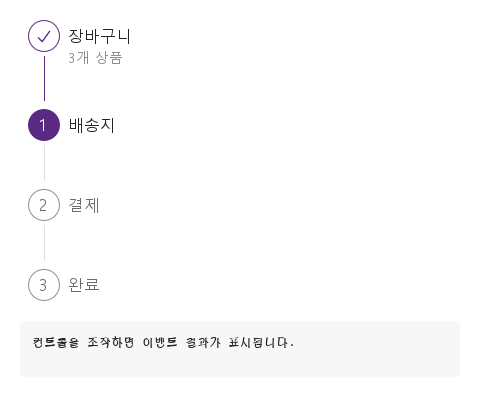
05 세로 진행 단계

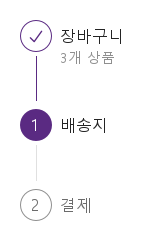
type 설정을 적용한 세로 진행 단계 예제입니다.

Qt 실행 화면 · 이미지
세로 진행 단계 · 실행 결과
기본 실행 화면
QML 코드
import QtQuick
import Syidax.Core

Item {
    component EventLog: Rectangle {
        id: logBox
        property var lines: []
        implicitWidth: 440
        implicitHeight: Math.max(56, logText.implicitHeight + 24)
        radius: 4; color: Theme.semantic.backgroundBold
        function log(value) { lines = lines.slice(-3).concat([String(value)]) }
        Text {
            id: logText; x: 12; y: 12; width: parent.width - 24
            text: logBox.lines.length ? logBox.lines.join("\n") : "컨트롤을 조작하면 이벤트 결과가 표시됩니다."
            wrapMode: Text.Wrap; color: Theme.semantic.textDefault
            font.family: Theme.monoFontFamily; font.pixelSize: 12
        }
    }

    implicitWidth: Math.max(360, childrenRect.width)
    implicitHeight: childrenRect.height
    id: story

    property QtObject settings: QtObject {
        id: storyArgs
        property int current: 1
        property bool clickable: false
        property bool complete: false
        property string type: "vertical"
        property string size: "medium"
        property int startIndex: 0
    }

    readonly property string members: [
        "SyStep { title: " + JSON.stringify("장바구니") + "; description: " + JSON.stringify("3개 상품") + " }",
        "SyStep { title: " + JSON.stringify("배송지") + " }",
        "SyStep { title: " + JSON.stringify("결제") + " }",
        "SyStep { title: " + JSON.stringify("완료") + " }"
    ].join("\n")

    Column {
        spacing: 12
        SySteps {
            width: storyArgs.type === "vertical" ? implicitWidth : 560
            current: storyArgs.current
            clickable: storyArgs.clickable
            complete: storyArgs.complete
            type: storyArgs.type
            size: storyArgs.size
            startIndex: storyArgs.startIndex
            onSelected: (index) => output.log(("선택: %1단계").arg(index))
            SyStep { title: "장바구니"; description: "3개 상품" }
            SyStep { title: "배송지" }
            SyStep { title: "결제" }
            SyStep { title: "완료" }
        }
        EventLog { id: output }
    }

}

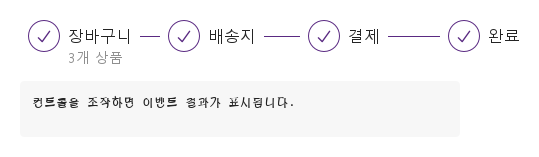
06 완료된 진행 단계

complete 설정을 적용한 완료된 진행 단계 예제입니다.

Qt 실행 화면 · 이미지
완료된 진행 단계 · 실행 결과
기본 실행 화면
QML 코드
import QtQuick
import Syidax.Core

Item {
    component EventLog: Rectangle {
        id: logBox
        property var lines: []
        implicitWidth: 440
        implicitHeight: Math.max(56, logText.implicitHeight + 24)
        radius: 4; color: Theme.semantic.backgroundBold
        function log(value) { lines = lines.slice(-3).concat([String(value)]) }
        Text {
            id: logText; x: 12; y: 12; width: parent.width - 24
            text: logBox.lines.length ? logBox.lines.join("\n") : "컨트롤을 조작하면 이벤트 결과가 표시됩니다."
            wrapMode: Text.Wrap; color: Theme.semantic.textDefault
            font.family: Theme.monoFontFamily; font.pixelSize: 12
        }
    }

    implicitWidth: Math.max(360, childrenRect.width)
    implicitHeight: childrenRect.height
    id: story

    property QtObject settings: QtObject {
        id: storyArgs
        property int current: 1
        property bool clickable: false
        property bool complete: true
        property string type: "horizontal"
        property string size: "medium"
        property int startIndex: 0
    }

    readonly property string members: [
        "SyStep { title: " + JSON.stringify("장바구니") + "; description: " + JSON.stringify("3개 상품") + " }",
        "SyStep { title: " + JSON.stringify("배송지") + " }",
        "SyStep { title: " + JSON.stringify("결제") + " }",
        "SyStep { title: " + JSON.stringify("완료") + " }"
    ].join("\n")

    Column {
        spacing: 12
        SySteps {
            width: storyArgs.type === "vertical" ? implicitWidth : 560
            current: storyArgs.current
            clickable: storyArgs.clickable
            complete: storyArgs.complete
            type: storyArgs.type
            size: storyArgs.size
            startIndex: storyArgs.startIndex
            onSelected: (index) => output.log(("선택: %1단계").arg(index))
            SyStep { title: "장바구니"; description: "3개 상품" }
            SyStep { title: "배송지" }
            SyStep { title: "결제" }
            SyStep { title: "완료" }
        }
        EventLog { id: output }
    }

}

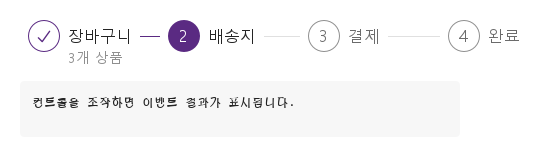
07 1부터 시작하는 단계

startIndex · current 설정을 적용한 1부터 시작하는 단계 예제입니다.

Qt 실행 화면 · 이미지
1부터 시작하는 단계 · 실행 결과
기본 실행 화면
QML 코드
import QtQuick
import Syidax.Core

Item {
    component EventLog: Rectangle {
        id: logBox
        property var lines: []
        implicitWidth: 440
        implicitHeight: Math.max(56, logText.implicitHeight + 24)
        radius: 4; color: Theme.semantic.backgroundBold
        function log(value) { lines = lines.slice(-3).concat([String(value)]) }
        Text {
            id: logText; x: 12; y: 12; width: parent.width - 24
            text: logBox.lines.length ? logBox.lines.join("\n") : "컨트롤을 조작하면 이벤트 결과가 표시됩니다."
            wrapMode: Text.Wrap; color: Theme.semantic.textDefault
            font.family: Theme.monoFontFamily; font.pixelSize: 12
        }
    }

    implicitWidth: Math.max(360, childrenRect.width)
    implicitHeight: childrenRect.height
    id: story

    property QtObject settings: QtObject {
        id: storyArgs
        property int current: 2
        property bool clickable: false
        property bool complete: false
        property string type: "horizontal"
        property string size: "medium"
        property int startIndex: 1
    }

    readonly property string members: [
        "SyStep { title: " + JSON.stringify("장바구니") + "; description: " + JSON.stringify("3개 상품") + " }",
        "SyStep { title: " + JSON.stringify("배송지") + " }",
        "SyStep { title: " + JSON.stringify("결제") + " }",
        "SyStep { title: " + JSON.stringify("완료") + " }"
    ].join("\n")

    Column {
        spacing: 12
        SySteps {
            width: storyArgs.type === "vertical" ? implicitWidth : 560
            current: storyArgs.current
            clickable: storyArgs.clickable
            complete: storyArgs.complete
            type: storyArgs.type
            size: storyArgs.size
            startIndex: storyArgs.startIndex
            onSelected: (index) => output.log(("선택: %1단계").arg(index))
            SyStep { title: "장바구니"; description: "3개 상품" }
            SyStep { title: "배송지" }
            SyStep { title: "결제" }
            SyStep { title: "완료" }
        }
        EventLog { id: output }
    }

}

08 클릭으로 단계 전환

clickable 설정을 적용한 클릭으로 단계 전환 예제입니다.

Qt 실행 화면 · 이미지
클릭으로 단계 전환 · 실행 결과
기본 실행 화면
QML 코드
import QtQuick
import Syidax.Core

Item {
    component EventLog: Rectangle {
        id: logBox
        property var lines: []
        implicitWidth: 440
        implicitHeight: Math.max(56, logText.implicitHeight + 24)
        radius: 4; color: Theme.semantic.backgroundBold
        function log(value) { lines = lines.slice(-3).concat([String(value)]) }
        Text {
            id: logText; x: 12; y: 12; width: parent.width - 24
            text: logBox.lines.length ? logBox.lines.join("\n") : "컨트롤을 조작하면 이벤트 결과가 표시됩니다."
            wrapMode: Text.Wrap; color: Theme.semantic.textDefault
            font.family: Theme.monoFontFamily; font.pixelSize: 12
        }
    }

    implicitWidth: Math.max(360, childrenRect.width)
    implicitHeight: childrenRect.height
    id: story

    property QtObject settings: QtObject {
        id: storyArgs
        property int current: 1
        property bool clickable: true
        property bool complete: false
        property string type: "horizontal"
        property string size: "medium"
        property int startIndex: 0
    }

    readonly property string members: [
        "SyStep { title: " + JSON.stringify("장바구니") + "; description: " + JSON.stringify("3개 상품") + " }",
        "SyStep { title: " + JSON.stringify("배송지") + " }",
        "SyStep { title: " + JSON.stringify("결제") + " }",
        "SyStep { title: " + JSON.stringify("완료") + " }"
    ].join("\n")

    Column {
        spacing: 12
        SySteps {
            width: storyArgs.type === "vertical" ? implicitWidth : 560
            current: storyArgs.current
            clickable: storyArgs.clickable
            complete: storyArgs.complete
            type: storyArgs.type
            size: storyArgs.size
            startIndex: storyArgs.startIndex
            onSelected: (index) => output.log(("선택: %1단계").arg(index))
            SyStep { title: "장바구니"; description: "3개 상품" }
            SyStep { title: "배송지" }
            SyStep { title: "결제" }
            SyStep { title: "완료" }
        }
        EventLog { id: output }
    }

}

API 43

항목을 가리키거나 선택하면 QML 예제와 복사 버튼이 나타납니다.

속성 · SySteps

속성타입기본값설명
list (기본 속성)—SyStep 항목들, 순서대로
int0진행 중인 단계의 번호; startIndex … startIndex + 개수 밖의 값은 가장 가까운 경계로 취급
boolfalse단계를 클릭할 수 있음; 클릭마다 selected(index) 발생
boolfalsecurrent와 status에 상관없이 모든 단계 finish
string"horizontal"horizontal(width 균등 분할) · vertical(쌓기)
string"medium"medium(32 px 원) · small(24 px 원, 작은 글자)
int0첫 단계의 번호
list (읽기 전용)—안의 단계들, 순서대로
bool—type === "vertical" · 제한된 뒤의 current
int (읽기 전용)—type === "vertical" · 제한된 뒤의 current

속성 · SyStep

속성타입기본값설명
string""단계 제목(16 px; small 14 px)
string""제목 아래 글(14 px); 비어 있으면 숨김
string"none"none(current를 따름) · finish · current · wait · error
boolfalse흰 원 위의 도는 고리; disabled, 완료, 오류일 때는 제외
boolfalse회색, 클릭 불가(error는 예외로 자기 색 유지)
boolfalse배치할 때마다 컨테이너가 자기 clickable로 설정
int0단계 번호 — 컨테이너가 설정(startIndex + 위치)
int—컨테이너가 설정: 그 current, 크기, 타입, complete면 "finish", 마지막 단계인지
string—컨테이너가 설정: 그 current, 크기, 타입, complete면 "finish", 마지막 단계인지
bool—컨테이너가 설정: 그 current, 크기, 타입, complete면 "finish", 마지막 단계인지
string (읽기 전용)—그려지는 상태: finish · current · wait · error
bool (읽기 전용)—고리가 보이는 중
bool (읽기 전용)—클릭하면 보고됨

메서드

항목동작 / 조건
SySteps와 SyStep에는 메서드가 없습니다. current, complete, 단계별 속성으로 다룹니다.

시그널

시그널인자시점
index: int클릭 가능한 단계가 클릭됨(그 번호); 단계 자신의 것 직후에 다시 발생
index: int이 단계가 clickable이고 disabled도 error도 아닌 상태에서 클릭됨

동작

항목동작 / 조건
첫 단계의 번호
단계 번호 — 컨테이너가 설정(startIndex + 위치)
current는 진행 중인 단계를 그 번호로 가리키며, startIndex … startIndex + 단계 수 밖의 값은 가장 가까운 경계로 취급됩니다(clampedCurrent; 마지막 다음 번호는 "모두 완료"를 뜻함): 번호가 작은 단계는 finish, 같은 단계는 current, 큰 단계는 wait입니다. complete: true는 current와 무관하게 모든 단계를 finish로 만듭니다. 단계가 그리는 상태는 currentStatus이며 이렇게 정해집니다: 컨테이너의 complete → finish; 아니면 단계 자신의 status가 "none"이 아닐 때 그 값(finish · current · wait · error); 아니면 current와의 비교. 컨테이너가 스스로 current를 옮기지는 않습니다.
current는 진행 중인 단계를 그 번호로 가리키며, startIndex … startIndex + 단계 수 밖의 값은 가장 가까운 경계로 취급됩니다(clampedCurrent; 마지막 다음 번호는 "모두 완료"를 뜻함): 번호가 작은 단계는 finish, 같은 단계는 current, 큰 단계는 wait입니다.
진행 중인 단계의 번호; startIndex … startIndex + 개수 밖의 값은 가장 가까운 경계로 취급
current와 status에 상관없이 모든 단계 finish
그려지는 상태: finish · current · wait · error
none(current를 따름) · finish · current · wait · error
흰 원 위의 도는 고리; disabled, 완료, 오류일 때는 제외
회색, 클릭 불가(error는 예외로 자기 색 유지)
원은 32 px(size: "small"이면 24 px)이고 단계 번호(16 / 12 px)를 보입니다 — finish면 ✓, error면 ✕. 제목은 16 / 14 px, 설명은 14 px이고 비어 있지 않을 때만 보입니다. 색은 상태를 따릅니다(wait와 disabled는 흐림).
가로(기본): 모든 단계가 컨테이너 width를 균등하게 나눠 갖고, 원과 글자는 왼쪽에, 꼬리선은 제목 끝에서 단계의 오른쪽 가장자리까지. 컨테이너의 암시 폭은 최소 320 px이므로 width를 설정하십시오.
단계를 클릭할 수 있음; 클릭마다 selected(index) 발생
클릭 가능한 단계가 클릭됨(그 번호); 단계 자신의 것 직후에 다시 발생

키보드

항목동작 / 조건
백분율 하나에는 SyProgressBar, 경로에는 SyBreadcrumb, 사용자가 자유롭게 전환하는 뷰에는 SyTabGroup.